RCS Message Send Failure on macOS 26.5 from Mac, iPad, and Watch: The Hidden Cellular Fix

Can't send RCS messages from Mac after macOS 26.5? Complete fix guide including the buried 'Limit IP Address Tracking' setting on iPhone, carrier-specific notes, and E2EE handshake explanation.
If you updated to macOS Tahoe 26.5 this week and suddenly your text messages to Android friends are failing with a bright red "Message Send Failure" — but only when you send from your Mac, iPad, or Apple Watch — you are not imagining things, you are not blocked, and there is absolutely nothing wrong with your account or your hardware. This is a real regression introduced by the May 11, 2026 release of macOS 26.5 (alongside the matching iOS 26.5 build), and within hours of the update going public, the MacRumors forums thread tracking the issue (thread 2482378, titled "Anyone else having problems with RCS — iOS 26.5 and macOS 26.5") had grown past four hundred replies. The complaints are nearly identical from poster to poster: a message typed on the Mac shows the red exclamation mark; pulling out the iPhone and sending the same text to the same person works perfectly. The message even shows as "RCS" in the iPhone composer. So the RCS bridge between your Mac and your iPhone is broken, the Continuity link is intact for SMS and iMessage, and you are stuck juggling devices when you just want to text someone back from the laptop you are already typing on.
The good news is that there is a fix, and it is one toggle. The bad news is that the toggle is buried three menus deep on your iPhone, has nothing to do with Messages on the surface, and Apple has not (as of this writing) acknowledged the regression in any release note or support document. It is a privacy-versus-functionality tradeoff, and you deserve to understand exactly what you are turning off before you flip the switch. This guide will walk you through the fix, explain the underlying E2EE handshake change that caused the breakage, cover carrier-specific quirks (T-Mobile users are getting hit hardest), and give you a fallback ladder of alternative fixes if the primary toggle does not resolve your particular situation.
Key Takeaways
- The symptom: Red "Message Send Failure" when sending RCS messages from Mac, iPad, or Apple Watch on macOS 26.5 / iOS 26.5. The same message sends fine when composed directly on the iPhone.
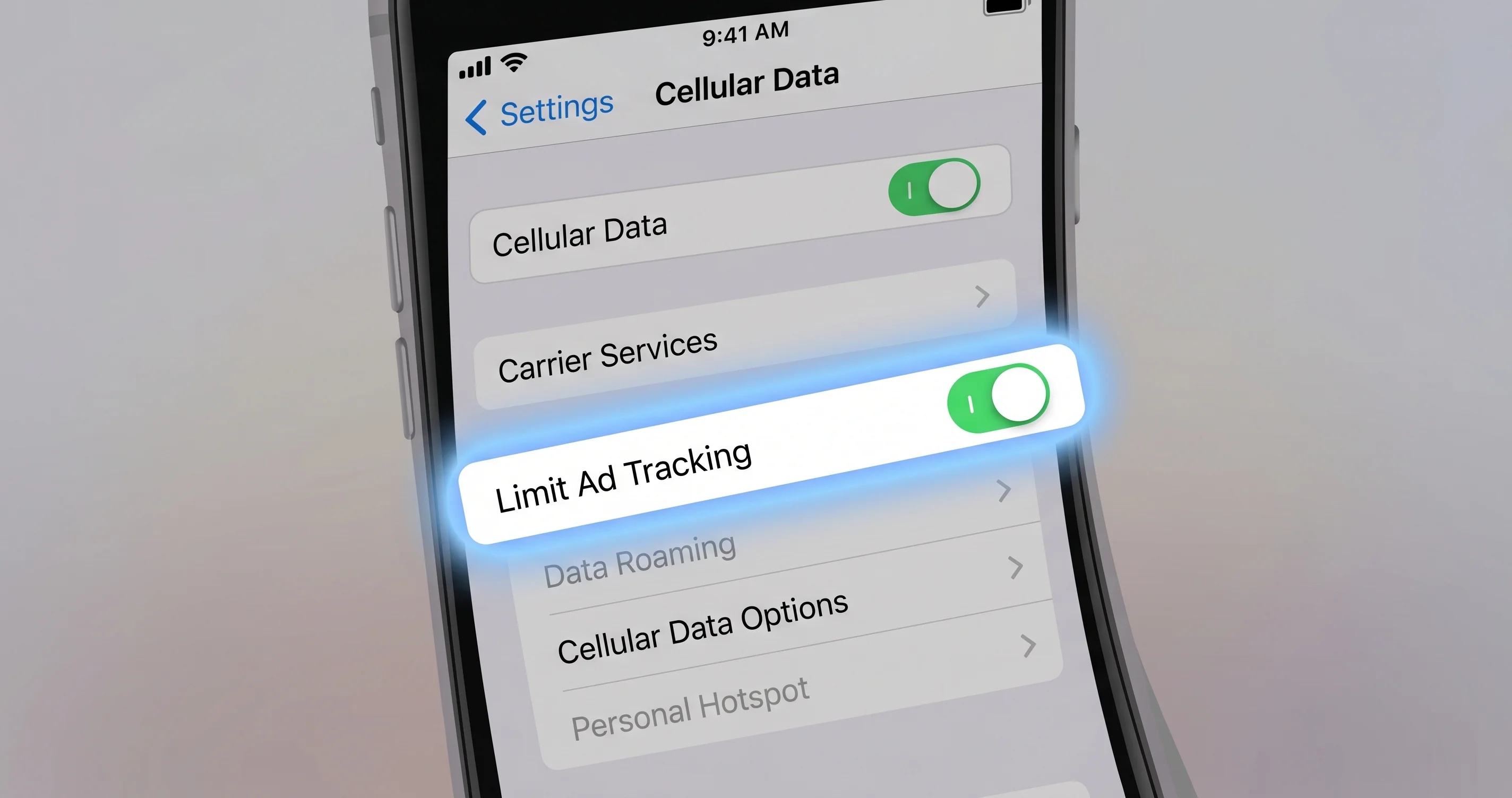
- The one-toggle fix: On your iPhone, go to Settings → Cellular → your line → Cellular Data Options → and turn OFF "Limit IP Address Tracking" for the SIM that handles your RCS messaging.
- The cause: macOS 26.5's new end-to-end encrypted (E2EE) RCS handshake routes the encrypted payload through an Apple relay. That relay is incompatible with iCloud Private Relay-style IP masking on the cellular line, which silently kills the handshake before the message ever leaves your iPhone.
- Who is affected: T-Mobile US customers are reporting the highest failure rate, followed by Verizon and AT&T. Google Fi users are largely unaffected because Fi uses Google's RCS path, not Apple's. International carriers with E2EE RCS enabled are affected on a case-by-case basis.
- The tradeoff: Turning off Limit IP Address Tracking gives your carrier (and websites your iPhone visits on cellular) a clearer view of your IP address. It does not affect iMessage, FaceTime, or any iCloud traffic — those still use Private Relay if you have it enabled.
- Apple's likely response: A 26.5.1 point release rebuilding the E2EE handshake to be compatible with IP masking is realistic for the mid-May to early-June window, based on Apple's recent cadence for handshake-level regressions.
- Verify it worked: Send a test message from your Mac to a known RCS contact; you should see "Delivered" (and a typing indicator on their next reply) instead of the red error.
The Exact Symptom: What You're Actually Seeing
Let me be precise about the failure mode, because there are at least four other things that look superficially similar and have nothing to do with this bug.
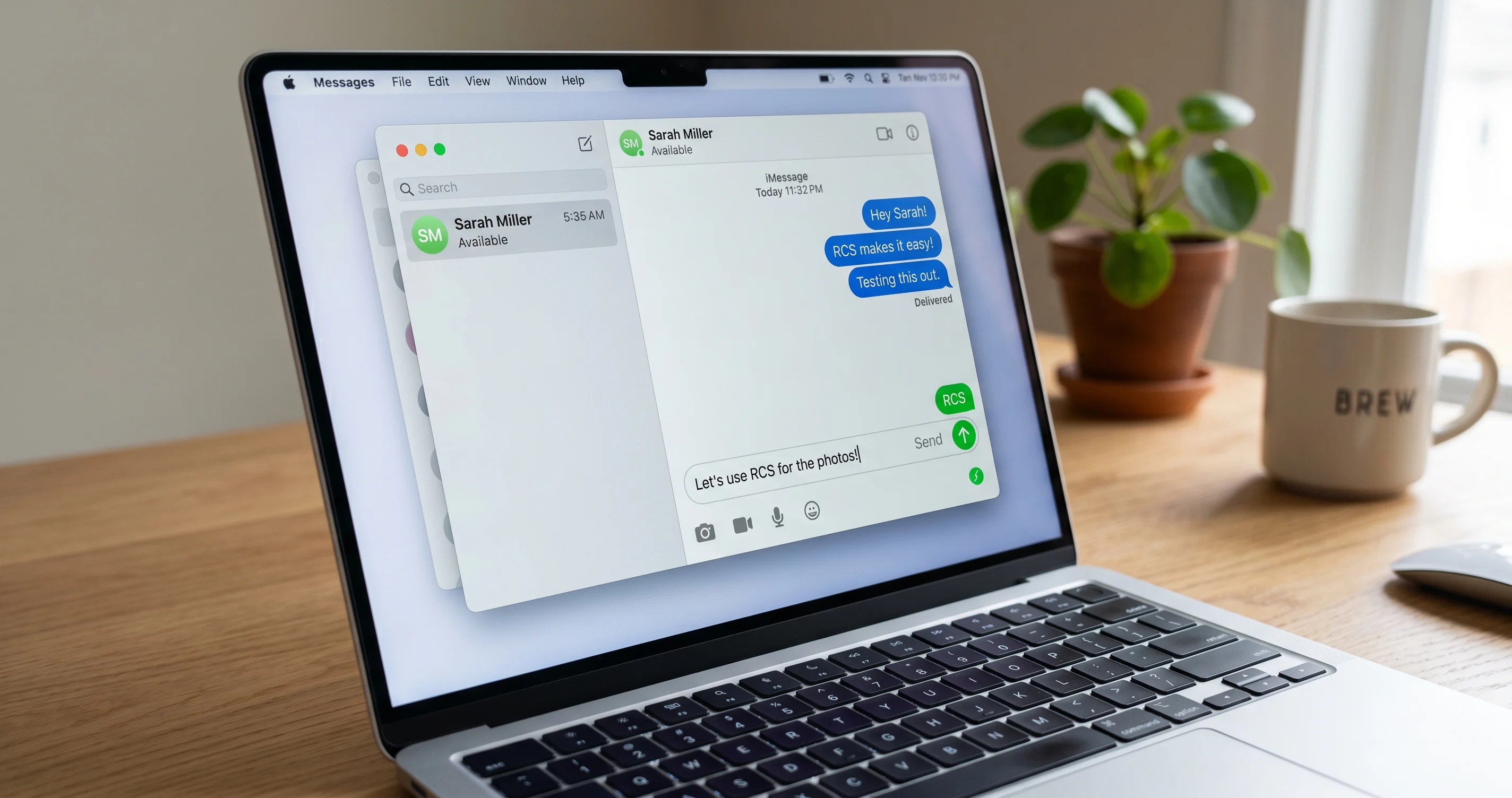
When you compose a message from Messages on your Mac (or iPad, or Apple Watch) to a contact whose phone is an Android device, the message bubble appears in the green RCS style — not the blue iMessage style, and not the older lighter green of SMS/MMS. You hit send. The message animates up the thread. And then, within one to three seconds, a small red circle with an exclamation point appears next to the bubble, and underneath the bubble in small red text you see "Not Delivered" or "Message Send Failure." Tapping the red exclamation gives you the standard "Try Again" or "Send as Text Message" prompt. Choosing "Send as Text Message" forces the message back through SMS and it goes through — but you lose the encryption, the read receipts, the typing indicators, the high-resolution media, and everything else that made RCS worth having in the first place.
Now here's the kicker that confirms you are looking at this specific regression and not some other Continuity issue: pick up your iPhone, open Messages, find the same thread, type the same text, and hit send. It goes through immediately, shows "Delivered," and you see the RCS label at the bottom of the composer the entire time. Same Apple ID, same iPhone, same carrier connection — but the message that failed from the Mac succeeds from the phone. That asymmetry is the fingerprint of the macOS 26.5 RCS handshake regression. It is not a network problem (your phone is on the same network or at least the same carrier); it is not an account problem (you are the same user across both devices); and it is not a contact problem (the recipient's number works fine when dialed from the phone).
If your symptoms include the message failing from the iPhone itself, you are looking at a different problem — likely a carrier provisioning issue or an iMessage activation hiccup — and this guide will not fix it. If your iMessage (blue bubbles, Apple-to-Apple) is also failing from your Mac, that is a Continuity authentication issue, not an RCS issue. If your messages to Android friends were already failing before the 26.5 update went out, that is also out of scope here. The exact regression we're addressing is: macOS 26.5 + iOS 26.5, RCS bubble (green, "RCS" label visible on the iPhone), fails from secondary devices, works from iPhone directly.
How RCS Works on macOS: The Continuity Bridge
To understand why this specific toggle fixes a specific problem, you need a working mental model of how RCS messages even reach your Mac in the first place. Unlike iMessage, which has its own native protocol and Apple's own servers and connects directly from each of your Apple devices to Apple's iMessage infrastructure, RCS on Apple devices is a phone-anchored protocol. Your iPhone is the RCS endpoint as far as the carrier is concerned. Your carrier knows about one device (the iPhone) that is provisioned for RCS on your phone number. Your Mac, iPad, and Apple Watch are not provisioned for RCS at all — the carriers don't even know they exist.
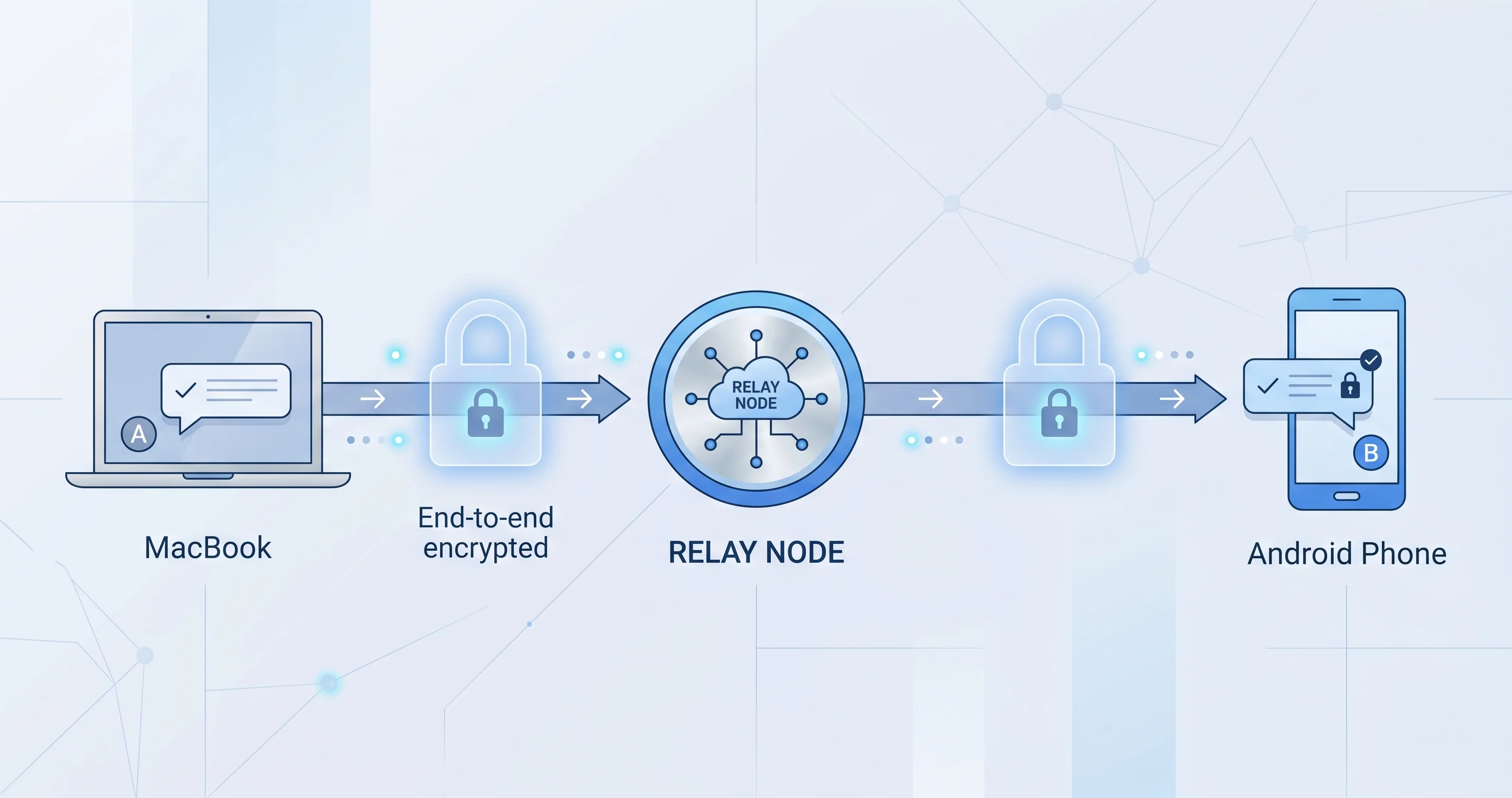
What macOS does, then, is route RCS messages over the same Continuity bridge that handles SMS/MMS forwarding. When you type a message on your Mac and hit send, the Messages app does not contact your carrier directly. Instead, it packages the message up, encrypts it for Continuity transport, and sends it to your iPhone via Apple's Continuity infrastructure (this is the same channel that handles "Text Message Forwarding," iPhone call relay, and Handoff). Your iPhone receives the package, recognizes it as an outgoing RCS message, and hands it off to its own cellular radio for transmission through the carrier's RCS server using the iPhone's own RCS credentials.
This is why RCS on Mac has always required: (1) your iPhone signed into the same Apple ID, (2) Text Message Forwarding enabled for your Mac in iPhone Settings → Messages → Text Message Forwarding, and (3) your iPhone to be powered on and reachable on the network. Take away any of those three and Mac RCS goes dark. You can think of the Mac as a thin client that lets you compose, but the actual sending always happens from the iPhone — your Mac is essentially using your iPhone as a remote modem for any non-iMessage traffic.
Before iOS 26.5 and the introduction of E2EE RCS on Apple devices in the United States, this bridge worked fine for SMS, MMS, and unencrypted RCS. The Continuity package was a fairly simple structure — sender, recipient, body, metadata — and the iPhone could relay it to the carrier's RCS server with minimal additional processing. The handshake between your Mac and the iPhone happened over Apple's standard Continuity transport, which is itself encrypted but doesn't impose constraints on the cellular layer.
Why It Broke in 26.5: The E2EE RCS Handshake
Here is where 26.5 changed something fundamental. Starting with the iOS 26.5 and macOS 26.5 release, Apple began rolling out end-to-end encrypted RCS for carriers that support the GSMA's E2EE RCS specification (Universal Profile 3.0 with MLS — Messaging Layer Security). T-Mobile US was one of the first major carriers in the world to fully enable E2EE RCS on Apple devices on that release, and Verizon and AT&T have been activating it on a region-by-region basis since. Apple Support document HT127115, the 26.5 release notes, includes a line referencing "end-to-end encrypted messaging support for RCS on supported carriers" — buried in the security update section, with no further detail on the handshake architecture.
The E2EE RCS handshake is significantly more complex than the unencrypted version. To negotiate the keys that will encrypt the message body end-to-end (so neither Apple nor the carrier can read it), the sender's device and the recipient's device exchange MLS-based key material through a dedicated handshake server. For an iPhone sending RCS directly, this handshake happens between the iPhone and the carrier's MLS handshake endpoint, with Apple sitting at the registration layer. For a Mac sending RCS via Continuity, however, Apple introduced a relay step: the Mac generates the MLS handshake material, packages it, sends it through the Continuity bridge to the iPhone, the iPhone forwards it to an Apple relay endpoint, and the relay forwards it to the carrier's handshake server. The relay step is what's new in 26.5, and it's what gives Apple a clean way to handle the case where the iPhone might be momentarily offline or in a low-power state — the relay can buffer the handshake material briefly.
The problem is that this Apple relay endpoint is connected to over the cellular interface from your iPhone. And starting in iOS 14, Apple added a privacy feature called "Limit IP Address Tracking" — a per-line cellular setting that obscures your IP address from known trackers when your iPhone is on cellular. It works by routing certain traffic through an Apple-operated proxy similar to iCloud Private Relay. For SMS, MMS, regular web browsing, and pre-26.5 RCS, this proxy worked transparently and nobody noticed. But the new E2EE RCS handshake is sensitive to the IP layer in a way the old protocol was not — specifically, the relay endpoint's authentication uses connection-level attributes that change when the traffic is proxied through Apple's IP-masking infrastructure. The handshake fails the relay's authentication check, silently, and the message never gets a key to encrypt with, so the iPhone returns a generic "send failure" up the Continuity bridge to your Mac.
From your perspective at the Mac, the failure is opaque: red exclamation point, no useful error message. From the iPhone's perspective, it knows the handshake failed but doesn't surface that to the user because the iPhone wasn't the device that originated the send. And from the carrier's perspective, no message was ever transmitted — the failure happens upstream of the carrier's RCS server entirely.
This is also why sending the same message from the iPhone directly works fine: when the iPhone composes the message itself, it uses a different handshake path that doesn't go through the relay (the iPhone is already the carrier-provisioned RCS endpoint, so it negotiates keys directly with the carrier without an Apple relay in between). The "Limit IP Address Tracking" privacy proxy doesn't break the iPhone-direct path because the carrier's RCS handshake server uses a different authentication model that's tolerant of proxied connections.
The Fix: The Hidden Cellular Toggle
Here is the exact path. Read it carefully because there are multiple settings with similar names and only one of them is the right one.
-
On your iPhone (not your Mac — this is an iPhone-side setting because the failure happens on the cellular interface that the iPhone is using to reach the Apple relay), open the Settings app.
-
Tap Cellular (on dual-SIM phones this may be labeled "Cellular" or "Mobile Data" depending on your region).
-
Under the "SIMs" section, tap the specific line that handles your RCS messaging. If you only have one SIM, there will only be one entry — tap it. If you have two SIMs (a physical SIM and an eSIM, or two eSIMs), tap the one that's set as your primary line for iMessage and your phone number. You can confirm this is the right line by going back to Settings → Messages → iMessage & FaceTime → and seeing which phone number is listed as the primary for iMessage; that's the line whose RCS setting matters.
-
On the line's detail screen, tap Cellular Data Options (sometimes labeled "Data Mode" on older iOS builds — but on 26.5 it's "Cellular Data Options").
-
You will see a toggle labeled Limit IP Address Tracking with a brief description below it: "Reduce tracking of your IP address by hiding it from known trackers in Mail and Safari." Toggle this OFF.
-
Back out of Settings entirely (swipe up to close, or hit the home indicator/button).
-
Pick up your Mac, open Messages, find the thread that was failing, and send a test message. Within a second or two you should see "Delivered" appear under the bubble, and the red exclamation point should not return.
That's the fix. One toggle, on the right SIM, on the iPhone (not the Mac). The change takes effect immediately — you do not need to restart either device, you do not need to sign out of anything, and you do not need to wait for a propagation period.
Dual-SIM Notes
If you have two SIMs and you're not sure which one handles RCS, here's the rule: RCS on iPhone is tied to the line that is currently set as your iMessage line (Settings → Messages → iMessage & FaceTime → primary number). It is also tied to the line that has RCS Messaging actively enabled in Settings → Apps → Messages → RCS Messaging (or Settings → Messages → RCS Messaging on slightly older builds), which on a dual-SIM phone will show a per-line toggle. The line that has the RCS toggle on AND that matches your iMessage primary number is the line whose "Limit IP Address Tracking" setting you need to turn off.
If both SIMs have RCS enabled (uncommon but possible if you use both for messaging), turn off Limit IP Address Tracking for both. You can leave it on for any data-only or hotspot SIMs.
The Honest Privacy Tradeoff
You should know what you are actually giving up when you flip this toggle, because some of the discussion online has been hand-wavy about it and you deserve a real answer.
When "Limit IP Address Tracking" is ON for a cellular line, your iPhone routes a subset of its cellular traffic — specifically, traffic to known trackers in Mail and Safari, and traffic to certain domains that match Apple's tracker list — through an Apple-operated proxy that hides your true IP from those destinations. This is a subset of what iCloud Private Relay does (Private Relay is broader and covers more traffic, but requires an iCloud+ subscription). The cellular-level toggle works for everyone, not just iCloud+ subscribers, and it's been on by default for several iOS releases.
When you turn it OFF, the proxy is bypassed for that line. Trackers that your iPhone communicates with over cellular (analytics endpoints embedded in Safari pages, Mail tracking pixels, some app telemetry) will see your real cellular IP address. Your carrier will also see a slightly cleaner picture of your traffic patterns, though your carrier already sees all your cellular traffic at the network layer regardless of this toggle.
What does not change:
- iMessage: Apple's iMessage traffic doesn't go through the cellular tracker proxy at all — iMessage has its own end-to-end encryption and its own infrastructure routing. Turning off Limit IP Address Tracking has zero effect on iMessage.
- FaceTime: Same as iMessage — separate routing, unaffected.
- iCloud Private Relay: If you have iCloud+ and Private Relay enabled, Safari browsing still goes through Private Relay's two-hop architecture. Limit IP Address Tracking is a separate, narrower feature.
- VPN traffic: Anything you have routed through a VPN is unaffected — VPN traffic skips both Limit IP Address Tracking and Private Relay.
- App-specific privacy settings: Each app's permissions (location, contacts, etc.) are unaffected.
So the tradeoff is: a slightly broader exposure of your IP address to web trackers and Mail trackers on your cellular line, in exchange for the ability to send RCS from your Mac. For most people that is a reasonable trade — especially if you have iCloud+ Private Relay covering Safari already. If you are in a situation where IP-level privacy on cellular is critical (journalists in sensitive jurisdictions, activists, etc.), this may not be an acceptable trade and you may need to use one of the alternative fixes below, or simply send RCS from the iPhone directly until Apple ships 26.5.1.
Alternative Fixes If the Primary Toggle Doesn't Work
The IP tracking toggle resolves the issue for the vast majority of users on T-Mobile, Verizon, and AT&T. But a small percentage of cases — particularly users on regional carriers, users with unusual iMessage account states, or users whose Continuity bridge has been previously misconfigured — still see the failure even after the toggle is off. Here is the ladder of additional fixes, in the order I'd try them.
1. Sign Out and Back Into iMessage on the iPhone
The RCS bridge piggybacks on the iMessage activation token in ways Apple has not fully documented. When iMessage gets into a weird state, RCS often follows. On the iPhone: Settings → Apps → Messages → iMessage & FaceTime → toggle iMessage off, wait a full 30 seconds (longer is better — give it a minute if you can), then toggle it back on. You may be prompted to re-verify your phone number, which is normal. Once you see the green checkmark next to your phone number under "You can be reached for messages at," try sending from the Mac again.
2. Disable and Re-enable Text Message Forwarding for the Mac
Continuity's text forwarding entry for your Mac can stale out. On the iPhone: Settings → Messages → Text Message Forwarding. Find your Mac in the list and toggle it off. Wait 15 seconds. Toggle it back on — your Mac will then display a six-digit code that you enter on the iPhone to re-pair the forwarding link. After re-pairing, send a test message from the Mac.
3. Restart RCS in the Carrier Menu
RCS itself can be toggled on the iPhone, and the toggle will force a re-registration with the carrier. On the iPhone: Settings → Apps → Messages → RCS Messaging → toggle it off, wait until you see the status drop to "Not Available" or similar (this can take 30-60 seconds), then toggle it back on. You will see it cycle through "Registering" and then settle on "Ready" or "Available." This is heavier than just signing out of iMessage and should be tried after that step.
4. Reset Network Settings on the iPhone
This is more disruptive — it will clear saved Wi-Fi passwords and VPN configs — but it can clear stuck Continuity-related network state. Settings → General → Transfer or Reset iPhone → Reset → Reset Network Settings. The phone will restart. You'll need to reconnect to your Wi-Fi networks. After it's back up, send a test from the Mac.
5. Restart Both Devices in Order
A surprising number of Continuity issues clear up with a sequenced restart: power down the Mac first, then power down the iPhone, then power up the iPhone and wait for it to fully connect to cellular and Wi-Fi (give it two minutes), then power up the Mac. The order matters because the Mac re-establishes the Continuity link based on what it sees from the iPhone, so the iPhone needs to be fully online first.
6. Last Resort: Fall Back to MMS for That Contact
If nothing else works and you have a critical message to get out, you can disable RCS for a specific contact thread — long-press the contact's name at the top of the thread on the iPhone, tap "Send as Text Message," and the thread will fall back to MMS. Quality drops (no high-res media, no read receipts, character limits) but messages will go through reliably from the Mac because MMS doesn't use the new E2EE handshake.
How to Tell If It's RCS or SMS Failing
Three quick visual checks will tell you which protocol is in play:
- Bubble color: Green RCS bubbles are slightly darker than green SMS/MMS bubbles. The shading is subtle but consistent — RCS bubbles also have a slight gradient that pure SMS bubbles lack. If you long-press a bubble and choose "Info," the message metadata will show "RCS" or "SMS" explicitly.
- Composer label: At the bottom of the text input field on the iPhone, you'll see a small label that reads "RCS," "iMessage," "SMS/MMS," or "Text Message." On the Mac, this label appears in the composer footer when you tap into the message field. If the label says "RCS" before you hit send and you still get a Send Failure, you're hitting the regression covered by this article.
- Encryption indicator: For E2EE RCS specifically, you'll see a small lock icon next to the RCS label on the iPhone composer. The lock indicates that the handshake completed successfully and the message will be end-to-end encrypted. If the lock is missing but the RCS label is present, the handshake failed and the message would have gone unencrypted (and on T-Mobile US after 26.5, the carrier rejects unencrypted RCS in favor of forcing E2EE — which compounds the failure).
If you don't see "RCS" at all and you only see "SMS/MMS" or "Text Message," then this article doesn't apply to your situation — your contact's device isn't RCS-capable, or RCS isn't activated on your line, and that's a separate troubleshooting flow.
Carrier-Specific Notes
T-Mobile US
T-Mobile US has been the most aggressive carrier in rolling out E2EE RCS on Apple devices, and as a result T-Mobile customers are reporting the highest failure rate after the 26.5 update. The T-Mobile community forums and support threads have been busy since May 11, with many users initially blaming their accounts or assuming a SIM issue before discovering the IP tracking fix. T-Mobile's RCS infrastructure requires the E2EE handshake to complete before any RCS message will be transmitted — they do not gracefully fall back to unencrypted RCS — which means the handshake failure is total rather than partial. If you're on T-Mobile and the primary toggle doesn't fix you, the carrier-side step 3 (toggling RCS off and on) is more likely to help than on other carriers, because T-Mobile's MLS registration is sensitive to the device's network state at the moment of registration.
Verizon
Verizon's E2EE RCS rollout is regional and less complete than T-Mobile's. Some Verizon customers are seeing the failure; others are not, even on the same iOS and macOS build, because their cell tower region hasn't activated E2EE RCS yet. If you're on Verizon and you're not hitting the failure, you can leave Limit IP Address Tracking on for now — your region's RCS isn't using the new handshake. If you do see the failure, the IP tracking toggle fixes it the same way it does for T-Mobile users.
AT&T
AT&T is somewhere between T-Mobile and Verizon on the rollout curve. Reports of the failure on AT&T are real but less common, and AT&T's RCS path will silently fall back to MMS in more cases than T-Mobile's, which sometimes masks the underlying issue (your message goes through, but as MMS instead of RCS). If your AT&T RCS messages from Mac are succeeding but you notice they're showing as SMS/MMS bubbles instead of RCS bubbles, you may be hitting the failure but getting an invisible fallback rather than a visible error.
Google Fi
Google Fi customers using iPhones report largely no issues with this regression. Fi's RCS path uses Google's RCS servers (Jibe Mobile) rather than the carrier-direct path that the GSMA Universal Profile 3.0 E2EE specification targets, so Fi messages don't go through the new Apple relay. Fi has its own E2EE implementation that pre-dates Apple's, and the bridge between iPhones-on-Fi and Apple's Continuity works through a different code path. If you're on Fi and you're seeing RCS failures from Mac, it's almost certainly a different issue — probably account-related — and this article won't help.
International Carriers
Outside the US, E2EE RCS rollout on Apple devices is patchy. Major European, UK, and Australian carriers have been enabling it on specific lines through 2025 and early 2026, but most customers on most international carriers are still on unencrypted RCS, which uses the older handshake and isn't affected by the regression. If you're outside the US and seeing the failure, check with your carrier's support whether they've enabled E2EE RCS on your line; if yes, the IP tracking fix applies; if no, this is probably a different issue.
What Apple Will Likely Do (and When)
Based on Apple's recent track record with handshake-level regressions — the iOS 17.4 iMessage delivery bug, the iOS 18.2 FaceTime authentication regression, the macOS Sequoia 15.1 AirDrop Continuity break, and the macOS 26.4 iPhone Mirroring break — the realistic expectation for a fix is a 26.5.1 point release in the mid-May to early-June window. Apple typically ships a .x.1 patch within 10 to 21 days of a .x release if there is a clearly identified regression with a visible user-impacting failure mode, and the RCS handshake issue easily clears that bar.
The fix at Apple's end will most likely rebuild the relay-side authentication to be tolerant of IP-masked connections. There are a few ways they could do this: (a) bypass the IP tracking proxy specifically for connections to the RCS relay endpoint, similar to how iCloud traffic is already exempt from Private Relay; (b) change the relay's authentication model to use device-level attestation rather than connection-level attributes; or (c) eliminate the relay step entirely for the Continuity bridge case and have the Mac's handshake material go directly through the iPhone's carrier-direct path. Option (a) is the easiest and most likely; (c) is the cleanest architecturally but would require more testing.
In the meantime, you have two paths: turn off Limit IP Address Tracking for the affected SIM and accept the privacy tradeoff, or send RCS messages directly from the iPhone until 26.5.1 ships. The Apple Support team has not (as of May 15, 2026) issued any public acknowledgement of the regression beyond standard "we're aware and investigating" responses to direct support contacts. Watch the Apple Support release notes page for HT127116 (the typical naming convention for the next point release) over the coming weeks.
If 26.5.1 doesn't ship by early June, the most likely reason is that Apple is rebuilding the handshake architecture more deeply (option c above) and that takes longer to test. In that case, expect 26.5.1 toward the end of June or early July, and consider whether the IP tracking tradeoff is worth maintaining until then. For most users on T-Mobile, Verizon, or AT&T, it is — the privacy exposure is modest and the messaging convenience is significant.
When the Bug Combines With Other Continuity Issues
A small but real subset of users are hitting this RCS regression on top of pre-existing Continuity issues, and the layered symptoms make diagnosis harder. If you're already seeing iPhone Mirroring issues on the same Mac, those are a separate regression from macOS 26.4 that we covered in detail in the iPhone Mirroring not working on macOS Tahoe 26.4 fix guide — fixing Mirroring may or may not affect RCS, and vice versa, but they are independent issues with independent fixes. Similarly, if AirDrop between your Mac and iPhone has been flaky, that's covered in the AirDrop not working on Mac fix guide, and resolving AirDrop won't automatically resolve RCS.
For a broader view of messaging-adjacent troubleshooting (the line between Messages, Mail, and various Apple ID auth issues can be blurry), the Mac Mail not working complete troubleshooting fix guide covers a lot of the underlying Apple ID and Continuity authentication patterns that show up in messaging failures too.
And if you arrived at 26.5 from 26.4 and were never quite sure what changed between the two releases, the macOS Tahoe 26.4 / 26.4.1 complete update guide recaps the prior release cycle and what was already broken or fixed coming into 26.5.
FAQ
Q: Will turning off "Limit IP Address Tracking" expose my iMessages?
A: No. iMessage doesn't use the IP tracking proxy at all — it has its own end-to-end encryption and its own routing infrastructure. The setting only affects cellular web traffic to known trackers in Safari and Mail. Your iMessage content, contact list, and message metadata are unaffected.
Q: Do I need to turn this setting off on my Mac, iPad, and Apple Watch too?
A: No. "Limit IP Address Tracking" is an iPhone-only setting (it's specifically for the cellular interface, which only the iPhone has in the conventional sense). The failure happens at the iPhone's cellular layer when it tries to reach the Apple relay, so the fix is only on the iPhone. Once it's off on the iPhone, all three of your secondary devices (Mac, iPad, Watch) will be able to send RCS through the Continuity bridge again.
Q: My iPhone is on Wi-Fi and not using cellular data — why does the cellular setting matter?
A: The relay endpoint is reached over the cellular interface regardless of whether you're actively using cellular data for general browsing. The iPhone's cellular radio handles RCS handshake traffic on the carrier-provisioned data channel, not on Wi-Fi, because RCS is a carrier-anchored protocol that needs to register with the carrier's RCS server. So even if you're sitting on home Wi-Fi, the relay handshake goes over the cellular path, and the IP tracking setting on that line applies.
Q: I turned the setting off and it still doesn't work. What now?
A: Try the alternative fixes in order: (1) sign out and back into iMessage on the iPhone, (2) disable and re-enable Text Message Forwarding for the Mac, (3) toggle RCS Messaging off and on in the carrier menu, (4) reset network settings on the iPhone, (5) restart both devices in sequence. If none of those work, you're likely seeing a different issue — possibly carrier-side — and your best path is to contact your carrier's RCS support team directly. T-Mobile in particular has a dedicated RCS support channel.
Q: Is this safe to do? Is anything actually wrong with my account?
A: There's nothing wrong with your account, your hardware, your SIM, your Apple ID, or your carrier provisioning. This is a software regression introduced by macOS/iOS 26.5 and it will eventually be fixed by an Apple update. Turning off Limit IP Address Tracking is a documented user setting that Apple ships with — you're not jailbreaking anything or doing anything unsupported. The privacy implications are real but modest, as explained in the tradeoff section above.
Q: Will this affect my Apple Watch's ability to send messages independently of my iPhone?
A: Apple Watch RCS goes through the same Continuity bridge as Mac RCS — it relays through the iPhone. So yes, once you've applied the fix on the iPhone, your Apple Watch should be able to send RCS messages again too. If your Watch is a cellular model and you're texting from it while away from the iPhone (using the Watch's own cellular plan), the situation is more complicated and depends on whether your carrier has provisioned RCS on the Watch line specifically — most carriers don't, so most Watches in cellular mode fall back to SMS regardless.
Q: Should I wait for Apple to fix this in 26.5.1 instead of changing my settings?
A: That's a reasonable choice if your messaging volume from Mac/iPad/Watch is low and you can comfortably reach for the iPhone for the few RCS messages you send. The wait is probably a couple of weeks. If you're sending dozens of RCS messages a day from your Mac and the inconvenience is significant, applying the fix now and reverting it after 26.5.1 ships is the more practical path.
Conclusion
The macOS 26.5 RCS regression is one of those frustrating Apple-ecosystem bugs where the symptom is dramatic and visible (a bright red error on every message), the cause is invisible and architectural (a relay-level authentication mismatch with an unrelated privacy setting), and the fix is buried four menu levels deep on a different device than the one showing the error. None of that is your fault, and none of it reflects on your skills as a user. Even the MacRumors forum readers — who skew toward the more technically literate end of the Apple user base — spent the better part of two days collectively reverse-engineering what was happening before the "Limit IP Address Tracking" workaround surfaced as the consistent fix.
If you apply the fix and your RCS messages are flowing from your Mac again, do yourself a small favor: set a reminder for late May or early June to check Apple's release notes for 26.5.1, and when it ships, re-enable Limit IP Address Tracking. The privacy tradeoff was a fair one to make for now, but you may as well restore it once Apple ships the proper fix. If 26.5.1 ships and your RCS breaks again with the setting back on, that means Apple's fix didn't fully address the relay/proxy interaction, and you can simply turn it back off and try again on the next point release.
For related Continuity troubleshooting — iPhone Mirroring, AirDrop, Mail authentication patterns that mirror RCS failures — see our iPhone Mirroring fix guide, AirDrop fix guide, Mac Mail troubleshooting guide, and the macOS Tahoe 26.4 / 26.4.1 update guide. The Apple Support page HT127115 documents the 26.5 release notes (without acknowledging this regression directly), and the MacRumors Forums thread 2482378 remains the best community-driven tracking thread if you want to follow other users' experiences and any updates as Apple responds.
Your texts to your Android friends matter, the green bubbles in your thread should not be a source of stress, and you should not have to keep two devices in front of you just to send a message. One toggle, on the right SIM, on the iPhone — and you're back to typing on the keyboard you actually want to type on.