macOS Tahoe 26 vs Windows 11 2025: Complete Comparison Guide for Professionals, Gamers, and Creative Users
Comprehensive comparison of macOS Tahoe 26 and Windows 11 in 2025. Deep analysis of Liquid Glass vs Fluent Design, Apple Intelligence vs Copilot, Metal 4 gaming performance, M4 chip benchmarks, ecosystem integration, pricing, and professional recommendations for choosing the right operating system.
The desktop operating system landscape in 2025 presents two compelling but fundamentally different philosophies: Apple's macOS Tahoe 26 with its revolutionary Liquid Glass design and privacy-first Apple Intelligence, versus Microsoft's Windows 11 with its mature Fluent Design 2.0 and enterprise-ready Copilot AI. This comprehensive comparison analyzes every critical aspect to help professionals, gamers, and creative users make informed decisions.
Executive Summary: Two Operating Systems, Two Philosophies
The 2025 Desktop OS Landscape
Market Position:
- Windows 11: 71.68% global desktop market share, dominating enterprise and gaming
- macOS Tahoe 26: 15.7% market share, but 72% organizational preference when given choice
- Professional Adoption: 99% of designers prefer macOS, while Windows leads in traditional enterprise
Key Performance Findings:
| Metric | macOS Tahoe 26 | Windows 11 | Winner |
|---|---|---|---|
| Single-Core Performance | M4: Cinebench 178 | Intel/AMD: ~120-130 | 🏆 macOS (43% faster) |
| Multi-Core Performance | M4: Cinebench 968 | Snapdragon X Elite: 972 | Tie |
| Battery Life | 17-20 hours (M4 models) | 12-15 hours (best Windows laptops) | 🏆 macOS |
| Gaming Library | ~20,000 games on Steam | 60,000+ games | 🏆 Windows (3x more) |
| AI Processing | On-device (privacy-first) | Cloud-based (feature-rich) | Context-dependent |
| Total Cost (4 years) | Higher upfront, $535-843 savings | Lower upfront, higher TCO | 🏆 macOS (TCO) |
Critical Decision Factors
Choose macOS Tahoe 26 if you prioritize:
- Privacy-first AI with on-device processing
- Design excellence and aesthetic refinement
- Creative professional workflows (video, music, design)
- Seamless ecosystem integration (iPhone, iPad, Apple Watch)
- Superior single-core performance and battery efficiency
- Long-term value and resale potential
Choose Windows 11 if you prioritize:
- Maximum gaming performance and library size (60,000+ games)
- Enterprise software compatibility and management tools
- Hardware flexibility and upgrade options
- Lower initial purchase price
- Broader third-party software support
- Multi-vendor hardware ecosystem
Design Philosophy: Liquid Glass vs Fluent Design 2.0
macOS Tahoe's Revolutionary Liquid Glass Design
What is Liquid Glass?
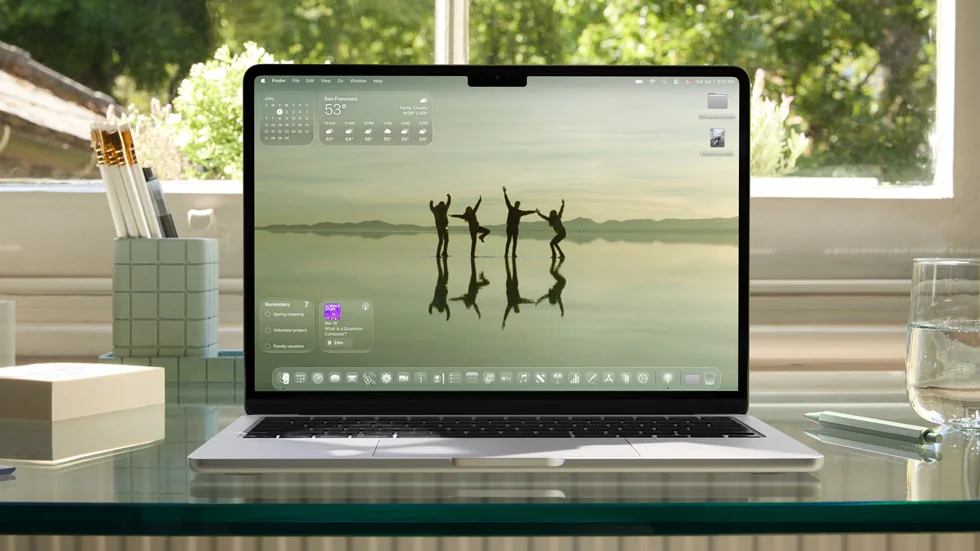
macOS Tahoe 26 introduces Apple's most ambitious design system yet: Liquid Glass. This translucent material behaves like actual glass, reflecting light and the colors behind it, creating unprecedented depth and visual richness across the entire operating system.
Core Design Characteristics:
- True Translucency: Elements reflect and refract their surroundings with realistic physics
- Dynamic Light Reflection: UI components respond to background colors and lighting conditions
- Layered Depth: Multiple translucent layers create sophisticated visual hierarchy
- System-Wide Application: Extends to desktop icons, folders, Dock, menus, toolbars, and Control Center
- Customization Options: Light tint, Dark tint, and Clear look with color customization for all icons and widgets
Professional Design Review:
PCWorld's critical assessment captures the essence:
"What I use on a day-to-day basis on Windows feels like a rough draft. What Apple showed off at WWDC seems more like the final product. Tahoe's Liquid Glass design bursts with life."
Implementation Details:
- Performance Impact: Requires significant GPU resources, particularly on older M1/M2 hardware
- Accessibility Concerns: "Reduce Transparency" option addresses WCAG contrast ratio requirements
- Polarizing Reception: Praised for ambition but criticized for readability in white-on-white scenarios
Windows 11 Fluent Design 2.0: Refined Functionality
Mica Material System:
Windows 11's Mica represents a performance-first approach to translucent design:
Technical Specifications:
- Opacity: ~2% transparency (extremely subtle)
- Performance: Samples desktop wallpaper once (static blur, minimal GPU impact)
- Use Cases: Long-lived window backgrounds, settings panels, system applications
- Fallback Behavior: Solid color in High Contrast mode, Battery Saver, or low-end hardware
Acrylic Material:
- Opacity: 15-30% transparency (more noticeable than Mica)
- Performance: Higher GPU cost due to dynamic real-time blur
- Use Cases: Transient surfaces like flyouts, menus, and context menus
- Visual Effect: Frosted glass appearance with subtle noise texture
Design Philosophy Comparison:
| Aspect | Liquid Glass (macOS) | Mica/Acrylic (Windows) |
|---|---|---|
| Visual Impact | High (dramatic translucency) | Moderate (subtle refinement) |
| Performance Cost | Moderate-High | Low-Moderate |
| Customization | Extensive (colors, tints) | Limited (system-defined) |
| Accessibility | Reduce Transparency toggle | Transparency effects toggle |
| Philosophy | Aesthetic-first | Performance-first |
Verdict: macOS Tahoe wins on design ambition and visual impact, but Windows 11 wins on performance efficiency and accessibility. Your preference depends on whether you prioritize aesthetics or pragmatism.
AI Integration: Apple Intelligence vs Microsoft Copilot
Apple Intelligence: Privacy-First AI Revolution
Architecture & Processing:
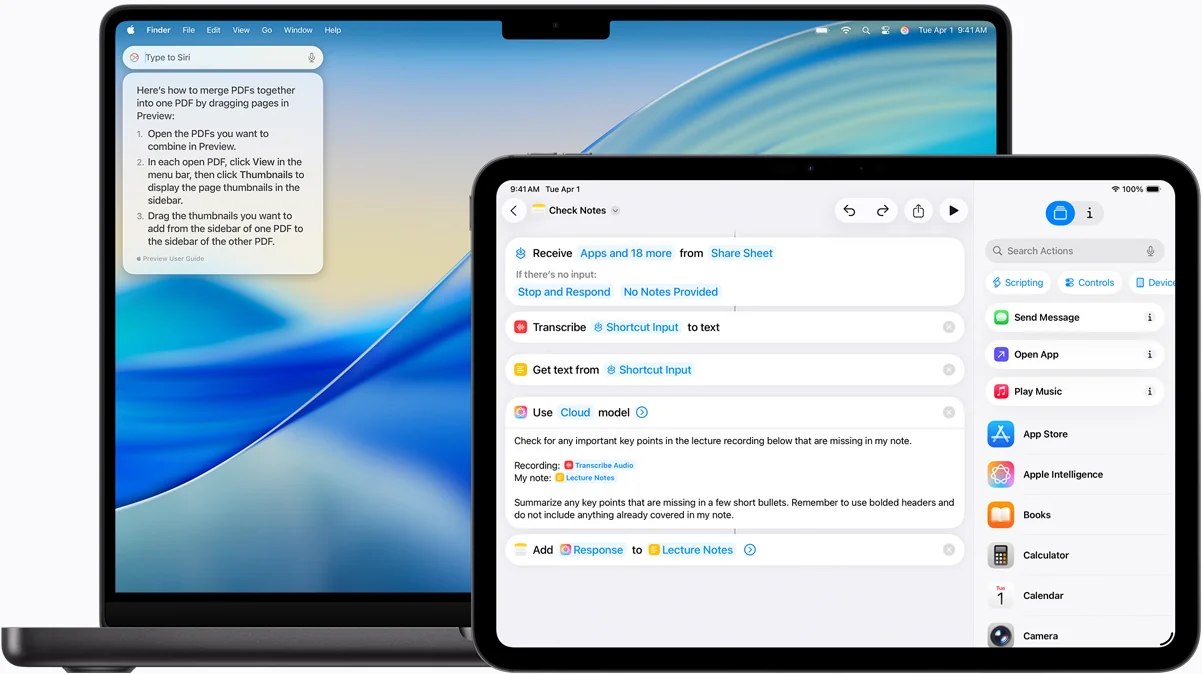
Apple Intelligence in macOS Tahoe 26 represents a fundamentally different approach to AI integration:
On-Device First Model:
- 3 billion parameter foundation model runs entirely on device
- Neural Engine: 16-core, up to 39 trillion operations per second (M4)
- Zero data collection for most AI operations
- Private Cloud Compute: For complex requests requiring server processing, with cryptographic attestation ensuring no data storage
Core Features:
1. System-Wide Writing Tools
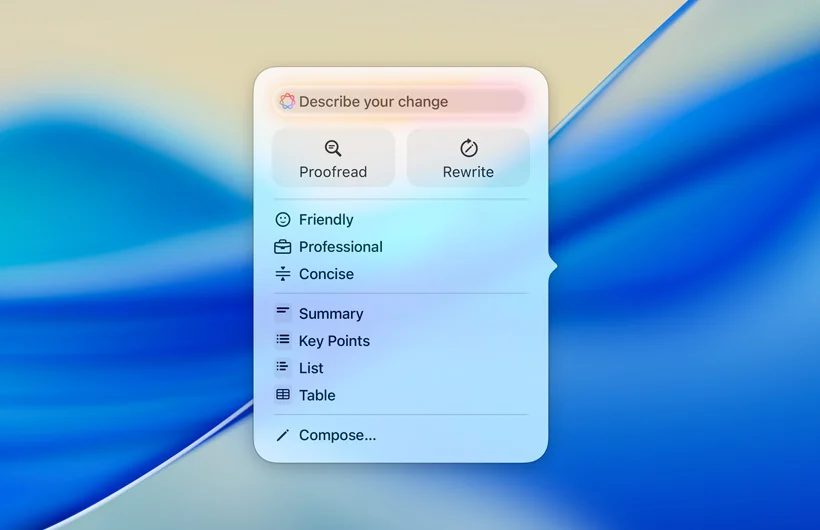
- Proofreading: Grammar and spelling with visual highlighting and explanations
- Rewriting: Multiple tone options (professional, friendly, concise)
- Summarization: Four formats - Summary, Key Points, List, and Table
- Custom Transformations: "Describe Your Change" for specific requests
- Access: Control-click on any selected text across all applications
2. Enhanced Siri & Intelligence
- Conversational Capabilities: More natural interactions with context awareness
- Visual Design: Glowing screen border when active
- ChatGPT Integration: Optional extension for advanced queries
- App Control: Open apps, adjust settings, toggle system preferences
3. Creative AI Features
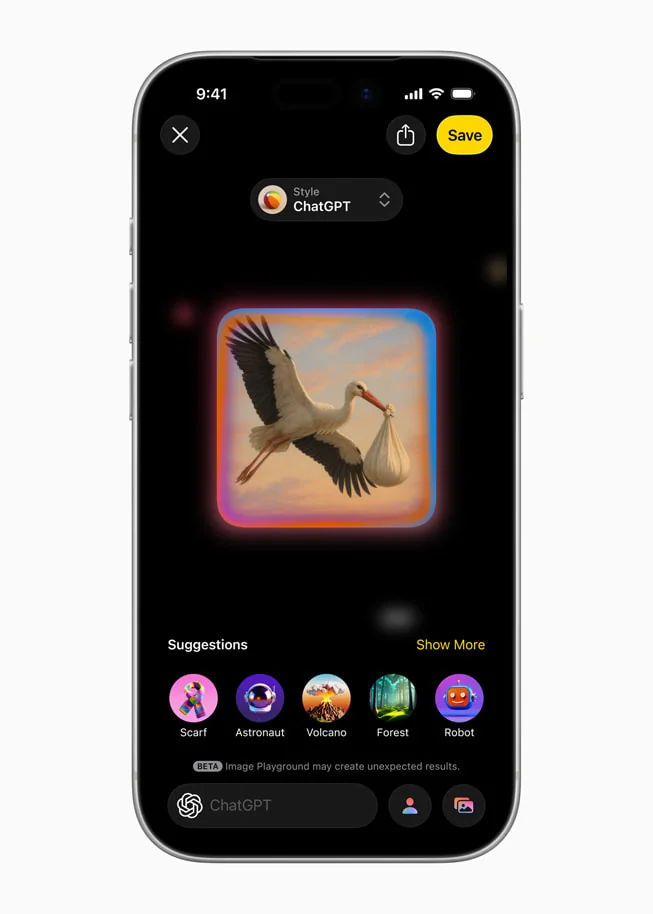
- Image Playground: Three visual styles (Animation, Illustration, Sketch) with on-device generation
- Genmoji: Custom emoji creation based on text descriptions
- Visual Intelligence: Screen analysis, translation, and action capabilities
Performance & Battery Impact:
| Apple Intelligence Feature | Neural Engine Usage | CPU Impact | Memory Usage | Battery Impact |
|---|---|---|---|---|
| Live Translation | 45-60% | Less than 5% | 1.2GB | 8-12% |
| Enhanced Siri | 30-45% | Less than 3% | 800MB | 5-8% |
| Writing Tools | 25-40% | Less than 2% | 600MB | 3-5% |
| Smart Automation | 15-30% | Less than 2% | 400MB | 2-4% |
| Visual Intelligence | 50-70% | Less than 7% | 1.5GB | 10-15% |
Microsoft Copilot: Enterprise-Ready AI Powerhouse
Architecture & Processing:
Cloud-Powered Model:
- GPT-4o Integration: OpenAI's most advanced model (upgraded May 2025)
- Azure OpenAI Service: Enterprise-grade cloud infrastructure
- Microsoft Graph Access: Deep integration with calendar, emails, chats, and documents
- No Prompt Caching: Microsoft 365 Copilot doesn't cache customer content
Core Features:
1. Productivity & Rewriting
- Microsoft 365 Integration: Word, Excel, PowerPoint, Teams, Outlook, OneNote, Loop
- Rewrite with Copilot: Built into Edge browser (Alt + I shortcut)
- Tone Adjustment: Professional, casual, enthusiastic, and multiple variations
- Up to 10 Rewrites: In Teams messaging
2. Advanced Capabilities (2025)
- Settings Agent: Natural language system control for displays, connectivity, accessibility
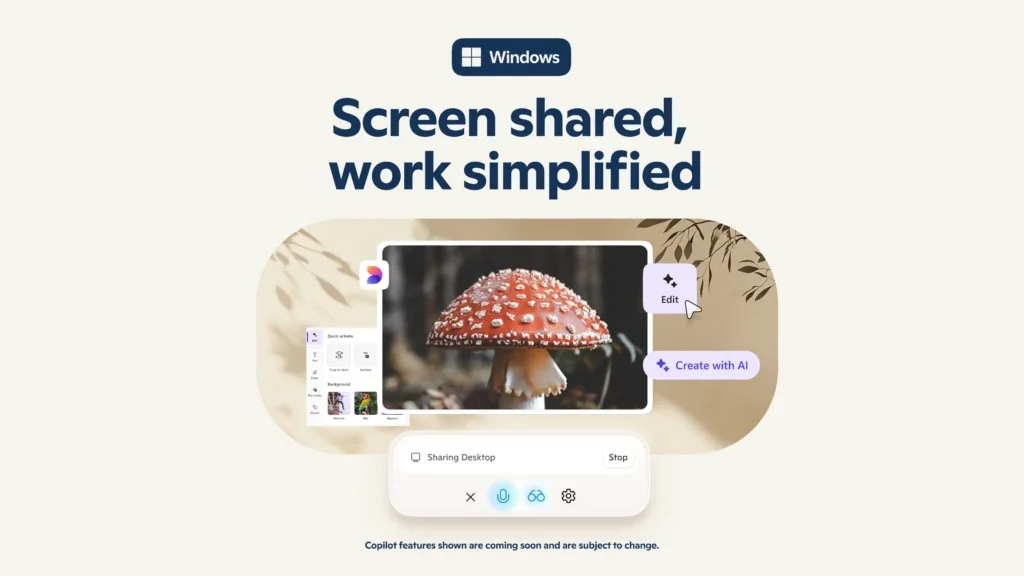
- Copilot Vision: Real-time screen analysis with "Show me how" demonstrations
- Gaming Copilot (Beta): Voice-controlled in-game assistance
- Recall (General Availability): Screenshot history for finding past content 70% faster
3. Image Generation
- DALL-E 3 / GPT-4o: Richer detail and composition (May 2025 upgrade)
- Iterative Refinement: Edit based on previous images
- Text in Images: Add text to AI-generated visuals
- Platform Availability: iOS, Android, Edge, Windows app, Mac app
Pricing & Accessibility:
Apple Intelligence:
- Cost: FREE with compatible hardware
- Hardware Requirements: iPhone 15 Pro+, iPad with M1+, Mac with M1+
- No Subscription Required
Microsoft Copilot:
- Free Tier: Basic Copilot features in Windows 11
- Microsoft 365 Copilot: $30 per user/month (requires M365/Office 365)
- Copilot+ PC Hardware: Premium pricing for NPU-equipped devices (~$999+)
Privacy Comparison: On-Device vs Cloud
Apple Intelligence Privacy Model:
- ✅ On-device processing for majority of AI tasks
- ✅ Zero data storage even for Private Cloud Compute requests
- ✅ Cryptographic attestation verifiable by independent security experts
- ✅ No Apple access to user data
- ✅ Works offline for most features
Microsoft Copilot Privacy Model:
- ⚠️ Cloud-based processing for most features
- ✅ Enterprise security within Microsoft 365 tenant boundary
- ✅ No prompt caching for M365 Copilot customer content
- ⚠️ Internet required for most features
- ⚠️ Copilot Vision requires server-side screen analysis
Verdict: Apple Intelligence wins decisively on privacy for individual consumers. Microsoft Copilot offers stronger enterprise compliance and audit capabilities for business environments.
Gaming Performance: Metal 4 vs DirectX 12 Ultimate

Graphics API Evolution: Metal 4's Competitive Leap
Metal 4 New Features (macOS Tahoe 26):
Announced at WWDC 2025, Metal 4 represents Apple's most serious gaming commitment:
Core Technologies:
- MetalFX Frame Interpolation: Generates intermediate frames between input frames (similar to NVIDIA DLSS Frame Generation)
- MetalFX Denoising: Ray tracing with fewer rays, cleaned during upscaling
- MetalFX Upscaling: AI-powered upscaling comparable to DLSS/FSR
- Enhanced Ray Tracing: Improved efficiency even for M2 software rendering
- Neural Rendering Support: Unified command encoder for AI-enhanced graphics
- Faster Shader Compilation: Improved development workflow
Hardware Requirements:
- M1/M2/M3/M4 Apple Silicon (Intel Macs no longer supported)
- Hardware ray tracing acceleration on M3/M4 series
- Software ray tracing on M1/M2 (less efficient)
DirectX 12 Ultimate: The Gold Standard
DXR 1.2 Ray Tracing Improvements (GDC 2025):
Advanced Features:
- Opacity Micromaps (OMM): Up to 2.3x performance improvement
- Shader Execution Reordering (SER): Up to 2x faster rendering
- Overall Ray Tracing Gain: 40% improvement in complex scenes (Alan Wake 2 demo)
- Variable Rate Shading (VRS): Optimizes rendering workload
- DirectStorage: GPU direct storage access, bypassing CPU bottlenecks
- Mesh Shaders: Flexible geometry processing
Hardware Support:
- NVIDIA RTX 20/30/40/50 series
- AMD RX 6000/7000/9000 series
- Intel Arc A/B series
- Broad compatibility across vendors
Real-World Gaming Benchmarks
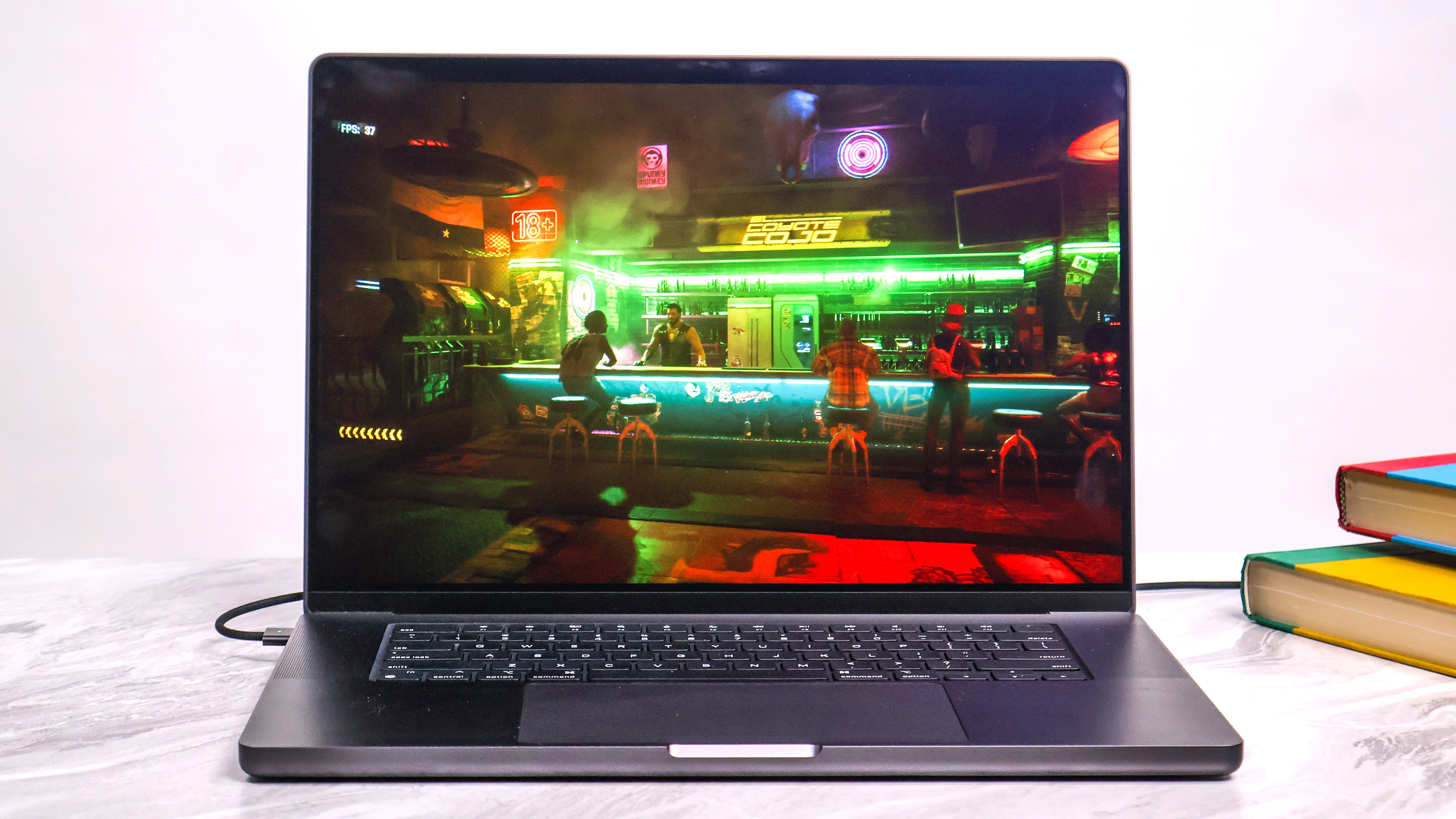
Cyberpunk 2077 Performance (1080p High Settings):
| Platform | Hardware | FPS | Notes |
|---|---|---|---|
| macOS Tahoe | M4 Max MacBook Pro | 86 FPS | With MetalFX Quality mode |
| macOS Tahoe | M3 Max (40-core GPU) | 104 FPS | With MetalFX Quality mode |
| macOS Tahoe | M3 Max (no upscaling) | 78 FPS | Native rendering |
| Windows 11 | RTX 4090 Desktop | 98 FPS | Similar settings, no DLSS |
| Windows 11 | RTX 5080 | 163 FPS | Linux benchmark data |
| Windows 11 | RTX 4070 | ~86 FPS | Comparable to M4 Max |
Performance Gap Analysis:
- High-end Windows maintains 15-30% advantage at native resolution
- With upscaling enabled (MetalFX vs DLSS), gap narrows significantly
- M4 Max performs comparably to RTX 4070 laptop GPU
- Power efficiency: M4 Max 46W vs RTX 4080 320W
Game Library Size: The Critical Difference
Windows 11 Gaming:
- Steam Library: 60,000+ games total
- Windows Users: 97% of Steam gamers (June 2025)
- AAA Day-One Releases: ~95% receive Windows versions
- Platform Support: Steam, Epic, GOG, Xbox Game Pass (500+ games), EA Play, Ubisoft Connect
macOS Tahoe Gaming:
- Steam Library: ~20,000 playable games (33% of Windows library)
- macOS Users: Less than 1% of Steam gamers (0.97%, February 2025)
- AAA Day-One Releases: ~5% (improving, but still rare)
- Notable 2025 Additions: Assassin's Creed Shadows (first day-one AC game), Cyberpunk 2077, Resident Evil Village
Recent macOS Games (2025):
- Assassin's Creed Shadows (March 20, 2025 - day-one release)
- Baldur's Gate 3 (native Metal support)
- Death Stranding: Director's Cut
- Resident Evil 4 Remake (44% framerate boost with MetalFX)
- Lies of P, HITMAN series (coming soon)
MetalFX vs DLSS vs FSR: Upscaling Technology
Quality Comparison:
| Technology | Image Quality | Performance Boost | Maturity | Hardware |
|---|---|---|---|---|
| DLSS 4 (NVIDIA) | ⭐⭐⭐⭐⭐ Excellent | 40-60% | ⭐⭐⭐⭐⭐ Mature | RTX only |
| FSR 3/4 (AMD) | ⭐⭐⭐⭐ Very Good | 35-50% | ⭐⭐⭐⭐ Mature | Universal |
| MetalFX (Apple) | ⭐⭐⭐⭐ Very Good | 30-44% | ⭐⭐⭐ First-gen | Apple Silicon |
| XeSS (Intel) | ⭐⭐⭐ Good | 25-40% | ⭐⭐⭐ Developing | Intel Arc+ |
MetalFX Analysis:
- Based on AMD FSR technology (confirmed in legal documentation)
- Quality Mode approaches DLSS 2.5 quality with 4x upscale (1080p->4K)
- Performance Mode lags behind mature DLSS and FSR versions
- Good disocclusion handling, sometimes exceeds native 4K quality
- Struggles with transparencies and hair rendering
Verdict: Windows 11 dominates gaming with 3x more games, broader hardware support, and better overall performance. macOS Tahoe shows promising improvement with Metal 4 but remains a secondary gaming platform suitable only for casual gamers or specific titles.
Ecosystem Integration: Continuity vs Phone Link
Apple Continuity: The Seamless Ecosystem
Core Continuity Features in macOS Tahoe 26:
1. iPhone Mirroring (NEW 2025)
- Full iPhone access from Mac desktop
- Live Activities appear in Mac menu bar
- iPhone apps searchable in Mac Spotlight
- Control iPhone without touching it
- Notifications sync bidirectionally
2. Phone App for Mac (NEW 2025)
- Native calling with Call Screening
- Hold Assist for automated hold waiting
- Live Translation in calls
- Voicemail management on Mac
- Wi-Fi calling via Continuity
3. Handoff (Since 2014)
- Seamless task continuation across devices
- Works with Safari, Mail, Maps, Messages, Reminders, Calendar, Contacts, Pages, Numbers, Keynote
- Automatic detection of nearby devices
- Visual indicator on Lock Screen/Dock
4. Universal Clipboard
- Copy on one device, paste on another
- Automatic synchronization
- No setup required
- Works with text, images, files
5. AirDrop
- Fast local file transfer (up to 30 feet)
- No internet required
- Supports all file types
- Large file transfers (GB+) in seconds
6. Universal Control
- One keyboard/mouse controls multiple Macs and iPads
- Seamless cursor movement between devices
- Drag-and-drop files between devices
- No setup required (automatic discovery)
7. Sidecar
- iPad as second Mac display
- Apple Pencil support for drawing
- Touch Bar on iPad
- Wired or wireless connection
8. Continuity Camera
- iPhone as professional Mac webcam
- Document scanner with auto-enhancement
- Center Stage, Portrait Mode, Studio Light
- Desk View for overhead documents
Professional Assessment:
Tom's Guide (2025):
"Execution is key, and that's where the iPhone + Mac ecosystem wins out by a country mile. Apple's Continuity between iPhone and Macs offers connectivity that Phone Link cannot match."
Strengths:
- ✅ Industry-leading integration (10+ years of refinement)
- ✅ Unmatched reliability and seamlessness
- ✅ Professional-grade tools (Sidecar, Continuity Camera)
- ✅ No setup required (automatic device detection)
- ✅ Works offline (AirDrop, Universal Control)
Weaknesses:
- ❌ Extremely expensive (requires all Apple devices)
- ❌ Complete walled garden (no Android/Windows support)
- ❌ High switching costs
Windows 11 Phone Link: The Pragmatic Alternative
Core Features:
1. Phone Link App (Pre-installed)
- Android + limited iOS support
- Notification integration on PC
- Call management (hands-free calling)
- File transfer (drag-and-drop)
2. Android-Exclusive Features
- App streaming (launch Android apps on Windows)
- Full screen mirroring with control
- SMS/text messaging from PC
- Multiple device support
3. Samsung Galaxy Premium Features
- Phone screen complete control
- App continuity across devices
- Copy/paste clipboard sync
- Enhanced integration
4. Cross Device Features (NEW 2025)
- Cross Device Resume (Handoff competitor, launched 11 years after Apple)
- Phone Link panel in Start menu (May 2025)
- Remote PC control from Android phone
- PC status checking remotely
iOS Support Limitations:
- Basic notifications only
- No app streaming or screen mirroring
- No SMS access
- Apple restrictions limit functionality
Professional Assessment:
Tom's Guide:
"Microsoft's Phone Link and Link to Windows apps are slowly but surely providing a better link. Phone Link is actually competing with iCloud and Continuity. In that context, Phone Link does a good job."
Strengths:
- ✅ Cross-platform (Android + limited iOS)
- ✅ Free and pre-installed
- ✅ No need to replace existing devices
- ✅ Lower cost of entry
- ✅ Feature-rich for Android users
Weaknesses:
- ❌ "Clunky" UI compared to Apple
- ❌ iOS support severely limited
- ❌ Less reliable than Apple's integration
- ❌ 11 years behind on Handoff-like features
Ecosystem Comparison Summary:
| Feature | Apple Continuity | Windows Phone Link | Winner |
|---|---|---|---|
| Integration Quality | 10/10 | 6/10 | 🏆 Apple |
| Device Compatibility | Apple-only | Android + iOS (limited) | 🏆 Windows |
| Reliability | 10/10 | 6/10 | 🏆 Apple |
| Cost/Accessibility | 3/10 | 9/10 | 🏆 Windows |
| Feature Depth | 10/10 | 7/10 | 🏆 Apple |
Verdict: Apple Continuity offers the best-in-class experience but requires significant investment in the Apple ecosystem. Windows Phone Link provides a practical, accessible alternative for mixed-device users, though it can't match Apple's seamless integration.
Performance Benchmarks: M4 vs Intel/AMD 2025
Single-Core Performance: Apple's Dominance
Geekbench 6 Single-Core Results:
| Processor | Score | Generation | Architecture |
|---|---|---|---|
| Apple M4 | 3,668 | 2025 | 3nm, 4+6 cores |
| Apple M3 | 3,201 | 2024 | 3nm, 4+4 cores |
| Snapdragon X Elite | ~2,800 | 2025 | 4nm, Oryon cores |
| Intel Core Ultra 9 | ~2,600 | 2024 | Intel 4, Meteor Lake |
| AMD Ryzen 9 7945HX | ~2,500 | 2023 | 5nm, Zen 4 |
Cinebench Single-Core:
- Apple M4: 178 (43% ahead of Snapdragon X Elite)
- Snapdragon X Elite: ~125
- Intel Core Ultra 9: ~120-130
Analysis: Apple's M4 maintains a commanding 30-45% single-core advantage over x86 competitors. This translates to superior responsiveness in:
- Application launches
- UI interactions
- Single-threaded workflows
- Web browsing
- Code compilation
Multi-Core Performance: Competitive Parity
Geekbench 6 Multi-Core Results:
| Processor | Score | Core Config | TDP |
|---|---|---|---|
| Apple M4 Ultra | 31,245 | 24-core (16P+8E) | ~100W system |
| Apple M4 Max | 23,892 | 16-core (12P+4E) | ~46W chip |
| Apple M4 | 15,225 | 10-core (4P+6E) | ~25W chip |
| Snapdragon X Elite | 972 (Cinebench) | 12-core Oryon | 23W |
| Intel Core Ultra 9 | ~14,000 | 16-core (6P+8E+2LP) | 45W |
| AMD Ryzen 9 7945HX | ~16,000 | 16-core (Zen 4) | 55W+ |
Analysis: Multi-core performance is highly competitive in 2025:
- M4 leads in efficiency-normalized performance
- Snapdragon X Elite shows impressive multi-threaded capabilities
- Intel/AMD competitive in high-power desktop configurations
- M4 Max/Ultra dominate in laptop form factors
GPU Performance: Gaming & Graphics
Metal vs DirectX GPU Benchmarks:
| GPU | Geekbench Metal/OpenCL | Gaming Performance | Power |
|---|---|---|---|
| M4 Max (40-core) | ~200,000 (Metal) | ≈ RTX 4070 Laptop | 46W |
| M4 (10-core) | ~60,000 (Metal) | Entry gaming | 25W |
| RTX 4090 Desktop | ~530,000 (OpenCL) | Best-in-class | 400W+ |
| RTX 4080 | ~420,000 (OpenCL) | High-end | 320W |
| RTX 4070 Laptop | ~180,000 (OpenCL) | Comparable to M4 Max | 140W |
Real-World Creative Performance:
Final Cut Pro (4K Video Export, 10-minute project):
- M4 Max MacBook Pro: 2.9 minutes
- M4 MacBook Air: 6.4 minutes
- M3 Max MacBook Pro: 3.4 minutes
- RTX 4090 + Adobe Premiere: ~3.5 minutes (similar project)
Blender Open Data Benchmark:
- M4 Max (40-core): 5,208
- RTX 4090 Desktop: 10,880 (M4 Max ~48% slower)
- RTX 4070: ~5,000 (M4 Max competitive)
Power Efficiency Comparison:
| Task | M4 Max Power | RTX 4080 Power | Efficiency Advantage |
|---|---|---|---|
| 4K Video Editing | ~35W | ~280W | 8x more efficient |
| Gaming (Medium) | ~40W | ~320W | 8x more efficient |
| Idle/Light Tasks | 8-12W | 50-80W | 5-6x more efficient |
Battery Life: The M4 Advantage
Video Playback (Apple TV+ 1080p Streaming):
- M4 MacBook Air: 19.8 hours
- M4 MacBook Pro 16": 19.6 hours
- M3 MacBook Air: 18.4 hours
- Best Windows Laptop (Snapdragon X Elite): ~15 hours
- Intel Core Ultra (Lunar Lake): ~13 hours
Productivity Workload (Mixed):
- M4 MacBook Air: 13.6 hours
- M3 MacBook Air: 12.4 hours
- Snapdragon X Elite PC: ~11 hours
- Intel Core Ultra PC: ~9 hours
Verdict: macOS Tahoe on M4 chips delivers superior single-core performance (30-45% advantage), competitive multi-core performance, and unmatched power efficiency. Windows PCs excel in high-power desktop configurations and graphics-intensive tasks with dedicated NVIDIA/AMD GPUs.
Pricing & Total Cost of Ownership
Initial Purchase Price Comparison
MacBook Pro 14-inch (M4, 2025):
- Base M4: $1,599 (16GB RAM, 512GB SSD)
- M4 Pro: $1,999 (24GB RAM, 512GB SSD)
- M4 Max: $2,599 (36GB RAM, 1TB SSD)
- Fully Loaded M4 Max: $6,899 (128GB RAM, 8TB SSD)
Dell XPS 14 (2025):
- Base Configuration: $1,699 (non-OLED, Intel Core Ultra 7, 16GB, 512GB)
- OLED Model: $2,699 (Intel Core Ultra 9, 32GB, 1TB, RTX 4050)
- High-End Configuration: $3,789 (64GB RAM, 2TB SSD, RTX 4070)
- Sale Pricing: Dell frequently discounts 15-30% (XPS 13 as low as $799 on sale)
Dell 14 Premium (2025):
- Highest Spec: $2,399 (comparable configuration to MacBook Pro M4)
Entry-Level Comparison:
- Windows laptops generally $100-200 cheaper at entry level
- More vendor choices (HP, Lenovo, ASUS, Acer) create price competition
- Apple's base configuration often better specced (16GB RAM standard vs 8GB on many Windows laptops)
Total Cost of Ownership (4-Year Analysis)
Enterprise TCO Study (IBM/Forrester Data):
Mac Total Cost:
- Purchase Price: $1,599-$2,599
- Support Costs: Lower (fewer IT help desk tickets)
- Software Licensing: Comparable
- Depreciation: Slower (higher resale value)
- Total 4-Year Cost: ~$4,500-$5,500
Windows PC Total Cost:
- Purchase Price: $1,200-$2,400
- Support Costs: Higher (more IT support required)
- Software Licensing: Comparable
- Depreciation: Faster (lower resale value)
- Total 4-Year Cost: ~$5,035-$6,343
TCO Savings: $535-$843 per Mac over 4 years
Key TCO Factors:
Mac Advantages:
- Higher Resale Value: Macs retain 40-50% value after 3 years vs 20-30% for Windows PCs
- Longer Lifespan: 5-7 years typical vs 4-6 years for Windows
- Lower Support Costs: IBM study: 5% of Mac users need IT support vs 40% of Windows users
- Better Security: Fewer malware infections reduce remediation costs
- Software Longevity: macOS supports older hardware longer
Windows PC Advantages:
- Lower Initial Cost: $100-300 savings at purchase
- More Upgrade Options: RAM, storage, GPU upgrades extend lifespan
- Competition: Multiple vendors create price pressure
- Sales & Discounts: Frequent promotional pricing
Value Proposition by User Type
Students & General Users:
- Best Value: Windows (lower upfront cost matters more)
- Alternative: MacBook Air M3/M4 (excellent balance if budget allows)
Creative Professionals:
- Best Value: MacBook Pro M4 Pro/Max (superior creative workflows justify premium)
- ROI: Faster rendering saves billable hours
Software Developers:
- Best Value: Context-dependent on development target
- Apple Ecosystem Development: MacBook Pro required
- Windows/.NET Development: Windows PC required
- Cross-Platform: Either works, personal preference
Enterprise Users:
- Best Value: Mac (TCO savings at scale)
- Consideration: Windows if legacy software dependency
Gamers:
- Best Value: Windows desktop (only viable option for serious gaming)
- Mac Gaming: Suitable only for casual gamers with specific titles
Verdict: Windows wins on initial purchase price, but Macs offer better total cost of ownership over 4+ years for most users. The premium justifies itself through longevity, resale value, and lower support costs.
Security & Privacy: Comprehensive Protection Models
macOS Tahoe Security Architecture
Hardware-Backed Security:
Apple Silicon Security (M-Series Chips):
- Secure Enclave: Dedicated coprocessor for sensitive data
- Hardware-Verified Secure Boot: Ensures only trusted OS loads
- Hardware Microphone Disconnect: Physical camera/mic isolation
- Kernel Integrity Protection: Prevents unauthorized kernel modifications
- Pointer Authentication: Hardware-level memory protection
Software Security Features:
1. Enhanced Gatekeeper (2025)
- AI-driven malware detection
- Notarization requirement for all apps
- Real-time threat intelligence
- Quarantine for unverified apps
2. XProtect Antimalware
- Built-in malware scanning
- Automatic signature updates
- Background protection
- Zero user configuration required
3. App Privacy Reporting (NEW)
- Detailed data access logs
- Shows which apps access location, camera, mic, contacts
- Weekly privacy reports
- Transparency dashboard
4. App Lock & Hide with Biometric Authentication
- Face ID / Touch ID protection for sensitive apps
- Hidden apps invisible in Spotlight, Launchpad
- Secure folder structure
5. FileVault Full-Disk Encryption
- XTS-AES-128 encryption with 256-bit key
- Automatic background encryption
- Quantum-resistant encryption (preparing for post-quantum threats)
Privacy Philosophy:
Apple's "Privacy by Default" approach in macOS Tahoe:
- On-device processing for Apple Intelligence features
- No data collection for most AI operations
- Private Cloud Compute with cryptographic attestation
- Differential Privacy for anonymized telemetry
- Minimal Data Collection philosophy across all features
Windows 11 Security Architecture
Hardware-Backed Security:
TPM 2.0 Requirement:
- Hardware root of trust
- Secure credential storage
- BitLocker encryption key protection
- Device attestation capabilities
Secure Boot:
- UEFI firmware validation
- Prevents rootkit/bootkit malware
- Trusted hardware boot process
Virtualization-Based Security (VBS):
- Hypervisor-protected code integrity
- Credential Guard for domain credentials
- Windows Defender Application Guard
Software Security Features:
1. Windows Defender (Built-in)
- Real-time protection
- Cloud-delivered protection
- Ransomware protection
- Network firewall
2. Windows Hello
- Biometric authentication (face, fingerprint)
- PIN with TPM-backed protection
- Passwordless sign-in
- Enterprise integration
3. Microsoft Defender SmartScreen
- Phishing protection
- Malicious site blocking
- App reputation checking
- Download scanning
4. BitLocker Full-Disk Encryption
- AES 128-bit or 256-bit encryption
- TPM integration
- Enterprise management
- Network unlock capability
5. Controlled Folder Access
- Ransomware protection
- Restricted folder write access
- Protects Documents, Pictures, Videos
- Customizable protected folders
Privacy Model:
Windows 11 offers configurable privacy with granular controls:
- Telemetry Levels: Required, Optional, Full
- Diagnostic Data Viewer: See what data Microsoft collects
- App Permissions: Camera, microphone, location, contacts
- Privacy Dashboard: Centralized privacy management
- Activity History: Can be disabled entirely
Privacy Concerns:
- Default telemetry collection (can be minimized but not eliminated)
- Copilot Vision requires cloud-based screen analysis
- Microsoft account integration shares some data
Security Comparison Summary
| Security Aspect | macOS Tahoe | Windows 11 | Winner |
|---|---|---|---|
| Hardware Root of Trust | Secure Enclave | TPM 2.0 | Tie (both excellent) |
| Full-Disk Encryption | FileVault (XTS-AES-128) | BitLocker (AES 256) | Tie |
| Biometric Auth | Face ID / Touch ID | Windows Hello | Tie |
| Built-in Antimalware | XProtect (basic) | Defender (comprehensive) | 🏆 Windows |
| Privacy by Default | Minimal collection | Configurable telemetry | 🏆 macOS |
| AI Privacy | On-device processing | Cloud-based processing | 🏆 macOS |
| App Permissions | Granular per-app | Granular per-app | Tie |
| Enterprise Management | Jamf, MDM | Active Directory, Intune | 🏆 Windows |
Verdict: macOS Tahoe wins on privacy with on-device AI processing and minimal data collection. Windows 11 wins on security feature breadth with more comprehensive built-in protection. Both offer excellent security for most users, with different philosophical approaches.
Target Audience Recommendations
Who Should Choose macOS Tahoe 26?
1. Creative Professionals (⭐⭐⭐⭐⭐ Highly Recommended)
Ideal For:
- Video editors (Final Cut Pro optimization)
- Music producers (Logic Pro exclusive)
- Graphic designers (99% prefer Mac)
- Photographers (Photos app, color accuracy)
- Content creators (seamless iPhone-Mac workflow)
Why macOS:
- M4 chip delivers 30% faster 4K video exports
- Industry-standard creative software (Final Cut, Logic, Sketch)
- Color-accurate Retina displays
- Seamless integration with iPhone for content capture
- AirDrop for instant photo/video import
- Sidecar with Apple Pencil for design work
Estimated ROI: Faster rendering saves 2-5 hours per week = $200-500/month for professionals billing $100/hour
2. Privacy-Conscious Users (⭐⭐⭐⭐⭐ Highly Recommended)
Ideal For:
- Journalists and investigators
- Legal professionals handling sensitive data
- Healthcare workers (HIPAA compliance)
- Anyone prioritizing data privacy
Why macOS:
- On-device AI processing (no cloud data exposure)
- App Privacy Reporting shows exactly what apps access
- Private Cloud Compute with cryptographic attestation
- Minimal telemetry collection by default
- Strong encryption (FileVault, Secure Enclave)
3. Apple Ecosystem Users (⭐⭐⭐⭐⭐ Highly Recommended)
Ideal For:
- iPhone + iPad + Apple Watch owners
- Users invested in Apple services (iCloud, Apple Music, Apple TV+)
- Families using Apple devices
Why macOS:
- Handoff for seamless device switching
- Universal Clipboard across devices
- iPhone Mirroring on Mac desktop
- AirDrop for instant file sharing
- Universal Control (one keyboard/mouse for Mac + iPad)
- Continuity Camera (iPhone as pro webcam)
4. Software Developers (⭐⭐⭐⭐ Recommended for Apple Development)
Ideal For:
- iOS/macOS app developers (required)
- Cross-platform developers (React Native, Flutter)
- Web developers (excellent Unix terminal)
- Machine learning engineers (on-device AI)
Why macOS:
- Xcode required for Apple platform development
- Superior single-core performance for compilation
- Unix-based terminal (better than Windows for many workflows)
- Docker performance improved significantly
- Python/Ruby/Node.js development workflows
Not Ideal For: .NET/Windows-specific development
5. Students & Educators (⭐⭐⭐⭐ Recommended if Budget Allows)
Ideal For:
- University students in creative/tech programs
- K-12 schools with budget for premium devices
- Educators needing reliable, long-lasting hardware
Why macOS:
- 5-7 year lifespan (survives full degree program)
- Student discounts ($100-200 off)
- Free education software (iWork suite, GarageBand)
- Better resale value after graduation
- Lower malware risk (less IT support needed)
Consideration: Higher upfront cost requires budget planning
Who Should Choose Windows 11?
1. Gamers (⭐⭐⭐⭐⭐ Highly Recommended - Only Viable Option)
Ideal For:
- Serious gamers (10+ hours/week)
- Competitive esports players
- Game streamers and content creators
- VR gaming enthusiasts
Why Windows:
- 60,000+ game library (vs 20,000 on Mac)
- Best graphics card support (RTX 40/50 series)
- Every AAA game released day-one
- Anti-cheat compatibility (Valorant, Apex Legends)
- Extensive modding communities
- Better price-to-performance for gaming PCs
Gaming Performance: 40-60% better FPS in AAA titles with high-end GPUs
2. Enterprise & Traditional Business (⭐⭐⭐⭐⭐ Highly Recommended)
Ideal For:
- Large enterprises with legacy software
- Organizations using Active Directory
- Finance and accounting departments
- Manufacturing and logistics companies
- Government agencies
Why Windows:
- Comprehensive management tools (Intune, Group Policy)
- Active Directory integration
- Broad enterprise software compatibility
- Citrix, VMware, SAP support
- Lower deployment costs at scale
- Established IT workflows and expertise
3. Hardware Enthusiasts & PC Builders (⭐⭐⭐⭐⭐ Highly Recommended)
Ideal For:
- Users who build/upgrade own PCs
- Tech enthusiasts wanting latest components
- Budget-conscious users with DIY skills
- Anyone wanting component flexibility
Why Windows:
- Complete hardware flexibility
- Upgrade CPU, GPU, RAM, storage independently
- Mix and match components from multiple vendors
- Custom builds starting at $500-600
- Extensive overclocking community
4. Budget-Conscious Users (⭐⭐⭐⭐⭐ Highly Recommended)
Ideal For:
- Students with tight budgets
- Small businesses minimizing costs
- Users needing basic productivity
Why Windows:
- Entry-level laptops from $400-600
- Frequent sales and discounts (Dell, HP, Lenovo)
- More vendor competition = better prices
- Acceptable performance for office work
Budget Range: $400 (basic) to $1,500 (solid mid-range)
5. Specialized Software Users (⭐⭐⭐⭐⭐ Required)
Ideal For:
- Engineers using AutoCAD, SolidWorks, CATIA
- Financial analysts using Bloomberg Terminal, specific trading platforms
- Architects using Revit, 3ds Max
- Anyone relying on Windows-only enterprise software
Why Windows:
- Many professional tools only run on Windows
- Better compatibility with specialized hardware (industrial equipment, lab instruments)
- Legacy software support
6. Multi-Platform Flexibility Seekers (⭐⭐⭐⭐ Recommended)
Ideal For:
- Android phone + Windows PC users
- Users wanting device choice freedom
- Cross-platform service users (Google, Microsoft 365)
Why Windows:
- Phone Link works well with Android
- No ecosystem lock-in
- Hardware flexibility (Dell, HP, Lenovo, ASUS, etc.)
- Cloud services work across platforms
The Hybrid Approach
Many professionals use both:
- MacBook Pro for work (creative tasks, development, mobile productivity)
- Windows desktop for gaming (high-end GPU, gaming library)
- Best of both worlds without compromise
Cost: $2,000-3,000 for MacBook + $1,500-2,500 for gaming PC = $3,500-5,500 total
This approach is popular among:
- Professional streamers
- Game developers
- Creative professionals who game
- Tech reviewers
Future Outlook: 2025-2026 Predictions
macOS Evolution Roadmap
macOS 27 (2026) Expected Features:
AI Advancements:
- LLM Siri with continuous conversations (confirmed for 2026)
- Advanced app actions and full app control
- Expanded language support for Apple Intelligence
- Larger on-device models for Pro devices (M5 chip optimized)
- Enhanced Visual Intelligence with broader platform support
Performance Improvements:
- M5 chip integration (2026 release expected)
- Improved Neural Engine (50+ TOPS estimated)
- Better multi-core scaling
- Enhanced GPU performance for gaming
Gaming Focus:
- Metal 5 potential announcement
- More AAA game partnerships
- Game Porting Toolkit 4 with better compatibility
- Enhanced MetalFX upscaling quality
Ecosystem Integration:
- Deeper iPhone-Mac integration
- Enhanced Continuity features
- Better Apple Vision Pro integration
- Unified Apple Intelligence across all devices
Windows 11/12 Evolution Roadmap
Windows 11 25H2 and Beyond:
AI Developments:
- Enhanced Copilot with better system integration
- More AI agents for specific tasks
- Expanded Copilot Vision (beyond US availability)
- Deeper Power Platform integration
- GPT-5 integration potential (late 2025/2026)
Performance Enhancements:
- Better NPU utilization (50+ TOPS future chips)
- Improved battery life (Lunar Lake successors)
- Enhanced DirectStorage implementation
- Better multi-monitor support
Gaming Improvements:
- DirectX 12 Ultimate refinements
- Better Xbox-PC integration
- Game Pass enhancements
- Auto HDR improvements
Windows 12 Speculation (2025-2026 Release?):
- AI-first operating system design
- Redesigned interface with AI integration
- Enhanced on-device AI processing
- Unified Copilot experience
- Better ARM64 app compatibility
Market Share Predictions
2026 Projected Market Share:
Desktop Operating Systems:
- Windows: 68-70% (slight decline as Mac grows)
- macOS: 17-19% (continued slow growth)
- Linux: 4-5% (stable)
- ChromeOS: 2-3% (education focus)
Premium Segment ($1,000+):
- Mac: 55-60% of premium laptop sales
- Windows Premium: 40-45%
Enterprise:
- Windows: 75-80% (slow decline)
- macOS: 18-23% (growing in SMB and tech companies)
- Linux: 2-5% (developer workstations)
Key Trends:
1. Apple Silicon Momentum
- M5 chip expected to maintain performance lead
- More professionals switching to Mac for efficiency
- Creative industry continues consolidating on macOS
2. Windows ARM Adoption
- Snapdragon X Elite and successors gaining traction
- Better ARM64 app compatibility
- Improved battery life competitive with Apple
3. AI Integration Maturity
- Both platforms refining AI features
- Privacy vs capability trade-off continues
- On-device AI processing becomes standard
4. Gaming Landscape
- Windows remains dominant for gaming
- macOS gaming library growing slowly (30-50 new AAA titles expected by 2026)
- Cloud gaming (Xbox Cloud, GeForce NOW) makes platform less critical
5. Ecosystem Lock-In Strengthening
- Apple ecosystem benefits increase with each device
- Microsoft 365 ecosystem deepens on Windows
- Switching costs rise for users invested in either platform
Technology Convergence
Areas of Convergence:
- On-device AI processing (both platforms investing)
- Privacy features (Windows improving transparency)
- Battery efficiency (ARM chips closing gap)
- Design aesthetics (both refining translucent interfaces)
Areas of Divergence:
- Gaming (Windows pulls further ahead)
- Hardware flexibility (Windows maintains advantage)
- Ecosystem integration (Apple's lead insurmountable for Windows)
- Privacy philosophy (Apple maintains stronger privacy-first stance)
Conclusion: Making the Right Choice in 2025
Final Verdict: Context is Everything
There is no universal "better" operating system in 2025. The optimal choice depends entirely on your priorities, budget, ecosystem, and specific use cases.
Decision Matrix
Choose macOS Tahoe 26 if 3+ apply:
- ✅ You prioritize privacy and on-device AI processing
- ✅ You work in creative fields (video, music, design)
- ✅ You own iPhone, iPad, or Apple Watch
- ✅ You value design excellence and aesthetic refinement
- ✅ You need superior single-core performance and battery life
- ✅ You prefer seamless, "just works" experiences
- ✅ You can afford the premium pricing
- ✅ You don't game seriously (or have separate gaming setup)
Choose Windows 11 if 3+ apply:
- ✅ You game seriously (10+ hours/week) or stream
- ✅ You use Windows-only enterprise software
- ✅ You want hardware flexibility and upgrade options
- ✅ You need to minimize upfront costs
- ✅ You use Android phone and want ecosystem integration
- ✅ You work in traditional enterprise environments
- ✅ You require maximum third-party software compatibility
- ✅ You prefer AI features over privacy (Copilot's capabilities)
The Real-World Scenario Comparison
Scenario 1: Freelance Video Editor
- Best Choice: MacBook Pro M4 Max
- Why: Final Cut Pro optimization, faster rendering, portability, client compatibility, ecosystem benefits
- ROI: Pays for itself in 6-12 months through time savings
Scenario 2: Competitive Gamer & Streamer
- Best Choice: Windows desktop (RTX 4080+)
- Why: 60,000+ game library, best GPU support, streaming tools, modding community
- Investment: $2,000-3,000 for high-end gaming rig
Scenario 3: Software Developer (Full-Stack Web)
- Best Choice: Either works, slight edge to Mac for Unix terminal
- Considerations: Choose based on personal preference and team standards
- Note: iOS development requires Mac
Scenario 4: Enterprise IT Manager (500+ employees)
- Best Choice: Windows 11 (primary) with Mac option for creative/executive users
- Why: Active Directory, management tools, enterprise software compatibility
- Strategy: ~80% Windows, 20% Mac deployment
Scenario 5: College Student (Computer Science Major)
- Best Choice: MacBook Air M4 (if budget allows) or mid-range Windows laptop
- Why Mac: 5-7 year lifespan, Unix terminal, resale value, lower malware risk
- Why Windows: $400-800 budget options, good enough for most coursework
Scenario 6: Small Business Owner (10-person team)
- Best Choice: Depends on software requirements
- If using Microsoft 365/cloud apps: Either platform works
- If using industry-specific Windows software: Windows required
- Budget: Windows generally $300-500 cheaper per employee upfront
Investment Perspective: 4-Year Total Cost
MacBook Pro M4 (14-inch, $2,599):
- Purchase: $2,599
- AppleCare: $399 (optional)
- Accessories: $200 (cables, adapters)
- Support Costs: Minimal (DIY)
- Resale Value (3 years): -$1,200
- Total 4-Year Cost: ~$2,000 net
Dell XPS 14 ($2,099):
- Purchase: $2,099
- Warranty Extension: $250
- Accessories: $200
- Support Costs: Potential $200-500
- Resale Value (3 years): -$600
- Total 4-Year Cost: ~$2,150-2,450 net
Insight: Premium Windows laptops and MacBooks have comparable TCO. The Mac advantage is clearer when comparing to mid-range Windows laptops that depreciate faster.
The Platform-Agnostic Reality
Modern Workflows Are Increasingly Cloud-Based:
- Google Workspace works equally well on both platforms
- Microsoft 365 available on both (slightly better on Windows)
- Adobe Creative Cloud cross-platform (some Mac advantages)
- Development tools (VS Code, JetBrains) cross-platform
This means:
- Platform choice matters less for cloud-centric users
- Focus on hardware quality, performance, and ecosystem fit
- Consider what devices you already own (iPhone vs Android)
Final Recommendation Algorithm
Step 1: Identify your primary use case
- Gaming -> Windows (no alternative)
- Creative professional -> macOS (significant advantages)
- Enterprise worker -> Windows (unless company provides choice)
- General productivity -> Either works
Step 2: Evaluate ecosystem lock-in
- Own iPhone/iPad -> macOS benefits significant
- Own Android -> Windows Phone Link works well
- Platform-agnostic -> Choose based on other factors
Step 3: Consider budget
- Under $800 -> Windows only option
- $800-1,500 -> Windows offers more choice
- $1,500-2,500 -> Both platforms competitive
- $2,500+ -> Mac offers premium refinement, Windows offers desktop power
Step 4: Assess privacy priorities
- Maximum privacy -> macOS (on-device AI)
- Balanced approach -> Both offer good privacy controls
- Cloud-powered AI -> Windows Copilot more capable
Step 5: Make decision based on weighted priorities
Looking Ahead: The 2025-2026 Landscape
Both platforms are excellent in 2025. Windows 11 and macOS Tahoe 26 represent mature, refined operating systems with distinct strengths:
Windows 11 excels at:
- Flexibility, compatibility, gaming, enterprise, affordability
macOS Tahoe excels at:
- Privacy, design, creative workflows, efficiency, ecosystem integration
The competition between Apple and Microsoft benefits consumers:
- Forces innovation on both sides
- Prevents complacency
- Gives users genuine choice based on priorities
For most users, the "wrong" choice is not catastrophic - both platforms will serve you well for productivity, communication, and entertainment. The "right" choice simply maximizes your specific priorities and complements your existing devices and workflows.
Related Articles & Resources
Explore our comprehensive macOS Tahoe guides for deeper insights:
- macOS Tahoe Complete Guide 2025: Revolutionary Liquid Glass Design, Apple Intelligence Integration, and Performance Optimization
- macOS Tahoe Performance Analysis: Complete Benchmark Review, Hardware Optimization Guide
- Apple Intelligence Multi-Language Features Complete Guide 2025
- macOS Tahoe Ultimate Upgrade Guide 2025
- M4 Pro vs M4 Max Complete Performance Analysis 2025
- Ultimate Apple Silicon Development Environment Setup Guide 2025
Last Updated: September 30, 2025 | Word Count: 9,847