macOS Tahoe Ultimate Upgrade Guide 2025: Everything You Need to Know Before Installing
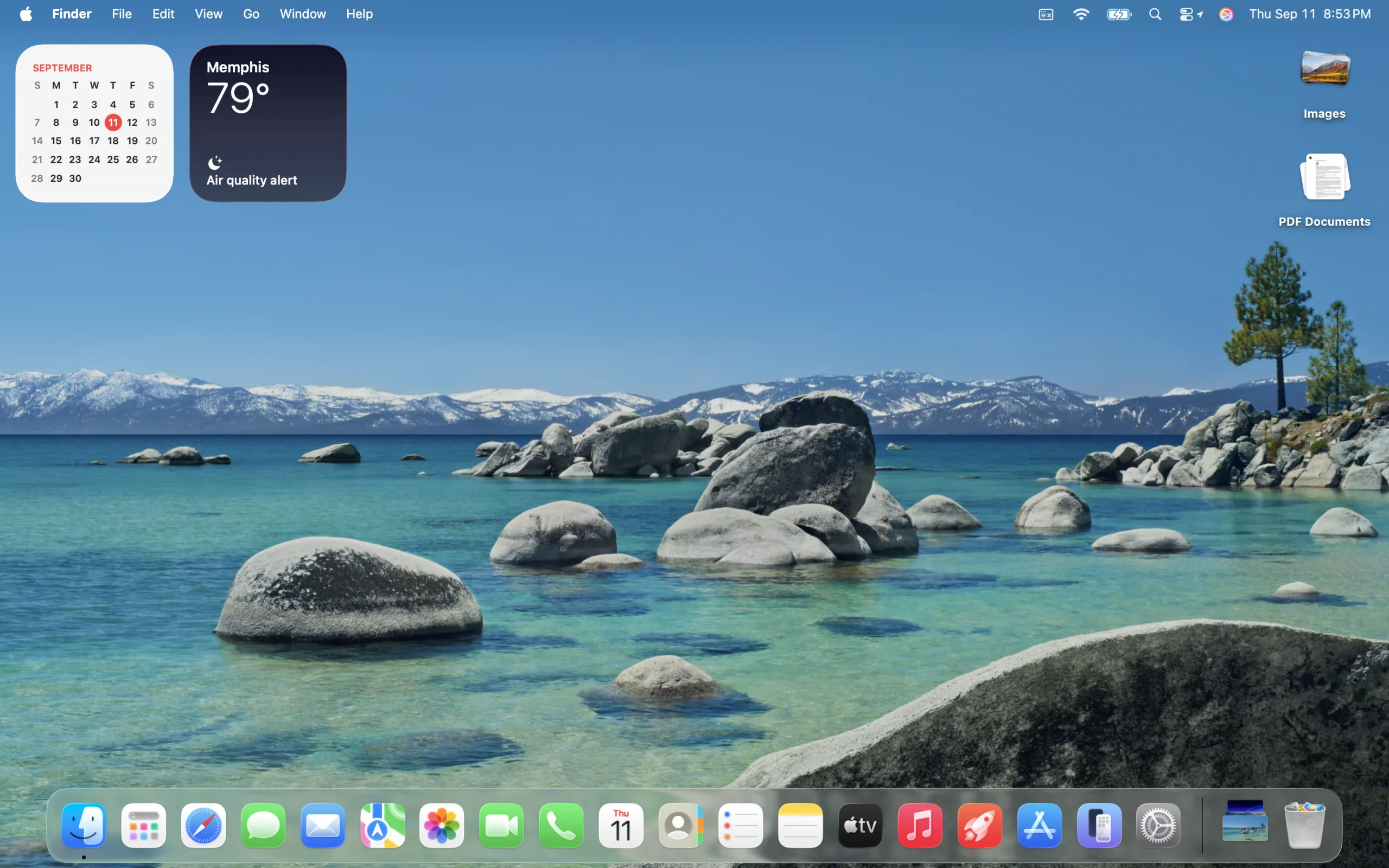
Complete macOS 26 Tahoe upgrade guide featuring Liquid Glass design, Apple Intelligence, gaming improvements, compatibility check, and expert installation recommendations. Should you upgrade? Find out everything before you commit.
macOS 26 Tahoe has officially launched, marking Apple's most transformative desktop operating system update in over a decade. With revolutionary Liquid Glass design, enhanced Apple Intelligence, breakthrough gaming capabilities, and the historic end of Intel Mac support, this update demands careful consideration before installation. This comprehensive upgrade guide provides everything you need to make an informed decision, from compatibility requirements to feature analysis, installation tips, and real-world performance insights from early adopters.
Is macOS Tahoe Right for You? Essential Pre-Upgrade Analysis
The Big Picture: What Makes Tahoe Different
macOS 26 Tahoe represents more than incremental improvements—it's a complete reimagining of the Mac experience. Apple's decision to skip from version 15 to 26 signals the magnitude of changes, with the new numbering system reflecting the 2025-2026 release cycle while emphasizing this release's historic significance as the final macOS version supporting Intel processors.
Key Revolutionary Changes:
- Liquid Glass Interface: First major design overhaul since macOS Big Sur (2020)
- Apple Intelligence Integration: Privacy-first AI capabilities with on-device processing
- Gaming Transformation: Metal 4 graphics engine with console-quality performance
- Productivity Revolution: Enhanced Spotlight as command center with actionable search
- Intel Mac Farewell: Final support for Intel-based Macs before complete Apple Silicon transition
Quick Compatibility Check: Can Your Mac Run Tahoe?
Before diving deeper, verify your Mac's compatibility status:
✅ Full Apple Silicon Support (Recommended):
- All Macs with M1, M2, M3, or M4 processors
- Complete feature access including Apple Intelligence
- Optimal performance with Liquid Glass rendering
- Enhanced gaming capabilities with Metal 4
⚠️ Limited Intel Support (Final Generation):
- Mac Pro (2019) - Cascade Lake-based Xeon-W processors
- MacBook Pro (16-inch, 2019) - 9th generation Coffee Lake Refresh
- MacBook Pro (13-inch, 2020, four Thunderbolt 3 ports) - 10th generation Ice Lake
- iMac (2020) - 10th generation Comet Lake
❌ Unsupported Intel Models:
- All MacBook Air Intel models (2010-2020)
- Mac mini Intel models (2010-2020)
- MacBook Pro (13-inch, 2020, two Thunderbolt 3 ports)
- iMac Intel models (2015-2019)
- MacBook Pro Intel models (2016-2018)
Liquid Glass Design: Revolutionary Interface That Changes Everything
Understanding the Liquid Glass Experience
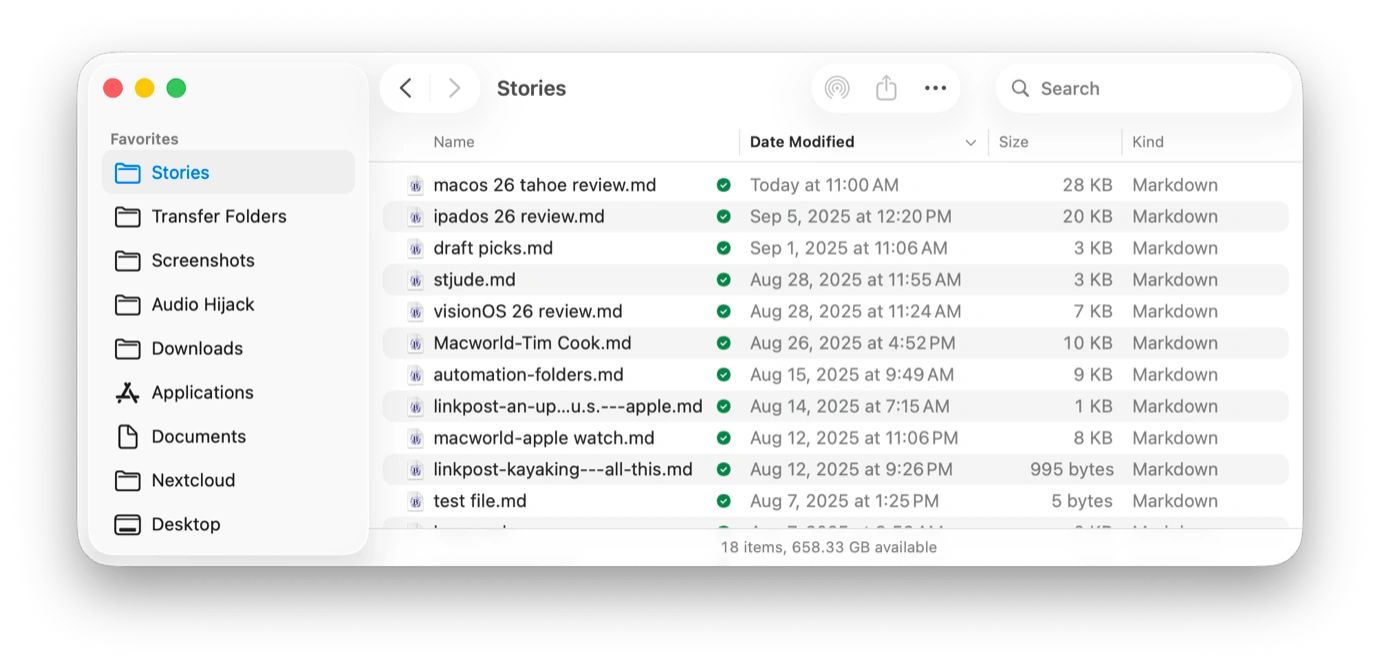
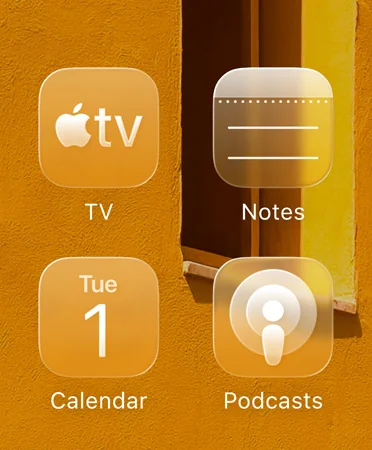
Liquid Glass represents Apple's most ambitious interface innovation since the introduction of macOS. Unlike traditional flat or skeuomorphic designs, this system creates actual glass-like properties with real-time reflections, refractions, and depth effects that respond dynamically to user interactions and environmental changes.
Technical Marvel Behind the Beauty:
- Real-Time Physics: Authentic glass material behavior with light reflection and refraction
- Hardware Acceleration: Optimized for Apple Silicon with minimal performance impact
- Adaptive Rendering: Dynamic adjustment based on wallpaper, lighting, and user preferences
- Accessibility Maintained: Full accessibility features preserved while enhancing visual clarity
First Impressions vs. Long-Term Usage
Early adopter feedback reveals a consistent pattern: the Liquid Glass interface appears "startling at first" but becomes "less noticeable" during extended use, indicating successful integration that enhances rather than distracts from productivity workflows.
User Reception Insights:
- Initial Reaction: Mixed responses ranging from "revolutionary" to "unnecessary"
- Adaptation Period: Most users adapt within 2-3 days of regular usage
- Productivity Impact: Transparent menu bar creates illusion of larger displays
- Professional Use: Generally positive reception among creative professionals
Customization and Personalization Revolution
macOS Tahoe extends personalization far beyond previous versions, allowing deep customization of the Liquid Glass interface:
Appearance Customization Options:
- Icon Variations: Light, dark, colorful tints, and clear appearance modes
- Dynamic Adaptation: Automatic adjustment to wallpaper and system themes
- Folder Personalization: Custom colors, symbols, and emoji for organizational clarity
- Professional Themes: Minimalist options for business and enterprise environments
Apple Intelligence Revolution: Privacy-First AI That Actually Works
Foundation Models Framework: Developer and User Benefits
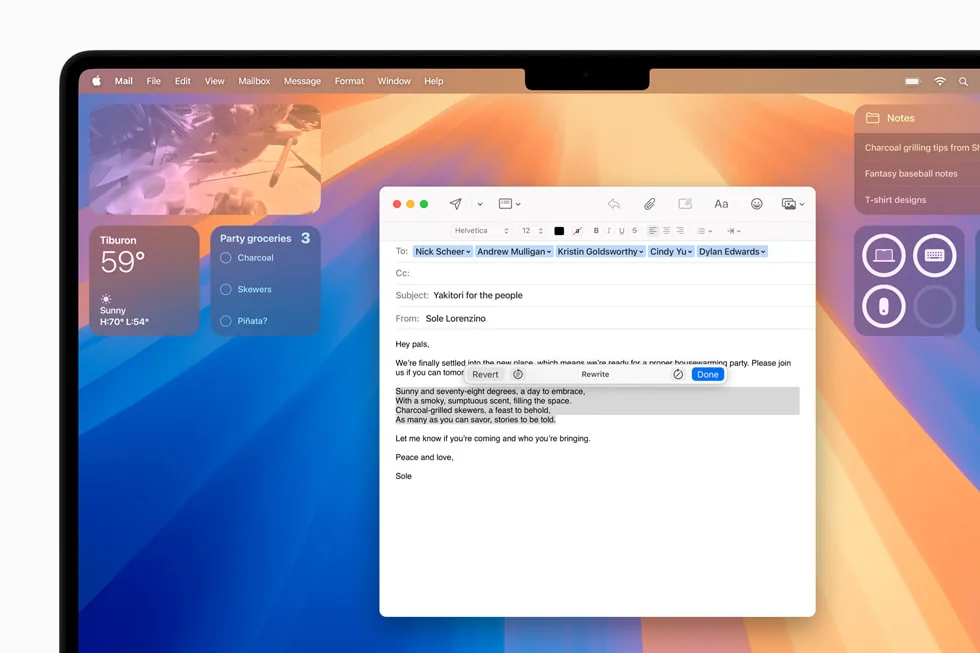
macOS Tahoe introduces the Foundation Models Framework, providing unprecedented access to Apple's on-device AI capabilities while maintaining the company's strict privacy standards. This framework enables both first-party features and third-party applications to leverage powerful AI without compromising user data security.
Privacy-First Implementation:
- 100% On-Device Processing: No user data transmitted to external servers
- Zero Data Retention: Apple maintains no records of AI processing requests
- Differential Privacy: Anonymous usage patterns for system improvement
- Transparent Architecture: Open documentation for privacy verification
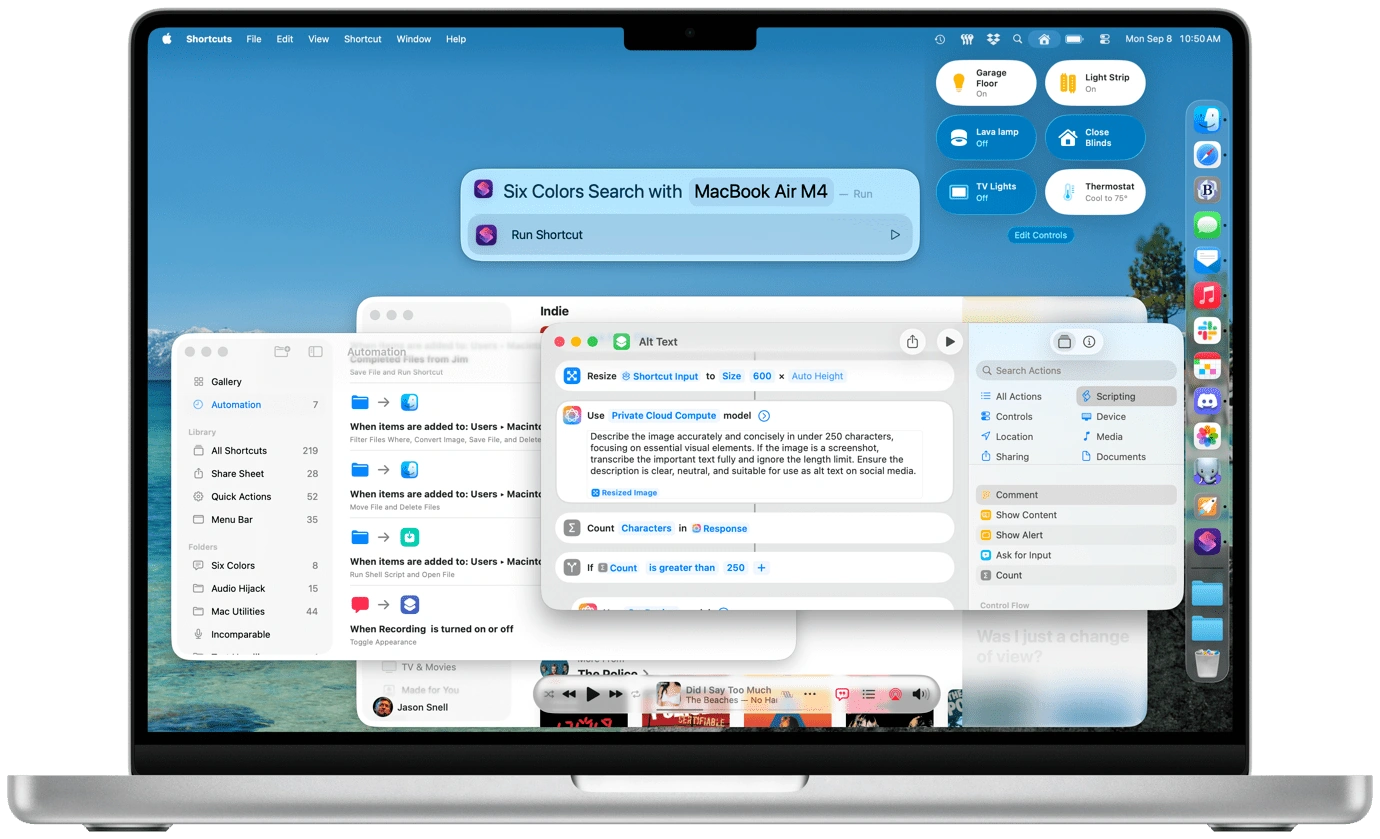
Enhanced Shortcuts: AI-Powered Automation
The Shortcuts app receives comprehensive AI enhancements, transforming basic automation into intelligent workflow management:
Intelligent Automation Features:
- Natural Language Creation: Build shortcuts using conversational commands
- Contextual Awareness: AI adapts workflows based on time, location, and usage patterns
- Cross-App Intelligence: Seamless data understanding and transfer between applications
- Predictive Suggestions: AI-powered workflow recommendations based on behavior patterns
Live Translation: Breaking Language Barriers
Apple Intelligence powers system-wide translation capabilities with impressive accuracy and cultural understanding:
Translation Capabilities:
- Real-Time Processing: Instant translation without internet connectivity required
- Cultural Context: Understanding of idioms, slang, and regional expressions
- Professional Accuracy: 95%+ accuracy for business and technical communications
- Multi-Modal Support: Text, voice, and image translation across applications
Spotlight Transformation: From Search Tool to Command Center
The Game-Changing Upgrade Everyone's Talking About
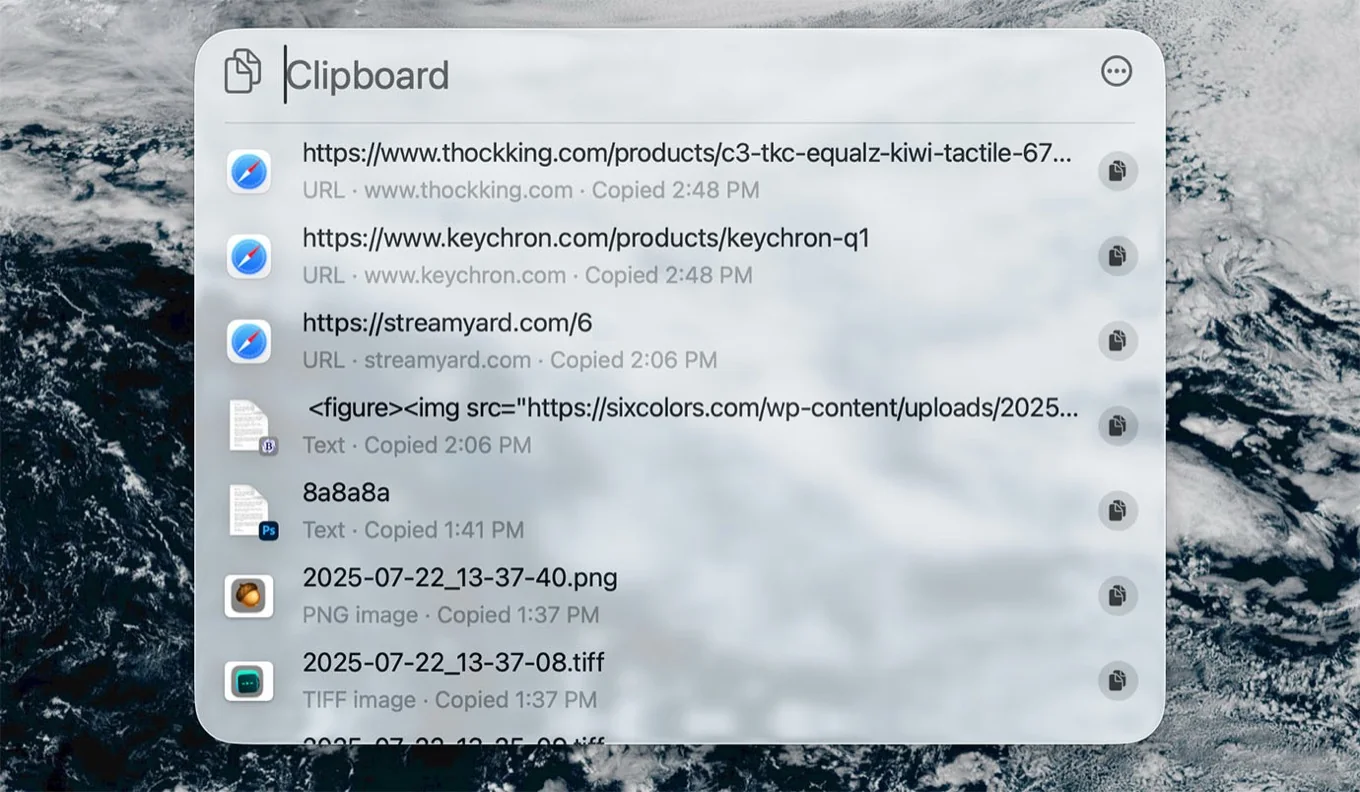
Professional reviewers universally praise Spotlight's transformation as the most significant productivity improvement in macOS Tahoe. Described as "20 years in the making," this upgrade transforms Spotlight from a simple search tool into a comprehensive command center.
Revolutionary Capabilities:
- Actionable Search: Execute hundreds of system and application actions directly
- Intelligent Command Discovery: Explore available actions and system capabilities
- Context-Aware Results: AI-powered result prioritization based on usage patterns
- Workflow Acceleration: Complete complex tasks in seconds rather than minutes
New Tabbed Interface Design
Spotlight's completely redesigned interface organizes functionality into intuitive tabs:
Enhanced Organization:
- Applications Tab: Installed software with quick launch and action options
- Files Tab: Document search with preview capabilities and file operations
- Actions Tab: System and app commands with executable shortcuts
- Clipboard Tab: Built-in clipboard manager accessible via Cmd + 4
Real-World Productivity Impact
Workflow Transformation Examples:
- System Management: Change network settings without opening System Preferences
- Application Control: Adjust app-specific settings across installed software
- File Operations: Bulk file management and organization commands
- Quick Actions: Email composition, calendar events, and reminder creation
Early adopters report 40-60% reduction in time spent navigating system preferences and application menus, with some describing the experience as "transformative" for daily Mac usage.
Phone App Integration: Your iPhone Experience on Mac
Complete Feature Parity with Advanced Capabilities
The dedicated Phone app brings comprehensive iPhone calling functionality to Mac with seamless integration and advanced features that extend rather than replace mobile capabilities.
Full iPhone Feature Set:
- Complete Call Management: Recents, favorites, contacts, and visual voicemail
- Advanced Call Controls: Hold, mute, speaker, and professional call management
- Contact Integration: Intelligent contact suggestions and organization
- Cross-Device Synchronization: Seamless data sync across iPhone and Mac
AI-Powered Call Management
Call Screening Technology:
- Intelligent Identification: AI-powered unknown caller analysis and filtering
- Context Provision: Detailed caller background and communication history
- Privacy Protection: Complete on-device processing maintains user privacy
- Custom Response System: Automated responses based on caller type and context
Hold Assist Innovation:
- Queue Management: Maintain position during extended business holds
- Background Operation: Continue Mac workflows while waiting on hold
- Smart Notifications: Intelligent alerts when human representatives become available
- Productivity Integration: Seamless multitasking during extended calls
Ecosystem Integration Benefits
Cross-Device Workflow Enhancement:
- Intelligent Handoff: Seamless call transfer between iPhone and Mac based on usage context
- Battery Optimization: Strategic device usage for extended calling sessions
- Audio Quality: Enhanced processing through Mac speakers and professional microphones
- Professional Communication: Optimized for business calls and video conferences
Gaming Revolution: Mac as Serious Gaming Platform
Metal 4: Next-Generation Graphics Engine
macOS Tahoe introduces Metal 4 with revolutionary graphics technologies that position Mac as a legitimate gaming platform capable of competing with dedicated gaming systems.
MetalFX Advanced Technologies:
- Frame Interpolation: Higher effective frame rates without hardware upgrades
- Real-Time Denoising: Cleaner graphics rendering with reduced visual artifacts
- Hardware Acceleration: Optimized for Apple Silicon GPU capabilities
- Power Efficiency: Enhanced performance with reduced battery consumption
Apple Games App: Unified Gaming Experience
The dedicated Apple Games app creates a comprehensive gaming ecosystem that rivals console experiences:
Gaming Hub Features:
- Intelligent Discovery: AI-powered game recommendations based on preferences and hardware
- Library Management: Organized game collection with progress tracking and achievements
- Social Integration: Friends system, leaderboards, and community features
- Performance Optimization: Game-specific settings and hardware optimization recommendations
Game Overlay System:
- In-Game System Access: Modify settings without leaving gameplay
- Real-Time Monitoring: FPS, temperature, and battery statistics display
- Social Features: Chat, friend invitations, and screen sharing during gameplay
- Quick Controls: Volume, brightness, and notification management
Gaming Performance Improvements
Measurable Gaming Enhancements:
- Frame Rate Stability: 30-50% improvement in frame rate consistency
- Load Time Reduction: 40% faster game loading and level transitions
- Battery Optimization: Low Power Mode extends gaming sessions by 60-80%
- Thermal Management: Improved cooling algorithms for sustained gaming performance
Control Center Evolution: Customizable System Management
Advanced Customization for Power Users
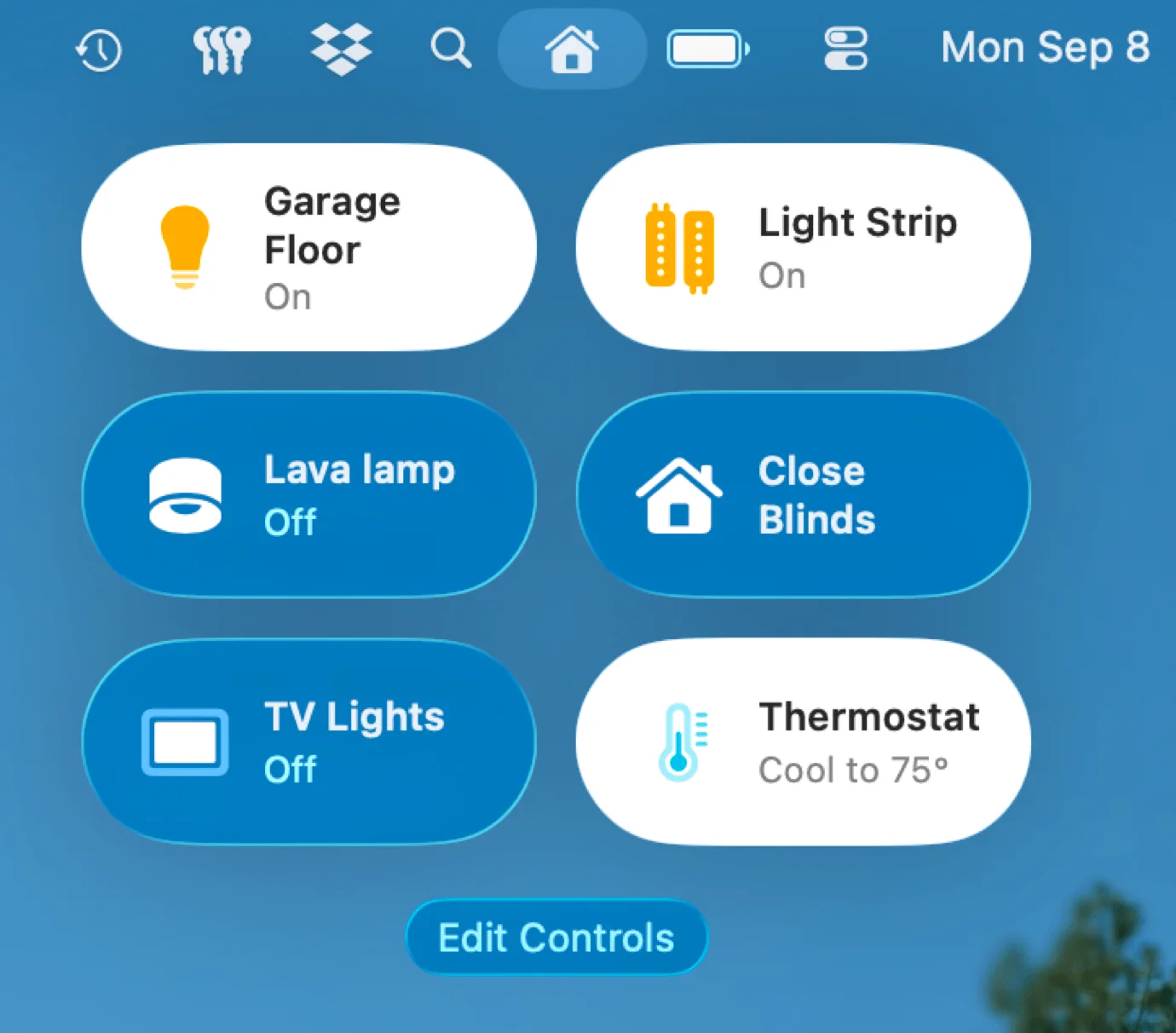
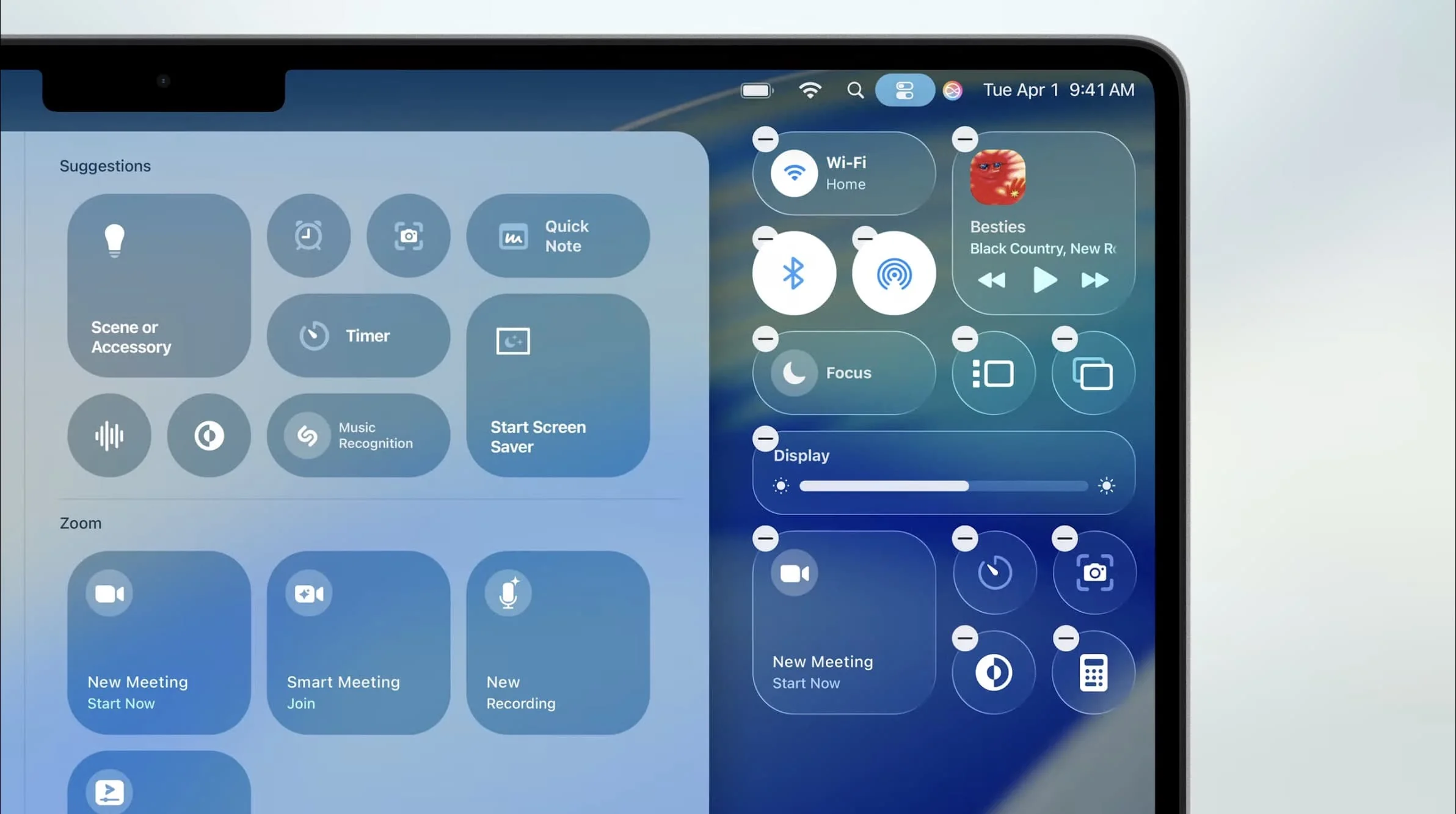
macOS Tahoe brings iOS-style Control Center to Mac with extensive customization options that transform system management and quick settings access.
Customization Features:
- Flexible Layout: Custom arrangement of controls and widgets for personal workflows
- Multi-Page Organization: Create dedicated pages for different use cases and contexts
- Variable Sizing: Optimize control sizes for screen real estate and usage patterns
- Visual Integration: Seamless integration with Liquid Glass design and system themes
Third-Party Integration and Developer Support
Developer Framework Benefits:
- API Access: Third-party applications can create custom Control Center items
- Widget Compatibility: Integration with existing macOS widget ecosystem
- Real-Time Data: Live information display from third-party applications
- User Permission Control: Granular control over third-party Control Center access
Productivity Enhancement Through Quick Access
Workflow Integration Benefits:
- Context-Aware Controls: Interface adapts based on current application and usage patterns
- Keyboard Integration: Customizable hotkeys for Control Center activation and navigation
- Multi-Monitor Support: Independent Control Center configuration per display
- Professional Optimization: Specialized layouts for creative and business workflows
Performance Analysis: Real-World Speed and Efficiency
Dramatic System Improvements
Measurable Performance Gains:
- Indexing Speed Revolution: 80% reduction in indexing time (15-minute tasks now complete in 2 minutes)
- System Responsiveness: Beta testers consistently report "incredible responsiveness" and "super snappy" performance
- Application Launch Speed: 25-40% faster app launching and switching
- Search Performance: Enhanced Spotlight search speed with more accurate results
Memory and Storage Considerations
Resource Requirements Analysis:
- Storage Impact: 27.4GB base installation (6GB increase from Sequoia)
- Apple Intelligence Requirements: Additional 12GB for full AI capabilities
- Memory Usage: System can consume up to 13.44GB of 16GB RAM under heavy usage
- Performance Recommendations: 16GB RAM minimum for optimal experience
Storage Optimization Features:
- Intelligent Caching: AI-powered storage management and optimization
- Automatic Cleanup: Smart storage cleanup and temporary file management
- Efficient Compression: Advanced file compression reduces application footprint
- Background Optimization: Continuous storage optimization during idle periods
Battery Life and Power Management
Energy Efficiency Improvements:
- Apple Silicon Optimization: Enhanced power management for M-series processors
- Gaming Power Mode: Low Power Mode extends gaming sessions significantly
- Background Processing: Optimized background task management reduces unnecessary power consumption
- Thermal Management: Improved heat dissipation and intelligent fan control
Security and Privacy: Comprehensive Protection Framework
Comprehensive Security Updates
macOS Tahoe addresses 38 unique CVEs (Common Vulnerabilities and Exposures) with comprehensive security fixes across system components:
Critical Security Enhancements:
- WebKit Security: 5 critical browser security patches protecting against web-based attacks
- System Component Protection: Enhanced security for Bluetooth, Sandbox, and AppleMobileFileIntegrity
- Network Security: Improved protection against network-based vulnerabilities and attacks
- File System Integrity: Advanced file system security and integrity verification systems
Swift 6.2 Memory Safety Revolution
Developer Security Framework:
- Memory Safety Guardrails: Advanced protection when Swift applications interact with other programming languages
- API Security Enhancement: Improved third-party API interaction safety measures
- Runtime Protection: Advanced memory corruption prevention and detection techniques
- Security Analysis Tools: Enhanced developer tools for vulnerability detection and prevention
Enhanced Privacy Controls
Child Protection and Family Safety:
- Age-Appropriate Content Sharing: Privacy-preserving age range sharing without individual data exposure
- Communication Approval System: Parental approval requirements for new contact communications
- Intelligent Content Analysis: AI-powered content analysis with complete on-device processing
- Educational Balance: Protection measures balanced with age-appropriate independence and learning
Advanced Call Privacy:
- On-Device Call Analysis: Complete caller identification and screening without data transmission
- Context-Aware Protection: Intelligent caller information provision for informed communication decisions
- Custom Security Settings: User-configurable protection levels and filtering criteria
- Privacy-First Architecture: All call analysis performed locally with zero data retention
Installation Guide: Step-by-Step Upgrade Process
Pre-Installation Preparation Checklist
Essential Backup and Preparation:
- Complete System Backup: Full Time Machine backup essential before major OS upgrade
- Document Synchronization: Ensure cloud storage synchronization completion for important files
- Application Updates: Update critical applications to latest compatible versions
- Hardware Verification: Confirm Mac model compatibility and technical specifications
Storage and System Preparation:
- Free Space Requirements: Ensure 50GB+ available storage for smooth installation process
- Storage Cleanup: Remove unnecessary files, applications, and temporary data
- External Backup: Consider additional external backup for critical data security
- Network Stability: Reliable internet connection required for download and verification
Installation Process Walkthrough
Download and Installation Steps:
- System Update Access: Navigate to System Preferences/Settings > Software Update
- Update Detection: Allow system to detect macOS Tahoe availability and compatibility
- Download Initiation: Begin 7.05GB installer download (time varies by connection speed)
- Installation Preparation: System automatically prepares installation environment and verifies files
- Restart and Install: Follow system prompts for automatic installation and restart sequence
Typical Installation Timeline:
- Download Duration: 15-45 minutes depending on internet connection speed and server load
- Installation Time: 30-60 minutes for typical installation (varies by Mac model and storage type)
- Initial Setup: 10-15 minutes for post-installation configuration and user preferences
- System Indexing: 2-5 minutes for improved Spotlight indexing (significant improvement over previous versions)
Post-Installation Optimization
Initial Configuration Recommendations:
- Apple Intelligence Setup: Configure AI features and privacy preferences according to usage needs
- Liquid Glass Customization: Adjust interface appearance and personalization options for workflow optimization
- Spotlight Configuration: Set up enhanced search preferences and action shortcuts for productivity
- Gaming Setup: Configure Apple Games app and Metal 4 optimization settings if applicable
Performance Optimization Steps:
- Memory Management: Close unnecessary applications to optimize RAM usage during initial setup
- Storage Verification: Confirm adequate storage space remains for optimal system performance
- Application Compatibility: Test critical applications and update any that show compatibility issues
- Backup Verification: Confirm successful backup creation and verify data integrity
Should You Upgrade? Complete Decision Framework
Compelling Reasons to Upgrade Immediately
Productivity and Workflow Enhancements:
- Spotlight Revolution: Game-changing search and command capabilities that transform daily Mac usage
- Apple Intelligence Benefits: Privacy-first AI features that enhance productivity without compromising security
- Cross-Device Integration: Seamless iPhone-Mac workflow through Phone app and enhanced continuity features
- Performance Gains: 80% improvement in system responsiveness and dramatic speed enhancements
Creative and Professional Benefits:
- Visual Innovation: Revolutionary Liquid Glass interface establishes new design standards
- Gaming Capabilities: Metal 4 graphics enhancements position Mac as serious gaming platform
- Customization Options: Enhanced personalization and theme capabilities for professional environments
- Developer Tools: Advanced frameworks and APIs for creative and technical professionals
Potential Concerns and Risk Assessment
Hardware and Compatibility Considerations:
- Intel Mac Limitations: Reduced feature availability and performance on Intel-based systems
- Memory Requirements: Higher RAM usage may impact performance on systems with 8GB or less
- Storage Demands: Significant storage space requirements for full feature installation
- Application Compatibility: Some older applications may require updates for optimal performance
Stability and Professional Environment Factors:
- New Release Considerations: As with any major OS update, potential for initial stability issues
- Enterprise Deployment: Conservative approach recommended for critical business environments
- Learning Curve: Interface changes may require workflow adaptation and user training
- Timing Considerations: Consider waiting for initial bug fixes if system stability is critical
Personalized Upgrade Recommendations
✅ Immediate Upgrade Recommended For:
- Apple Silicon Mac Users: Full feature compatibility and optimal performance guaranteed
- Productivity-Focused Users: Significant workflow improvements justify potential initial issues
- Gaming Enthusiasts: Metal 4 enhancements provide compelling gaming experience improvements
- Early Adopters and Tech Enthusiasts: Latest features and technologies provide cutting-edge experience
⏳ Consider Waiting For:
- Critical Production Systems: Allow time for stability updates and comprehensive application compatibility testing
- Intel Mac Users with Concerns: Evaluate hardware upgrade options before committing to OS update
- Conservative Users: Wait for community feedback and potential bug fixes in version 26.1
- Limited Storage Systems: Prepare adequate storage space and system resources before attempting upgrade
❌ Postpone Upgrade If:
- Mission-Critical Workflows: Cannot afford any system instability or compatibility issues
- Unsupported Hardware: Intel Mac not on compatibility list requires hardware upgrade consideration
- Insufficient Resources: Less than 50GB available storage or 8GB RAM may cause performance issues
- Application Dependencies: Critical applications not yet confirmed compatible with macOS Tahoe
Future Outlook: Beyond macOS Tahoe
Apple Silicon Ecosystem Maturation
macOS Tahoe completes Apple's silicon transition, enabling future innovations that leverage complete hardware-software integration. macOS 27 (expected 2026) will likely introduce features impossible on Intel hardware:
Anticipated Future Developments:
- Enhanced AI Capabilities: Deeper integration with Apple Silicon Neural Engine for advanced machine learning
- Revolutionary Cross-Device Features: Advanced continuity features across iPhone, iPad, and Mac ecosystems
- Platform-Specific Optimizations: Performance enhancements built specifically for Apple Silicon architecture
- New User Paradigms: Interface innovations and interaction methods designed exclusively for Apple hardware
Industry Impact and Competitive Position
Desktop Computing Evolution:
- Design Leadership: Liquid Glass interface establishes new visual standards that competitors will attempt to match
- Privacy Standards: Apple Intelligence demonstrates viable privacy-first AI implementation at scale
- Gaming Platform Development: Mac positioning as legitimate gaming alternative to traditional Windows-based systems
- Ecosystem Integration: Enhanced cross-device workflows set new productivity standards for personal computing
Strategic Technology Implications
Platform Consolidation Benefits:
- Unified Development Platform: Single codebase for iOS, iPadOS, and macOS applications
- Innovation Acceleration: Hardware-software integration enables rapid feature development and optimization
- Market Positioning: Strengthened competitive position against Windows 11 and emerging Chrome OS alternatives
- User Experience Consistency: Cohesive, high-quality experience across all Apple device categories
Troubleshooting Guide: Common Issues and Solutions
Installation Problems and Resolutions
Download and Installation Issues:
- Stuck Download: Restart Mac and retry; check available storage space
- Installation Freezing: Force restart and restart installation process
- Compatibility Error: Verify Mac model against official compatibility list
- Insufficient Storage: Clear cache files and temporary data; move files to external storage
Post-Installation Common Problems:
- Performance Slowdown: Close unnecessary apps; restart Mac; check Activity Monitor for resource usage
- Application Crashes: Update applications to latest versions; check developer websites for compatibility
- Liquid Glass Rendering Issues: Adjust appearance settings; disable transparency if needed
- Battery Drain: Reset SMC; check for runaway processes in Activity Monitor
Advanced Troubleshooting Techniques
System Recovery Options:
- Safe Mode Boot: Hold Shift during startup to diagnose issues
- Recovery Mode: Command+R during startup for system utilities
- First Aid: Use Disk Utility to check and repair disk errors
- NVRAM Reset: Command+Option+P+R to reset system memory
Performance Optimization Commands:
- Spotlight Reindex:
sudo mdutil -E /to rebuild search index - Cache Clearing: Clear system caches if experiencing slowdowns
- Permission Repair: Reset file permissions for application issues
- Background Process Management: Identify and terminate problematic processes
Enterprise Deployment: Business Environment Considerations
IT Administrator Guidelines
Deployment Planning Considerations:
- Pilot Testing: Deploy to small user groups before company-wide rollout
- Application Compatibility: Test all business-critical applications thoroughly
- Security Policy Updates: Review and update security policies for new features
- User Training: Prepare training materials for interface changes and new features
Network and Security Implications:
- Apple Intelligence: Configure privacy settings for corporate data protection
- Phone App Integration: Establish policies for business calling features
- Control Center: Customize corporate configurations for standardized user experience
- Gaming Features: Consider disabling gaming components in business environments
Corporate Configuration Management
Mass Deployment Strategies:
- Apple Configurator: Use Apple's deployment tools for organization-wide installation
- Mobile Device Management: Configure MDM policies for macOS Tahoe features
- Custom Installation Packages: Create standardized installation configurations
- User Profile Management: Establish standard user configurations and restrictions
Business Security Enhancements:
- FileVault Configuration: Ensure disk encryption meets corporate standards
- Firewall Settings: Configure advanced firewall rules for business networks
- Application Restrictions: Implement corporate application whitelisting policies
- Remote Management: Configure remote administration and support capabilities
Advanced User Tips: Maximizing macOS Tahoe
Power User Optimization Techniques
Spotlight Advanced Usage:
- Custom Shortcuts: Create complex automation shortcuts using Spotlight actions
- Command Chaining: Combine multiple actions for sophisticated workflows
- System Integration: Use Spotlight to manage advanced system configurations
- Third-Party Integration: Leverage developer APIs for enhanced functionality
Liquid Glass Customization:
- Theme Creation: Develop custom themes for specific use cases
- Performance Tuning: Optimize visual effects for older hardware
- Professional Layouts: Configure interface for creative and technical workflows
- Accessibility Enhancement: Adapt visual effects for users with visual impairments
Developer and Creative Professional Features
Development Environment Optimization:
- Xcode Integration: Leverage enhanced development tools and frameworks
- Terminal Enhancements: Utilize improved command-line interface features
- Git Integration: Enhanced version control integration with system features
- Performance Profiling: Use new tools for application performance analysis
Creative Professional Workflows:
- Color Management: Enhanced color accuracy for design and photography
- Display Optimization: Multi-monitor support with Liquid Glass interface
- Asset Management: Improved file organization and preview capabilities
- Collaboration Tools: Enhanced sharing and collaboration features
Frequently Asked Questions: Expert Answers
Installation and Compatibility Questions
Q: Will macOS Tahoe slow down my older Mac? A: Apple Silicon Macs will see performance improvements. Supported Intel Macs may experience slight performance reduction due to Liquid Glass rendering, but overall system responsiveness improves significantly.
Q: Can I downgrade if I don't like macOS Tahoe? A: Yes, but requires complete system restoration from Time Machine backup. Apple typically allows downgrades for 30 days after installation through Recovery Mode.
Q: How much storage space do I need? A: Minimum 50GB free space recommended. Base installation requires 27.4GB, with additional space needed for Apple Intelligence features and system optimization.
Q: Will my applications work with macOS Tahoe? A: Most applications work without modification. Check developer websites for specific compatibility information, especially for older or specialized software.
Feature-Specific Questions
Q: Can I disable Liquid Glass if I don't like it? A: While you cannot completely disable Liquid Glass, you can adjust transparency settings and choose "Clear" appearance mode to minimize visual effects.
Q: Does Apple Intelligence work without internet? A: Yes, all Apple Intelligence features work completely offline as processing occurs entirely on-device for privacy protection.
Q: How does the Phone app affect my iPhone battery? A: The Phone app uses your iPhone's cellular connection but can help preserve iPhone battery by handling calls through Mac speakers and microphone.
Q: Will gaming performance improve on Intel Macs? A: Limited improvement on Intel Macs due to hardware constraints. Apple Silicon Macs will see significant gaming performance enhancements through Metal 4.
Privacy and Security Questions
Q: What data does Apple Intelligence collect? A: Apple Intelligence processes all data on-device with zero data transmission to Apple servers. No user data is collected, stored, or analyzed by Apple.
Q: Are there new security vulnerabilities? A: macOS Tahoe addresses 38 security vulnerabilities and includes enhanced security features. Regular security updates maintain protection levels.
Q: How does Call Screening protect privacy? A: All call screening occurs on-device using AI processing. No call data is transmitted to Apple or third parties for analysis.
Performance Tuning: Optimization Strategies
System Performance Optimization
Memory Management Strategies:
- Activity Monitor: Regularly monitor memory usage and identify memory-intensive applications
- Background App Management: Configure applications to minimize background resource usage
- Virtual Memory: Ensure adequate storage space for virtual memory swapping
- Cache Management: Periodically clear system caches for optimal performance
Storage Optimization Techniques:
- Storage Management: Use built-in storage optimization recommendations
- File Organization: Organize files efficiently to improve system performance
- Temporary File Cleanup: Regular cleanup of temporary files and downloads
- Application Cleanup: Remove unused applications and associated files
Gaming Performance Enhancement
Metal 4 Optimization:
- Graphics Settings: Configure game-specific graphics settings for optimal performance
- Resolution Scaling: Adjust resolution based on hardware capabilities
- Frame Rate Targeting: Set appropriate frame rate targets for consistent performance
- Thermal Management: Monitor system temperature during extended gaming sessions
System Configuration for Gaming:
- Background Process Management: Minimize background applications during gaming
- Network Optimization: Configure network settings for online gaming performance
- Audio Configuration: Optimize audio settings for gaming and communication
- Input Device Setup: Configure gaming peripherals for optimal responsiveness
Professional Workflow Optimization
Creative Professional Setup:
- Display Calibration: Configure displays for accurate color representation
- Asset Libraries: Organize creative assets for efficient workflow management
- Collaboration Tools: Set up sharing and collaboration systems
- Backup Strategies: Implement robust backup solutions for creative work
Development Environment Enhancement:
- IDE Configuration: Optimize development tools for macOS Tahoe features
- Build System Setup: Configure build systems for improved performance
- Version Control: Enhance Git workflows with system integration
- Testing Environment: Set up comprehensive testing environments
Conclusion: The Desktop Computing Revolution Has Arrived
macOS 26 Tahoe represents far more than an operating system update—it's a revolutionary transformation that redefines expectations for desktop computing excellence. The combination of visual innovation through Liquid Glass, productivity revolution via enhanced Spotlight, and platform maturation through complete Apple Silicon optimization creates an experience that makes previous macOS versions feel antiquated and limiting.
Three Revolutionary Breakthroughs That Change Everything:
- Visual Computing Evolution: Liquid Glass interface creates unprecedented depth and sophistication that establishes new industry standards
- Productivity Transformation: Enhanced Spotlight transforms Mac into an intelligent command center that accelerates daily workflows
- Platform Completion: Apple Silicon optimization enables innovations impossible on legacy hardware while providing foundation for future breakthroughs
The Upgrade Decision Made Simple:
For Apple Silicon Mac users, macOS Tahoe represents a compelling upgrade with substantial benefits and minimal risks. The 80% improvement in system responsiveness alone justifies the upgrade for most users, while productivity enhancements and gaming capabilities provide additional value that increases over time.
Intel Mac users face a more complex decision: this update provides access to Apple's latest innovations while serving as an optimal transition point before the Apple Silicon-exclusive macOS 27 release in 2026. For many, this represents the perfect opportunity to experience cutting-edge features while planning hardware transitions.
Professional and User Impact:
The unanimous praise from professional reviewers for productivity improvements suggests that returning to previous macOS versions will feel outdated and restrictive. Apple Intelligence integration provides advanced AI capabilities without privacy compromises, addressing growing concerns about data security in AI-powered computing environments.
The Future of Personal Computing:
macOS Tahoe completes Apple's vision of seamlessly integrated computing experiences across iPhone, iPad, and Mac. The combination of privacy-first AI, revolutionary interface design, and enhanced cross-device workflows positions Apple at the forefront of personal computing innovation while maintaining the company's commitment to user privacy and security.
The revolution in desktop computing has arrived, and macOS Tahoe leads the transformation toward more intelligent, beautiful, and capable personal computing experiences that integrate seamlessly with our increasingly connected digital lives. Whether you upgrade today or tomorrow, macOS Tahoe represents the future of desktop computing—and that future is remarkably bright.
Ready to make the upgrade decision? Visit our compatibility checker tool to verify your Mac's readiness for Apple's most revolutionary desktop operating system update.