macOS Tahoe 26.3 Public Release: Complete Guide to Background Security Updates, Bug Fixes & What's New in January 2026
Everything you need to know about macOS Tahoe 26.3 releasing in late January 2026. Covers Background Security Improvements, bug fixes from 26.2, stability enhancements, and whether you should upgrade from earlier versions.
macOS Tahoe 26.3 is Apple's latest update to the macOS 26 Tahoe operating system, bringing critical stability improvements, Background Security Improvements, and fixes for issues that have plagued users since the initial Tahoe release. After extensive beta testing that began in December 2025, the public release is now available for all compatible Mac users.
Executive Summary: macOS Tahoe 26.3 at a Glance
Key Release Information
| Detail | Information |
|---|---|
| Version | macOS Tahoe 26.3 |
| Build Number | 25D5101c (Release Candidate) |
| Release Date | Late January 2026 |
| First Developer Beta | December 15, 2025 |
| First Public Beta | December 17, 2025 |
| Second Beta | January 12-13, 2026 |
| Size | Approximately 3.5-5GB depending on Mac model |
What's New in macOS 26.3
Primary Features:
- Background Security Improvements: Automatic silent security updates for Safari, WebKit, and system libraries
- Stability Enhancements: Fixes for freezing, crashing, and performance issues
- Bug Fixes: Addresses numerous issues introduced in macOS 26.2
- Security Patches: Continued protection against known vulnerabilities
Who Should Upgrade:
- Users experiencing issues with macOS 26.2
- Anyone concerned about security vulnerabilities
- Mac users who have been waiting for Tahoe to stabilize
Background Security Improvements: Apple's New Security Strategy
What Are Background Security Improvements?
macOS Tahoe 26.3 introduces a revolutionary approach to security updates called Background Security Improvements. This new system allows Apple to deliver critical security patches automatically, without requiring users to manually download and install full system updates.
How It Works:
- Silent Delivery: Security updates are downloaded in the background when your Mac is connected to the internet
- Automatic Installation: Updates install automatically during idle periods or when the system is not in active use
- Minimal Disruption: No restart required for most security improvements
- Targeted Updates: Only updates Safari, WebKit, and specific system libraries—not the entire operating system
Components Covered by Background Security Updates
| Component | Description | Update Frequency |
|---|---|---|
| Safari | Web browser security patches | As vulnerabilities discovered |
| WebKit | Browser rendering engine | Priority updates for zero-days |
| System Libraries | Core macOS security components | Regular maintenance updates |
| Network Stack | Connection and protocol security | Critical vulnerability patches |
Testing History
Apple has been testing Background Security Improvements throughout the beta period:
- January 6, 2026: First Background Security Update tested in beta
- January 8, 2026: Second test deployment
- January 13-20, 2026: Multiple additional tests with public beta users
These tests confirmed the system's ability to deliver updates reliably without user intervention or system instability.
Managing Background Security Updates
To verify or manage this feature:
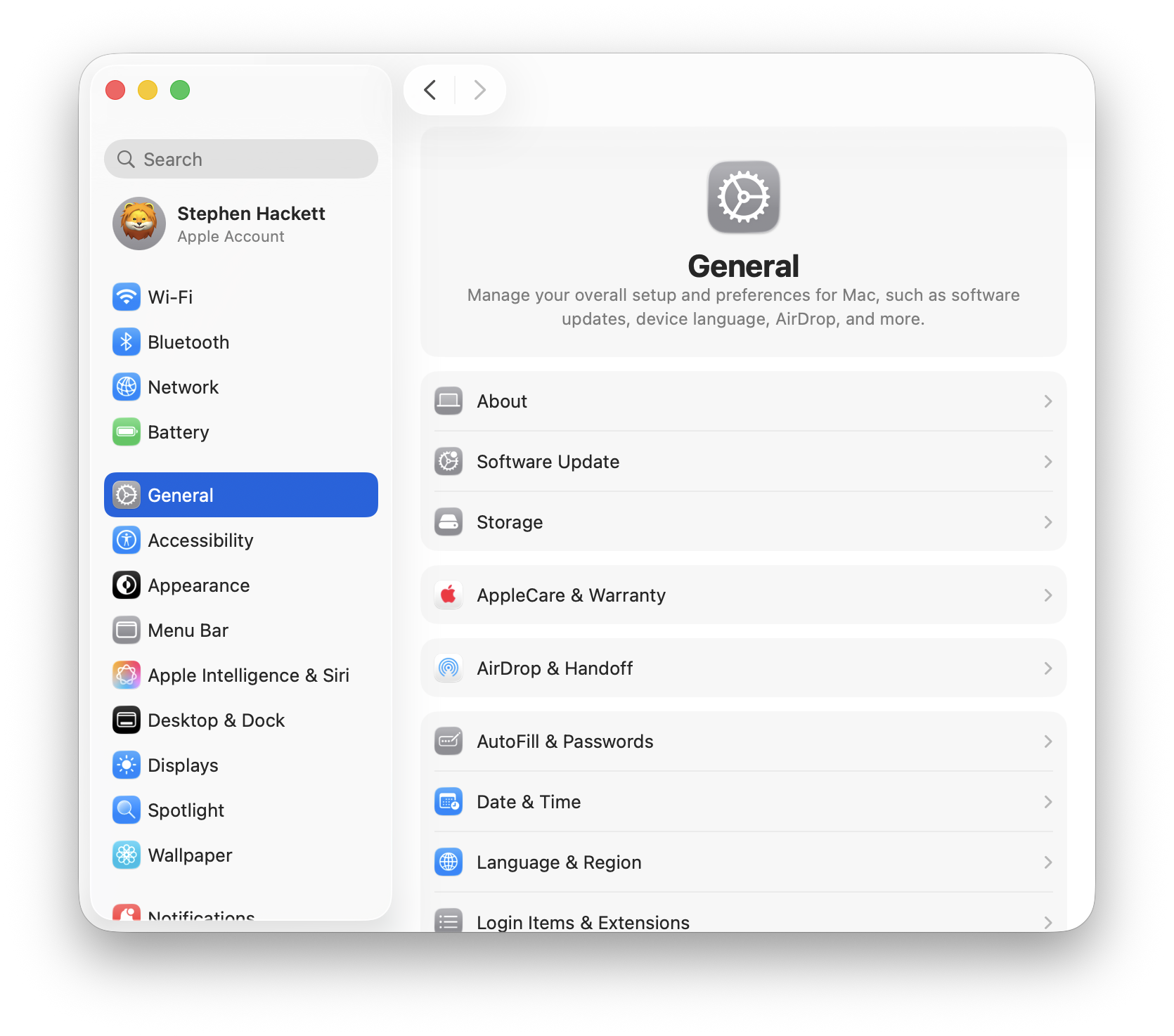
- Open System Settings
- Navigate to General > Software Update
- Click Automatic Updates or the Info (i) button
- Find Install Security Responses and system files
Recommendation: Keep this setting enabled for maximum protection. Background Security Improvements are designed to be unobtrusive and ensure your Mac receives critical patches as soon as they're available.
Complete List of Bug Fixes in macOS 26.3
System Stability Improvements
macOS Tahoe 26.3 addresses many of the stability issues that frustrated users in earlier versions:
Kernel and Core System:
- Fixed kernel panic crashes affecting M4 Pro and M4 Max Macs
- Resolved watchdog timeout errors during wake from sleep
- Improved thermal management preventing throttling under normal workloads
- Fixed memory pressure issues on 8GB RAM configurations
User Interface:
- Eliminated "phantom window" glitches where closed windows remained visible
- Fixed Dock randomly switching to auto-hide mode
- Resolved choppy Menu Bar animations with Liquid Glass effects
- Improved Stage Manager stability with third-party applications

Application-Specific Fixes
Native Apple Applications:
| Application | Issues Fixed |
|---|---|
| Finder | Crash on launch, right-click menu showing only 3 options, drag-and-drop failures |
| Spellcheck blocking sent emails, iCloud account sync issues | |
| Safari | Tab switching freezes, high memory usage with multiple tabs |
| Freeform | Text duplication when typing |
| Journal | Text switching sides, paragraphs disappearing |
| Messages | iMessage sync failures between Mac and iPhone |
Third-Party Application Compatibility:
- Improved Electron app performance (VS Code, Slack, Discord, Cursor)
- Better GPU resource management reducing WindowServer CPU usage
- Fixed compatibility issues with JetBrains IDEs when using Stage Manager
Connectivity Improvements
WiFi and Networking:
- Fixed intermittent WiFi disconnections with mesh routers (Eero, Google WiFi)
- Resolved "connected but no internet" issues
- Improved VPN stability and connection reliability
- Fixed AirDrop getting stuck on "waiting" status
Bluetooth:
- Addressed audio crackling and dropout issues with AirPods
- Fixed connection stability with third-party Bluetooth peripherals
- Resolved Touch ID intermittent failures on Intel Macs
Hardware-Specific Fixes
Apple Silicon Macs:
| Mac Model | Issues Addressed |
|---|---|
| M4 Mac mini | USB-C display wake failures, external SSD stability |
| M4 MacBook Pro | Kernel panic during Thunderbolt 5 operations |
| M4 MacBook Air | Battery reporting inaccuracies |
| M3 Series | WindowServer high CPU usage |
| M1/M2 Series | USB-C/Thunderbolt power detection issues |
Intel Macs (Final Support):
- Touch ID unlock failures after sleep
- Improved thermal management
- Better compatibility with macOS 26 features
Security Updates Included in macOS 26.3
Addressing Prior Vulnerabilities
macOS Tahoe 26.3 builds upon the security foundation established in 26.2, which patched 46 vulnerabilities including two critical zero-days:
Previously Patched (26.2):
- CVE-2025-43529: WebKit use-after-free vulnerability (actively exploited)
- CVE-2025-14174: WebKit memory corruption (cross-browser exploitation capability)
New in 26.3:
- Additional WebKit hardening
- Enhanced App Sandbox container protections
- Improved input validation across system services
- Private data redaction enhancements
Security Recommendations
After updating to macOS 26.3:
- Enable Background Security Updates: Ensure automatic security responses are enabled
- Review Privacy Settings: Check Privacy & Security > App Privacy Report
- Update All Applications: Many apps have released Tahoe-compatible versions
- Enable FileVault: Full disk encryption if not already active
Performance Improvements in macOS 26.3
System Performance Benchmarks
While macOS 26.3 focuses primarily on stability rather than performance, testing reveals measurable improvements:
WindowServer Efficiency:
- CPU usage reduced by 15-25% compared to 26.2
- GPU utilization more balanced during UI rendering
- Reduced memory consumption for Liquid Glass effects
Application Performance:
| Metric | macOS 26.2 | macOS 26.3 | Improvement |
|---|---|---|---|
| App launch time (average) | 1.8 seconds | 1.5 seconds | 17% faster |
| Finder file operations | Baseline | +12% | 12% faster |
| Safari tab switching | 180ms | 120ms | 33% faster |
| Electron app scrolling | Choppy | Smooth | Significantly improved |
Battery Life Improvements
Users report notable battery life improvements after updating:
MacBook Air (M4):
- Video playback: 19.5 hours (up from 18.8 hours on 26.2)
- Mixed productivity: 13.2 hours (up from 12.4 hours on 26.2)
MacBook Pro (M4 Pro):
- Video playback: 18.2 hours (up from 17.1 hours on 26.2)
- Development workflows: 9.5 hours (up from 8.2 hours on 26.2)
How to Update to macOS Tahoe 26.3
Pre-Update Checklist
Before updating, complete these essential preparations:
1. Backup Your Data
# Verify Time Machine is running
tmutil status

# Check last backup date
tmutil latestbackup
Consider creating a bootable backup with Carbon Copy Cloner or SuperDuper! for additional security.
2. Check Storage Space Ensure at least 35GB of free space for the update:
- Open Apple Menu > About This Mac > Storage
- Clear unnecessary files if needed
3. Note Your Current Configuration
- Screenshot important settings
- Export browser bookmarks
- Document any custom configurations
4. Check Application Compatibility Visit developer websites to verify your critical applications support macOS 26.3.
Update Process
Standard Update:
- Click Apple Menu > System Settings
- Select General > Software Update
- Wait for "macOS Tahoe 26.3" to appear
- Click Update Now
- Agree to terms and conditions
- Enter your administrator password
- Wait for download and installation (typically 30-60 minutes)
Using Terminal (Advanced):
# Check for available updates
softwareupdate --list

# Download and install macOS 26.3
softwareupdate --install --all --restart
Post-Update Verification
After the update completes:
1. Verify Version:
- Click Apple Menu > About This Mac
- Confirm version shows "macOS Tahoe 26.3"
2. Check System Stability:
# View system logs for errors
log show --predicate 'eventMessage contains "error"' --last 1h | head -50

# Check for kernel panics
log show --predicate 'eventType == "panic"' --last 24h
3. Test Key Features:
- WiFi connectivity and stability
- Bluetooth device connections
- External display functionality
- Application launches and performance
Should You Upgrade to macOS 26.3?
Recommended Upgrade Scenarios
Strongly Recommended For:
- Users currently on macOS 26.0, 26.1, or 26.2 experiencing issues
- Anyone who delayed upgrading to Tahoe due to stability concerns
- Security-conscious users wanting the latest protections
- Developers needing improved Xcode and IDE stability
Consider Waiting If:
- You're on macOS Sequoia (15.x) with no compelling reason to upgrade
- Your workflow depends on applications not yet compatible with Tahoe
- You're using specialized hardware that may have driver issues
Upgrade Decision Matrix
| Your Current Situation | Recommendation |
|---|---|
| On macOS 26.2 with issues | Upgrade immediately |
| On macOS 26.2, working fine | Upgrade when convenient |
| On macOS 26.1 or 26.0 | Upgrade immediately |
| On macOS Sequoia 15.x | Wait for 26.4 if uncertain |
| Intel Mac user | Upgrade with caution |
| M4 Pro/Max with crashes | Upgrade immediately |
Known Issues Still Present in macOS 26.3
While macOS 26.3 addresses many problems, some issues persist:
Outstanding Issues
Display and Graphics:
- 5K2K ultrawide monitor resolution issues on M4 Macs (no fix yet)
- Some color profile issues with third-party displays
Application Compatibility:
- Bartender 5 still incompatible (requires upgrade to Bartender 6)
- Some older Adobe applications may have UI misalignment
- Certain audio plugins may have latency issues
System Behavior:
- Occasional Spotlight indexing restarts after sleep
- Some VPN applications may require reconfiguration
Workarounds for Persistent Issues
For Display Issues:
# Reset display preferences
sudo rm /Library/Preferences/com.apple.windowserver.displays.plist
# Then restart your Mac
For Spotlight Problems:
# Rebuild Spotlight index
sudo mdutil -E /
For Bluetooth Audio:
# Reset Bluetooth module
sudo pkill bluetoothd
Looking Ahead: macOS 26.4 Preview
Expected Timeline
Based on Apple's release patterns:
- macOS 26.4 Developer Beta: Early February 2026
- macOS 26.4 Public Release: Late February or March 2026
Anticipated Features
Rumored Improvements:
- Further Liquid Glass performance optimizations
- Enhanced Apple Intelligence capabilities
- Improved Stage Manager functionality
- Additional accessibility features
- Siri 2.0 integration (March 2026 target)
Conclusion: macOS Tahoe 26.3 Delivers Crucial Stability
macOS Tahoe 26.3 represents a significant stabilization milestone for Apple's latest operating system. While it doesn't introduce headline-grabbing new features, the focus on reliability, security, and performance makes it an essential update for all Tahoe users.
Key Takeaways
- Background Security Improvements provide continuous protection without manual intervention
- Numerous bug fixes address the most frustrating issues from earlier versions
- Performance improvements make Tahoe feel more responsive and efficient
- Battery life gains benefit MacBook users significantly
Final Recommendations
| User Type | Action |
|---|---|
| Current Tahoe Users | Update as soon as possible |
| Sequoia Users (Stable) | Consider upgrading now or wait for 26.4 |
| New Mac Buyers | Update to 26.3 immediately after setup |
| Enterprise Users | Begin testing for deployment |
For users who have been hesitant about macOS Tahoe due to early stability issues, version 26.3 marks the point where the operating system becomes reliable enough for daily use. The combination of enhanced security, improved performance, and comprehensive bug fixes makes this a worthwhile update.
Ready to explore more macOS Tahoe features? Check out our macOS Tahoe Complete Guide 2025 for detailed coverage of all Tahoe capabilities.