macOS Tahoe 26.3 Beta Preview: New Features, Known Issues & Installation Guide 2025
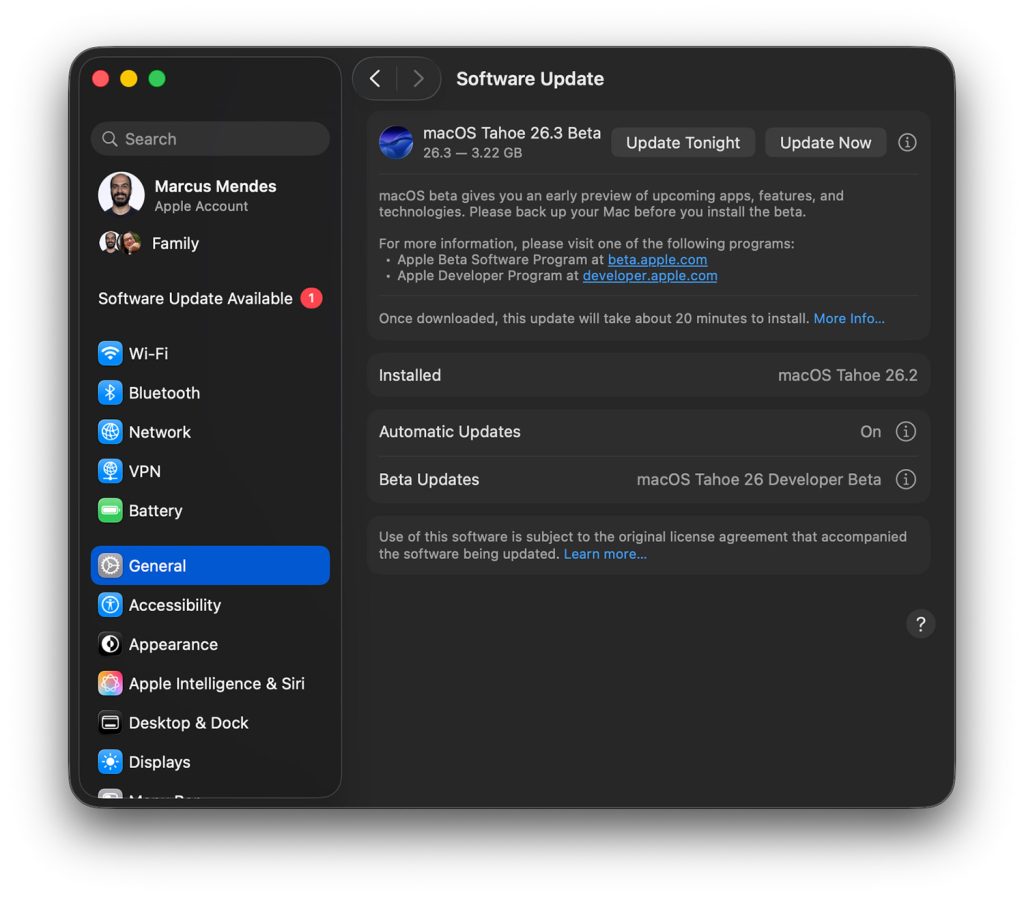
Complete guide to macOS Tahoe 26.3 beta released December 2025. Explore new features, stability improvements, known issues, installation steps, and what to expect before the public release in late January 2026.
Apple released the first developer beta of macOS Tahoe 26.3 on December 15, 2025, followed by the public beta on December 17, 2025—just three days after the launch of macOS Tahoe 26.2. This guide covers everything you need to know about the latest beta, including new features, installation instructions, known issues, and whether you should install it on your Mac.
Quick Summary
What you need to know about macOS Tahoe 26.3 beta:
- Release dates: Developer Beta 1 on December 15, Public Beta 1 on December 17, 2025
- Focus: Primarily stability improvements and bug fixes rather than major new features
- Expected release: Late January 2026 (estimated)
- Key changes: Preparing groundwork for enhanced Siri with Apple Intelligence, M5 MacBook compatibility
- Recommendation: Wait for stable release unless you need to test app compatibility

What's New in macOS Tahoe 26.3 Beta
Overview
The macOS Tahoe 26.3 public beta appears to be particularly light on visible user-facing changes. Early analysis indicates Apple's primary focus is on stability improvements, bug fixes, and under-the-hood optimizations ahead of more substantial updates in future releases.
Confirmed Changes
1. Stability Improvements
Apple is addressing numerous bugs reported in macOS Tahoe 26.2, including:
- Memory management optimizations: Improvements to reduce the Safari memory leak issues
- WindowServer stability: Better handling of Liquid Glass animations
- Finder performance: Reduced instances of Finder freezing under heavy load
- Electron app compatibility: Continued refinements for third-party app performance
2. Preparing for Enhanced Siri
According to reports, Apple is working intensively on finishing the AI-enhanced version of Siri, scheduled to launch in spring 2026. macOS 26.3 likely includes foundational work for this major update:
- Updated Apple Intelligence frameworks
- Enhanced on-device processing capabilities
- Improved natural language understanding components

3. M5 MacBook Support
While the M5 MacBook Air is expected to ship with macOS Tahoe 26.2, future MacBook variants with M5 Pro and M5 Max processors are anticipated to debut with macOS 26.3:
- Full M5 Pro/Max Neural Engine optimization
- Enhanced MLX framework support
- Improved thermal management for new hardware

Regional Features (iOS 26.3 Related)
Some features announced for iOS 26.3 may eventually come to macOS:
- Data transfer to Android: Simpler process for users switching platforms
- Third-party wearable notifications: Notification forwarding for non-Apple wearables (EU requirement)
How to Install macOS Tahoe 26.3 Beta

Prerequisites
Before installing the beta, ensure you meet these requirements:
- Compatible Mac: Any Mac that supports macOS Tahoe (Apple Silicon or supported Intel Macs)
- Free developer account or public beta enrollment
- Backup: Create a complete Time Machine or bootable backup
- Free storage: At least 35 GB of available space
Installation Steps for Developers
# Step 1: Open System Settings
# Navigate to: System Settings > General > Software Update

# Step 2: Enable Beta Updates
# Click on "Beta Updates" and select:
# - "macOS Tahoe 26.3 Developer Beta" (requires Apple Developer account)

# Step 3: Download and Install
# Click "Upgrade Now" and follow the on-screen instructions
Detailed walkthrough:
- Open System Settings from the Apple menu
- Navigate to General > Software Update
- Click the info button (i) next to Beta Updates
- Select macOS Tahoe 26.3 Developer Beta
- You may need to sign in with your Apple ID (must be enrolled in Apple Developer Program)
- Click Upgrade Now to download the update
- Allow the download to complete (approximately 4-6 GB)
- Follow the installation prompts and restart your Mac
Installation Steps for Public Beta
- Visit beta.apple.com and sign in with your Apple ID
- Enroll your device in the public beta program
- Open System Settings > General > Software Update
- Enable Beta Updates and select macOS Tahoe Public Beta
- Download and install following the prompts
Reverting to Stable Release
If you encounter issues and need to revert to macOS Tahoe 26.2:
# Option 1: Wait for stable 26.3 release
# The stable version typically releases 4-6 weeks after first beta

# Option 2: Restore from backup
# Boot into Recovery Mode (hold power button on Apple Silicon)
# Use Time Machine to restore your pre-beta backup

# Option 3: Clean install
# Create bootable installer for macOS Tahoe 26.2
# Erase and reinstall the stable version
Known Issues in macOS Tahoe 26.3 Beta 1

Reported Problems
Based on early beta tester feedback:
| Issue | Severity | Workaround |
|---|---|---|
| Some third-party menu bar apps may not appear correctly | Medium | Force quit and relaunch the app |
| Spotlight may require re-indexing after update | Low | Wait 24-48 hours for indexing to complete |
| Safari extensions may need to be re-enabled | Low | Go to Safari > Settings > Extensions |
| Bluetooth devices may need re-pairing | Low | Forget and re-pair affected devices |
| Some kernel extensions may not load | High | Wait for app developers to update |
Apps with Known Compatibility Issues
Early reports indicate potential issues with:
- Virtualization software: Parallels Desktop and VMware Fusion may require updates
- Audio production apps: Some DAWs report latency issues
- Security software: Third-party antivirus may need updates
- Custom kernel extensions: Legacy kexts may not load
Recommended Workarounds
For Spotlight issues:
# Rebuild Spotlight index
sudo mdutil -E /
For Bluetooth problems:
# Reset Bluetooth module
sudo pkill bluetoothd
For app crashes:
# Clear app caches
rm -rf ~/Library/Caches/com.apple.app-name
Should You Install the Beta?

Install If:
- You're a developer testing app compatibility with upcoming macOS releases
- You have a secondary Mac dedicated to testing
- You enjoy testing new software and reporting bugs
- You need to verify specific features for your workflow
Wait If:
- This is your primary work machine
- You rely on mission-critical apps that may not be compatible
- You use virtualization software extensively
- You prefer stable, well-tested software
Best Practices for Beta Testing
- Never install on production machines: Use a dedicated test Mac or partition
- Create complete backups: Time Machine and bootable clone before installing
- Document issues: Use Feedback Assistant to report bugs to Apple
- Check app compatibility: Verify your essential apps work before committing
- Plan for recovery: Know how to revert if needed
Timeline: What to Expect
Estimated Release Schedule
| Milestone | Estimated Date |
|---|---|
| Developer Beta 1 | December 15, 2025 (released) |
| Public Beta 1 | December 17, 2025 (released) |
| Developer Beta 2 | Early January 2026 |
| Public Beta 2 | Mid-January 2026 |
| Release Candidate | Late January 2026 |
| Public Release | Late January to Early February 2026 |
Future Updates
macOS Tahoe 26.4 (Spring 2026):
- Enhanced Siri with Apple Intelligence
- More substantial feature additions
- Deeper AI integration across system apps
Comparison: 26.2 vs 26.3 Beta
| Feature | macOS 26.2 | macOS 26.3 Beta |
|---|---|---|
| Edge Light | Yes | Yes |
| Thunderbolt 5 Clustering | Yes | Yes (improved) |
| M5 MLX Support | Yes | Enhanced |
| Stability | Good | Focus of update |
| New visible features | Many | Minimal |
| Recommended for | All users | Developers/testers |
FAQ
Is macOS Tahoe 26.3 beta stable enough for daily use?
No. Beta software is intended for testing purposes and may contain bugs that affect productivity. Use it only on non-essential machines.
What are the main differences between 26.2 and 26.3?
macOS 26.3 focuses primarily on stability improvements and bug fixes rather than new features. It lays groundwork for the enhanced Siri update coming in spring 2026.
When will the stable version of 26.3 be released?
Based on Apple's typical beta cycle, expect the public release in late January to early February 2026.
Can I downgrade from 26.3 beta to 26.2?
Yes, but you'll need to restore from a backup made before installing the beta, or perform a clean install of 26.2.
Will my apps work with the 26.3 beta?
Most apps compatible with 26.2 should work, but some third-party apps, especially those using kernel extensions, may have compatibility issues.
Do I need a developer account to install the beta?
No, you can enroll in Apple's free public beta program at beta.apple.com. However, developer betas typically release a few days earlier.
Conclusion
macOS Tahoe 26.3 beta represents Apple's continued refinement of the Tahoe experience, focusing on stability and bug fixes rather than flashy new features. While it doesn't bring major visible changes, it addresses many issues users have reported in 26.2 and prepares the foundation for the significant Siri AI update coming in spring 2026.
For most users, waiting for the stable public release in late January 2026 is the recommended approach. Developers and dedicated testers can benefit from early access to identify compatibility issues and provide feedback to Apple through Feedback Assistant.
Related Resources
- macOS Tahoe 26.2 Update Complete Guide
- macOS Tahoe 26.1 Update Guide
- Apple Developer - macOS 26.3 Beta Release Notes
Last updated: December 29, 2025