Apple Background Security Improvements (BSI): Complete Guide to macOS Silent Security Updates

Everything about Apple's new BSI updates replacing Rapid Security Response. How they work, the first WebKit patch, installation steps, and what changes for Mac security.
On March 17, 2026, Apple delivered the first-ever Background Security Improvement (BSI) update to macOS Tahoe users worldwide. This wasn't just another security patch. It was the inaugural deployment of a completely new security delivery system that Apple has been building since WWDC 2025 — one designed to fix the frustrations, failures, and friction that plagued Rapid Security Response (RSR) since its debut in macOS Ventura. The update, targeting a WebKit Same Origin Policy bypass vulnerability, arrived silently, installed in seconds, and required no restart. For millions of Mac users, nothing visibly changed. Behind the scenes, everything did.
Key Takeaways
- Apple shipped its first BSI update on March 17, 2026, patching a WebKit vulnerability in macOS Tahoe 26.3.1 that allowed maliciously crafted web content to bypass Same Origin Policy.
- BSI replaces Rapid Security Response (RSR), the emergency patching system introduced in macOS Ventura that suffered from app breakage, confusing version numbering, and mandatory restarts.
- BSI updates install through Privacy & Security settings, not Software Update — a deliberate architectural separation from standard macOS updates.
- No restart is required for most BSI patches, and the update sizes are significantly smaller than RSR payloads.
- Enterprise administrators need to update their MDM policies and workflows to account for this new update channel, particularly if they manage fleets through Addigy, Jamf, or Kandji.
What Are Background Security Improvements?
Background Security Improvements is Apple's second-generation system for delivering critical security patches between major macOS releases. Announced at WWDC 2025 as part of the macOS Tahoe security framework, BSI represents a ground-up rethinking of how urgent security fixes reach end users.
The core idea is simple: when Apple discovers an actively exploited vulnerability in Safari, WebKit, or other critical system components, they shouldn't need to push a full operating system update to fix it. BSI allows Apple to surgically patch specific components in the background, without disrupting the user's workflow and without requiring a system restart.
The Technical Definition
BSI is a modular, component-level security update mechanism that operates independently from the standard Software Update channel. Rather than replacing entire system frameworks or requiring kernel-level changes that necessitate a reboot, BSI targets individual components — most notably WebKit, Safari, and related security libraries — and applies binary patches that take effect immediately or after a brief background process.
Apple's official documentation describes BSI updates as delivering "important security improvements between software updates." But that understates the engineering significance. BSI fundamentally changes the macOS update architecture from a monolithic model (where security fixes are bundled into OS point releases) to a modular model (where individual components can be updated independently).
How BSI Differs from Regular macOS Updates
Standard macOS updates — the ones you see in System Settings under Software Update — are comprehensive packages. When Apple releases macOS Tahoe 26.3 or 26.4, those updates include bug fixes, feature additions, driver updates, and security patches all bundled together. They range from hundreds of megabytes to several gigabytes, require significant download time, and almost always mandate a restart.
BSI operates in an entirely different lane. These updates are small (typically under 50 MB), focused exclusively on security-critical components, and designed to install without any user-facing interruption. You won't see a progress bar. You won't see a spinning globe on a black screen. Your Mac applies the fix and moves on.
This distinction matters because security vulnerabilities don't wait for convenient update windows. A zero-day exploit discovered on a Monday needs to be patched before the next scheduled update cycle, which might be weeks away. BSI gives Apple the ability to respond in hours rather than days.
How BSI Differs from Rapid Security Response
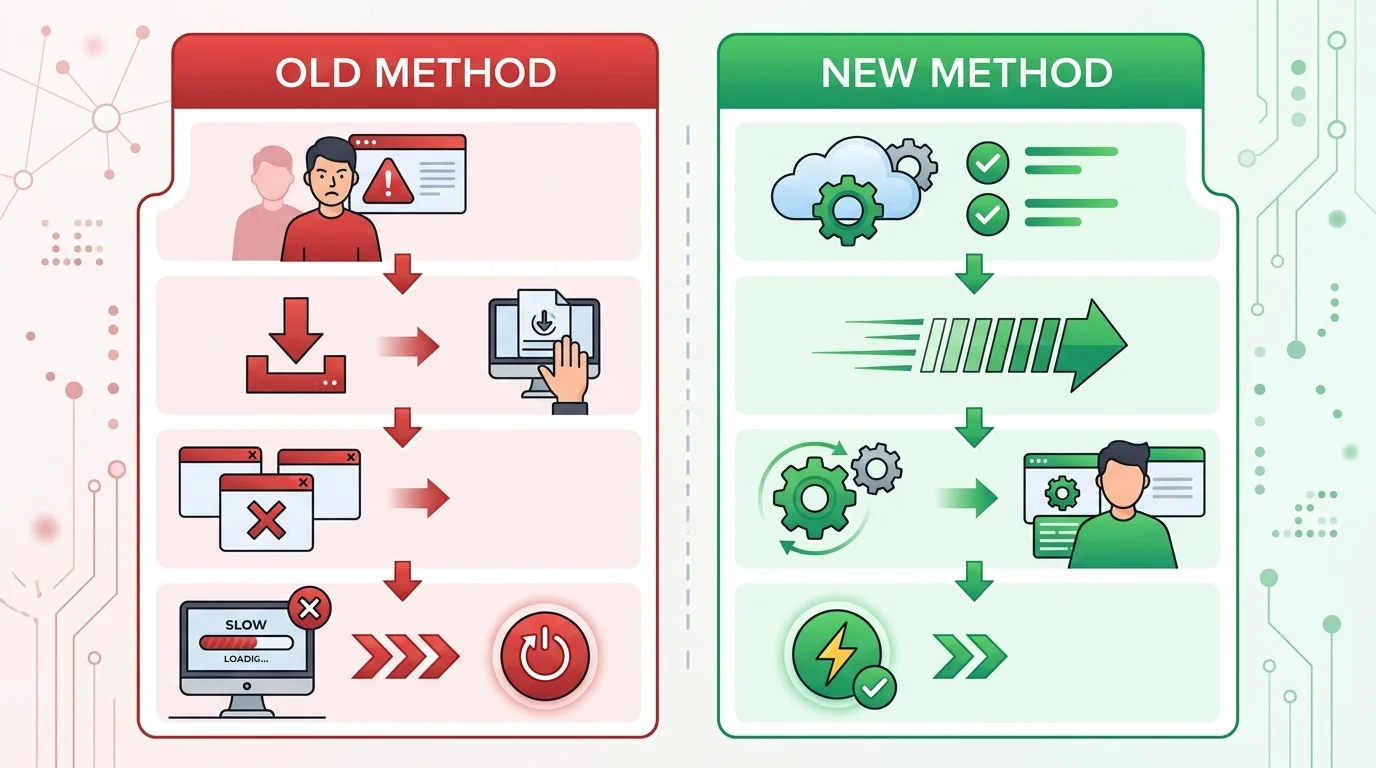
This is the critical comparison, and understanding it requires knowing what went wrong with RSR. BSI and RSR share the same goal — fast security patches between major releases — but they differ substantially in execution:
Delivery mechanism: RSR updates appeared in Software Update alongside regular macOS updates. BSI updates are delivered and managed through Privacy & Security settings, creating a clear separation between security patches and feature updates.
Installation impact: RSR frequently required a restart, sometimes taking several minutes. BSI updates install in the background with no restart required for most patches.
Scope of changes: RSR could modify a broader range of system components, which sometimes led to unintended side effects. BSI is deliberately constrained to security-critical components, reducing the surface area for compatibility issues.
Versioning: RSR used a confusing lettered suffix system (macOS 13.3.1 (a), macOS 13.3.1 (b)) that puzzled users and complicated IT management. BSI updates don't alter the visible macOS version number at all.
Rollback: RSR updates could be removed through Settings, but the process was clunky and sometimes incomplete. BSI includes improved rollback mechanisms that Apple can trigger server-side if an issue is detected.
The History: Why Apple Replaced Rapid Security Response
To understand why BSI exists, you need to understand why Rapid Security Response failed to meet Apple's own standards.
The Promise of RSR
Apple introduced Rapid Security Response at WWDC 2022, shipping it with macOS Ventura in late 2022. The premise was compelling: instead of waiting for full macOS point releases to patch critical vulnerabilities, Apple could push small, targeted security fixes that users could install quickly. In theory, this would dramatically reduce the window of exposure for zero-day exploits.
For the first few months, RSR seemed to work as intended. Apple pushed a handful of emergency patches, and the security community praised the faster response times.
Where RSR Went Wrong
The problems started in early 2023 and compounded over the following months.
The July 2023 RSR Incident. Apple released RSR update macOS 13.4.1 (a) on July 10, 2023. Within hours, reports flooded in that the update broke Safari for many users. Websites failed to load correctly, certain web applications stopped functioning, and some users experienced kernel panics. Apple pulled the update, issued a revised version days later, and published a support document explaining how to remove the problematic patch. For a system designed to build trust in rapid security patching, this was a serious credibility blow.
Confusing version numbering. The lettered suffix system confused both users and IT administrators. When you see "macOS 13.3.1 (a)," it's not immediately clear what that means, whether it's a beta, a pre-release, or something else entirely. Enterprise environments that track OS versions for compliance purposes had to adapt their tooling to handle these unusual version strings. Some MDM platforms didn't correctly parse the suffixed versions, leading to inaccurate fleet reporting.
Restart requirements undermined the value proposition. RSR was supposed to be fast and non-disruptive, but many RSR updates still required a restart. For users in the middle of work — especially professionals running long rendering jobs, database operations, or virtual machines — an unexpected restart prompt was unwelcome. Some users began disabling RSR entirely, which defeated the security purpose.
Application compatibility breakage. Beyond the Safari incident, several RSR updates caused issues with third-party applications. VPN clients, security software, and some browser extensions exhibited unexpected behavior after RSR installations. Developers had limited ability to test against RSR updates before they shipped, since Apple understandably couldn't provide advance notice of security patches without risking disclosure of the vulnerabilities.
Adoption hesitancy. As reports of RSR problems accumulated, many IT administrators began advising their organizations to disable RSR and wait for standard point releases that had been more thoroughly tested. This was the opposite of Apple's intended outcome. The system designed to accelerate security adoption was instead delaying it for the most security-conscious organizations.
Apple's Internal Response
According to reporting from Eclectic Light Company and corroborated by WWDC 2025 session materials, Apple's security engineering team began working on BSI as early as mid-2024. The team's analysis of RSR's shortcomings led to several design principles for the replacement system:
- Minimize installation impact — eliminate restarts for the vast majority of patches.
- Reduce scope — patch only what's necessary, nothing more.
- Separate from Software Update — don't confuse security patches with feature updates.
- Invisible versioning — don't alter the user-visible macOS version string.
- Improve testing infrastructure — build better automated validation for patches before deployment.
These principles directly informed every aspect of BSI's design, from the technical delivery mechanism to the user-facing settings location.
How BSI Updates Work Technically
Understanding BSI's technical architecture reveals why it's more reliable than RSR and why it represents a genuine advancement in operating system security.
The Delivery Pipeline
BSI updates flow through a dedicated content delivery infrastructure separate from the standard Software Update servers. When Apple's security team identifies a vulnerability that warrants a BSI patch, the following sequence occurs:
1. Patch Development. Apple's engineers develop a targeted fix for the specific vulnerability. Unlike a full OS update, this patch modifies only the affected component (e.g., WebKit's rendering engine, a specific security library, or Safari's network stack).
2. Automated Testing. The patch undergoes automated compatibility testing against a matrix of Mac hardware configurations, third-party applications, and network environments. Apple significantly expanded this testing infrastructure after the RSR incidents.
3. Staged Rollout. BSI updates use a staged deployment model. Apple initially pushes the update to a small percentage of eligible Macs, monitors for issues through crash reporting and telemetry, and then gradually expands the rollout. This contrasts with RSR, which was often pushed to all eligible devices simultaneously.
4. Background Download. Once your Mac is selected for the update, the BSI payload downloads in the background during periods of low network activity. Given the small size of BSI payloads (typically under 50 MB), this download completes quickly even on slow connections.
5. Silent Installation. The installation occurs automatically when your Mac detects appropriate conditions — typically when the system is idle but awake. The affected component is patched in place, and the new code takes effect either immediately or the next time the component is loaded.
Why No Restart Is Needed
The no-restart capability is BSI's most user-visible improvement over RSR, and it's worth understanding why it's possible.
Traditional macOS updates often require restarts because they modify components that are loaded into memory at boot time — kernel extensions, core system frameworks, and security policies that can't be safely swapped while the system is running. RSR sometimes needed restarts for the same reason: the patches it delivered could touch these deeply embedded components.
BSI deliberately restricts its scope to components that can be safely updated at runtime. WebKit, for example, runs as a separate process for each Safari tab and web view. When BSI patches WebKit, it updates the on-disk binary; new WebKit processes automatically use the patched version, while existing processes continue running the old version until they're naturally recycled (e.g., when you close a tab or quit Safari).
This process-level isolation is a direct benefit of the security architecture evolution Apple has been building across Apple Silicon Macs, where each component runs with minimal privileges in its own sandbox.
The Privacy & Security Settings Integration
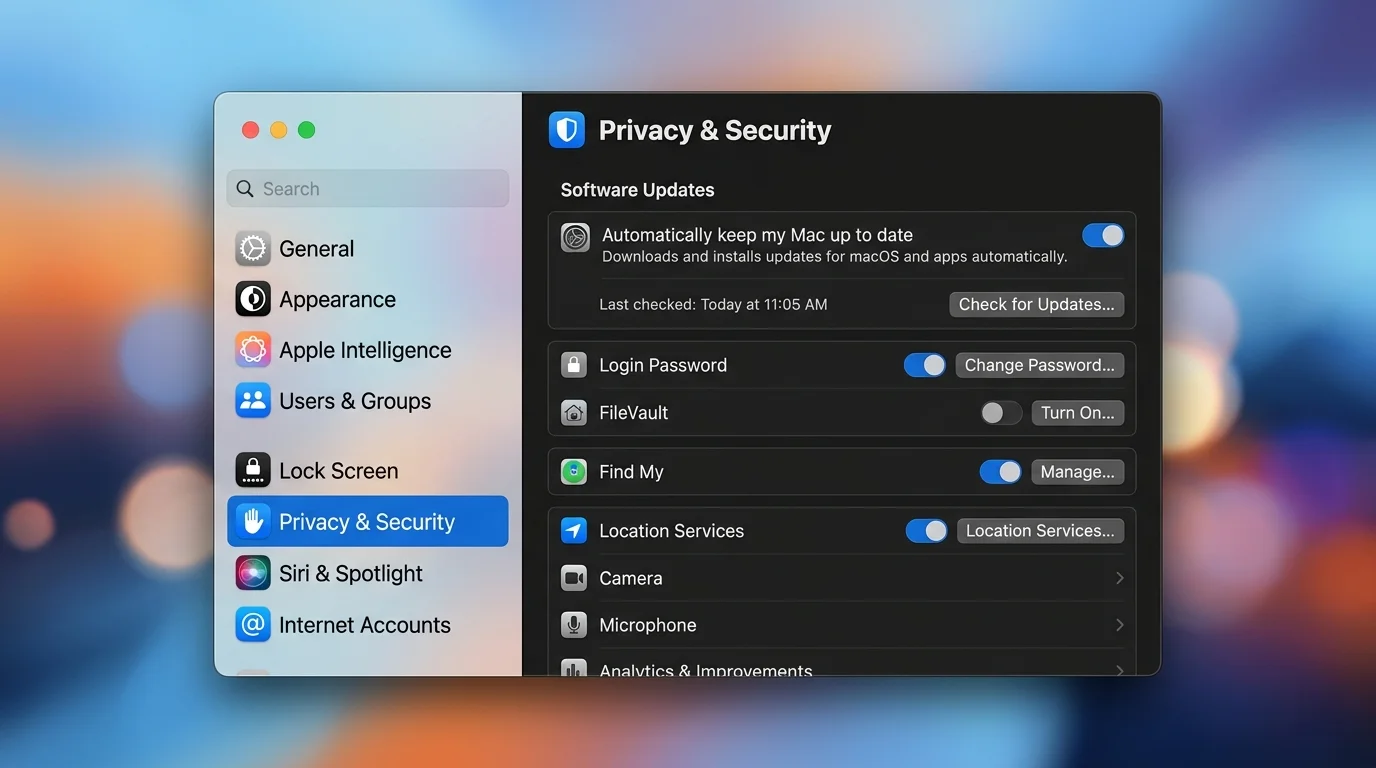
BSI updates are managed through System Settings > Privacy & Security, not through Software Update. This architectural choice serves multiple purposes:
- It signals to users that BSI is a security feature, not a software feature.
- It prevents BSI updates from being accidentally deferred when users postpone standard software updates.
- It allows Apple to maintain a separate opt-in/opt-out mechanism specifically for security patches.
- It reduces the complexity of the Software Update interface by keeping security patches in their own domain.
Within Privacy & Security, BSI has its own toggle labeled "Background Security Improvements." When enabled (the default), your Mac automatically checks for, downloads, and installs BSI updates. When disabled, your Mac will not receive BSI updates until the corresponding fixes are included in the next standard macOS point release.
The First BSI Update: WebKit Same Origin Policy Patch (March 17, 2026)
The first BSI update, delivered on March 17, 2026, targeted a specific vulnerability in WebKit's implementation of the Same Origin Policy — one of the foundational security mechanisms of the modern web.
What Is the Same Origin Policy?
The Same Origin Policy (SOP) is a critical security concept in web browsers. It prevents code running on one website from accessing data on another website. For example, when you have your banking website open in one tab and a random news site in another, SOP ensures the news site's JavaScript can't read your bank account information.
SOP works by restricting cross-origin requests based on three criteria: the protocol (HTTP vs HTTPS), the domain name, and the port number. If any of these differ between two pages, they're considered different origins and are isolated from each other.
The Vulnerability
The vulnerability patched by the first BSI update allowed maliciously crafted web content to bypass the Same Origin Policy in WebKit. In practical terms, this meant an attacker could create a webpage that, when visited by a Mac user, could potentially:
- Read data from other websites the user had open in Safari.
- Access authentication tokens and session cookies from other origins.
- Exfiltrate sensitive information from web applications running in other tabs.
Apple's security advisory classified this as a high-severity vulnerability. While Apple did not confirm active exploitation at the time of the BSI release, the nature of the vulnerability — a SOP bypass in a widely-used rendering engine — made rapid patching essential. WebKit SOP bypasses are consistently among the most valuable vulnerabilities in bug bounty programs because they undermine a fundamental browser security boundary.
Technical Details of the Patch
According to analysis published by Eclectic Light Company, the BSI update modified several WebKit framework files related to cross-origin request handling. The patch tightened validation checks in WebKit's network layer to ensure that cross-origin requests properly enforce SOP rules even in edge cases involving redirect chains and certain MIME type handling scenarios.
The total payload size of the first BSI update was approximately 32 MB — dramatically smaller than even the smallest RSR update Apple had previously shipped. The update applied to all Macs running macOS Tahoe 26.3.1 regardless of hardware configuration.
The macOS 26.3.2 Distinction
It's important to note that on the same day (March 17, 2026), Apple also released macOS Tahoe 26.3.2 as a separate, standard software update specifically for the MacBook Neo. This was not a BSI update — it was a traditional point release delivered through Software Update that addressed hardware-specific issues unique to the MacBook Neo's configuration.
This simultaneous release actually demonstrates BSI's value proposition clearly: the WebKit security fix needed to reach all Mac users immediately (via BSI), while the MacBook Neo-specific fixes followed the standard update channel because they involved hardware drivers and system components that couldn't be patched without a restart.
Community Reception
The Mac security community's response to the first BSI update was overwhelmingly positive. MacRumors reported on March 17 that the update installed cleanly for users, with no reports of the application breakage or system instability that had characterized several RSR deployments. Appleosophy noted that many users didn't even realize the update had been applied until they checked their Privacy & Security settings — which, for a silent security patch, is exactly the desired outcome.
Howard Oakley at Eclectic Light Company published a technical analysis confirming the patch's narrow scope and clean implementation, calling it "a promising start for a system that needs to earn the trust that RSR lost."
How to Check and Install BSI Updates
While BSI updates are designed to install automatically, you may want to verify that your Mac is configured to receive them and confirm that the latest patches have been applied.
Step 1: Open System Settings
Click the Apple menu () in the top-left corner of your screen and select System Settings.
Step 2: Navigate to Privacy & Security
In the System Settings sidebar, click Privacy & Security. You may need to scroll down in the sidebar to find it.
Step 3: Locate the Background Security Improvements Section
Scroll down within the Privacy & Security pane until you find the Security section. Look for Background Security Improvements.
Step 4: Verify the Toggle Is Enabled
The Background Security Improvements toggle should be enabled (green) by default. If it's disabled, click the toggle to turn it on. You may be prompted to authenticate with your password or Touch ID.
Step 5: Check for Pending Updates
If you want to manually check whether a BSI update is available, you can turn the toggle off and back on, which triggers a check. However, in normal operation, your Mac checks for BSI updates automatically and applies them without intervention.
Step 6: Verify Installation
Currently, macOS does not provide a detailed log of applied BSI updates in System Settings. To verify that a BSI update has been installed, you can:
- Check the system log: Open Terminal and use
log show --predicate 'subsystem == "com.apple.backgroundsecurityd"' --last 24hto view recent BSI activity. - Verify WebKit version: In Safari, go to Safari > About Safari to check if the WebKit build number has been updated.
- Use system_profiler: Run
system_profiler SPInstallHistoryDataTypein Terminal to see recent installation history.
Important Notes
- BSI updates require an active internet connection to download.
- Your Mac must be awake (though not necessarily actively in use) for installation to occur.
- FileVault encryption does not interfere with BSI updates, since the patches are applied at the application/framework level, not the boot volume level.
- If you've disabled BSI, the security fixes it would have delivered will be included in the next standard macOS update, but you'll remain unprotected until that update arrives.
BSI vs RSR vs Regular Software Updates: Complete Comparison
Understanding where BSI fits in Apple's update ecosystem requires a direct comparison across all three update types. This is essential context for anyone managing their own Mac security or building a comprehensive security strategy.
| Feature | BSI | Rapid Security Response (RSR) | Standard macOS Update |
|---|---|---|---|
| Still active? | Yes (current) | Deprecated | Yes |
| Introduced | macOS Tahoe (WWDC 2025) | macOS Ventura (2022) | Always |
| Delivery channel | Privacy & Security settings | Software Update | Software Update |
| Typical size | Under 50 MB | 100-500 MB | 500 MB - 5+ GB |
| Restart required | No (most cases) | Often yes | Almost always |
| Installation time | Seconds (background) | 5-15 minutes | 15-60 minutes |
| User interruption | None | Moderate to high | High |
| Scope | Security-critical components | Emergency security patches | Everything |
| Version string change | No | Yes (lettered suffix) | Yes (point release) |
| Rollback capability | Improved (server-side) | Manual via Settings | Full OS rollback |
| Default state | Enabled | Enabled | Enabled |
| MDM controllable | Yes | Yes | Yes |
| Pre-deployment testing window | Staged rollout | Simultaneous push | Beta program |
When Each Update Type Applies
BSI handles the most time-sensitive security patches — vulnerabilities that are being actively exploited or that affect fundamental security boundaries like Same Origin Policy, certificate validation, or sandbox escapes.
Standard macOS Updates continue to handle everything else: feature additions, bug fixes, driver updates, performance improvements, and security patches that aren't urgent enough to warrant BSI deployment.
RSR is effectively deprecated. Apple has not issued any RSR updates since macOS Tahoe's release, and BSI has assumed RSR's role in the security update hierarchy. Macs running macOS Ventura or Sonoma may still receive RSR updates for legacy support, but all new security patch development focuses on BSI for Tahoe and later.
What This Means for Enterprise and IT Administrators
The shift from RSR to BSI has significant implications for organizations managing Mac fleets. If you're an IT administrator, security engineer, or MSP managing macOS devices, here's what you need to know.
MDM Policy Updates
Most major MDM platforms — including Jamf Pro, Kandji, Mosyle, and Addigy — have released or are releasing updates to support BSI management. Key policy considerations include:
BSI toggle control. MDM administrators can enforce the BSI toggle state across managed devices. For most organizations, keeping BSI enabled is the recommended posture, since the patches address critical security vulnerabilities.
Reporting and compliance. Addigy published a detailed guide in March 2026 on monitoring BSI deployment across managed fleets. The key challenge is that BSI updates don't change the macOS version string, so traditional version-based compliance checks won't detect whether a BSI patch has been applied. Administrators need to monitor system logs or use vendor-specific APIs to verify BSI status.
Testing workflows. Enterprise organizations that maintained testing workflows for RSR updates (installing on test machines before allowing fleet-wide deployment) need to adapt their processes for BSI. Since BSI uses staged rollout, organizations can configure a subset of devices to receive updates first, then monitor for issues before the broader rollout reaches the full fleet.
Network Considerations
BSI updates download from Apple's content delivery infrastructure. Organizations with strict network controls should ensure that the BSI update servers are allowlisted. Apple publishes the required domains in their support documentation, and they overlap significantly with existing Software Update allowlists.
The small size of BSI payloads (under 50 MB) means bandwidth impact is minimal even for large fleets. However, organizations with extremely constrained networks (e.g., field offices with satellite connections) should plan for the additional traffic.
Compliance Implications
For organizations subject to security compliance frameworks (SOC 2, ISO 27001, HIPAA, FedRAMP), BSI introduces a new category of security update that must be accounted for in patch management policies. Key questions to address:
- Patch timeline SLAs. If your compliance framework requires security patches to be applied within a specific timeframe (e.g., 14 days for critical vulnerabilities), BSI patches should be tracked against these SLAs.
- Documentation. Since BSI updates don't generate the same kind of audit trail as standard macOS updates, organizations may need to implement additional logging to demonstrate compliance.
- Risk acceptance. Organizations that choose to disable BSI for testing purposes must document this as a risk acceptance decision, since it leaves devices unprotected against known vulnerabilities.
Recommendations for IT Teams
- Enable BSI across your fleet immediately. The security benefits far outweigh the minimal risk of compatibility issues, especially given the improved testing infrastructure compared to RSR.
- Update your MDM platform to the latest version that supports BSI monitoring and management.
- Modify compliance reporting to account for BSI patches as a separate update category.
- Brief your help desk on BSI so they can answer user questions about the new Privacy & Security toggle.
- Review network allowlists to ensure BSI update traffic isn't blocked.
Security Implications and Zero-Day Response Timeline
BSI's most significant impact is on Apple's ability to respond to zero-day vulnerabilities — security flaws that are being actively exploited before a patch is available.
The Old Timeline (Pre-BSI)
Before BSI, Apple's response to a zero-day vulnerability in WebKit or Safari typically followed this timeline:
- Day 0: Vulnerability discovered or reported.
- Days 1-3: Apple's security team triages and begins developing a fix.
- Days 3-7: Fix developed and tested.
- Days 7-14: Fix packaged into an RSR or point release, undergoes QA.
- Day 14-21: Update pushed to users.
- Days 21-30: Most users install the update (some delay significantly).
This meant that even in the best case, there was a two to three week window between vulnerability discovery and widespread patch adoption. In the worst case — when RSR updates were pulled due to bugs — the window could extend to a month or more.
The New Timeline (With BSI)
BSI compresses this timeline dramatically:
- Day 0: Vulnerability discovered or reported.
- Days 1-2: Apple's security team triages and begins developing a fix.
- Days 2-4: Fix developed and tested against automated compatibility matrix.
- Day 4-5: BSI update staged to initial rollout group.
- Day 5-6: Rollout expanded to all eligible devices.
- Day 6-7: Vast majority of Macs patched (since BSI auto-installs with no restart needed).
The critical improvement isn't just that Apple can develop and ship the patch faster — it's that adoption is nearly instantaneous. When an update requires no user action and no restart, the gap between "patch available" and "patch installed" shrinks to hours rather than weeks.
Real-World Impact
Consider the first BSI update's WebKit SOP bypass vulnerability. Under the old system, this would have required either an RSR update (with restart) or would have been held for the next point release. Users who disabled RSR or delayed updates would have remained vulnerable for weeks.
With BSI, the patch reached the vast majority of macOS Tahoe users within 24 hours of release. That's a transformative improvement in the security posture of the entire Mac ecosystem.
This speed is particularly critical given the evolving threat landscape for Mac users. As Macs have gained market share in both consumer and enterprise environments, they've become increasingly attractive targets for sophisticated threat actors who exploit zero-day vulnerabilities.
How BSI Fits Into macOS Tahoe's Broader Security Architecture
BSI doesn't exist in isolation. It's one component of a comprehensive security overhaul that Apple introduced with macOS Tahoe, building on the security evolution from T2 chips to Apple Silicon.
Integration with Other Tahoe Security Features
Lockdown Mode enhancements. macOS Tahoe's enhanced Lockdown Mode works in concert with BSI. When Lockdown Mode is active, BSI updates are prioritized and may install more aggressively, reflecting the heightened security posture of users who've enabled this feature.
Improved Gatekeeper. Tahoe's Gatekeeper improvements include better detection of malicious code that might exploit the types of vulnerabilities BSI patches. This layered approach means that even before a BSI patch arrives, Gatekeeper can provide some protection against exploitation attempts.
Enhanced XProtect. Apple's built-in malware detection has been updated alongside BSI to share threat intelligence. When a BSI patch addresses a vulnerability that XProtect has detected exploitation attempts for, both systems coordinate to provide comprehensive protection.
For a complete overview of these features working together, see our macOS Tahoe 26.3 background security guide.
The Bigger Picture
BSI represents Apple's acknowledgment that traditional software update models are too slow for modern security threats. Attackers can weaponize a vulnerability within hours of its discovery. If defenders need weeks to deploy a patch — and additional weeks for users to install it — the asymmetry favors attackers.
By making security patches automatic, silent, instant, and non-disruptive, Apple has removed nearly every friction point that prevented users from staying protected. It's the same philosophy that drove automatic updates in iOS, but adapted for the more complex macOS environment where users expect greater control over their systems.
Frequently Asked Questions
Can I opt out of BSI updates?
Yes. You can disable Background Security Improvements by navigating to System Settings > Privacy & Security and toggling off the BSI option. However, Apple strongly recommends keeping it enabled. If you disable BSI, the security fixes it delivers will eventually be included in standard macOS point releases, but your Mac will remain unprotected against known vulnerabilities until you install that point release. Unless you have a specific technical reason to disable BSI (such as a documented compatibility issue with critical software), leave it on.
Will BSI slow down my Mac?
No. BSI updates are specifically engineered to have minimal performance impact. The download occurs during periods of low network activity, and the installation happens when your system is idle. The patched components (WebKit, Safari, security libraries) are not re-optimized or recompiled during installation — Apple delivers pre-compiled binaries that replace existing files. You should not notice any performance difference before or after a BSI update.
How do BSI updates differ from the macOS 26.3.2 update?
macOS 26.3.2 was a standard software update released on March 17, 2026, specifically for the MacBook Neo. It addresses hardware-specific issues and follows the traditional Software Update delivery path, requiring a download through Software Update and a system restart. The BSI update released on the same day was a separate, security-focused patch for WebKit that applied to all Macs running macOS Tahoe 26.3.1, installed through Privacy & Security settings, and required no restart. They are completely independent updates serving different purposes.
Do BSI updates work on older Macs running macOS Ventura or Sonoma?
No. BSI is exclusive to macOS Tahoe and later. Macs running macOS Ventura or Sonoma will continue to receive Rapid Security Response (RSR) updates and standard point releases for security patches. Apple has not announced plans to backport BSI to older macOS versions, which is consistent with their historical approach of introducing new security infrastructure only in current OS releases.
Can IT administrators delay or stage BSI updates?
Yes, with caveats. MDM platforms that support BSI management (including recent versions of Jamf Pro, Kandji, and Addigy) can configure BSI policies at the fleet level. Administrators can disable BSI on managed devices, though this is generally not recommended. Apple's built-in staged rollout means that not all devices receive BSI updates simultaneously, which provides a natural testing window. For organizations requiring formal testing before deployment, the recommended approach is to maintain a small group of test devices that receive BSI updates first, then monitor for 24-48 hours before allowing the update to reach the broader fleet.
How will I know if a BSI update has been installed?
Currently, macOS does not display a prominent notification when a BSI update is applied. You can verify BSI activity by checking the system log via Terminal (log show --predicate 'subsystem == "com.apple.backgroundsecurityd"' --last 24h) or by checking your Safari/WebKit version for changes. Apple may introduce better visibility into BSI update history in future macOS releases. For a comprehensive view of your Mac's security status, check our best antivirus solutions for Mac guide which covers monitoring tools.
What happens if a BSI update causes problems?
Apple has built improved rollback capabilities into BSI compared to RSR. If Apple detects widespread issues with a BSI update (through crash reporting and telemetry), they can initiate a server-side rollback that reverses the patch automatically. Individual users who experience issues can disable BSI through Privacy & Security settings, which prevents future BSI updates but does not roll back already-applied patches. In such cases, the next standard macOS update would include a corrected version of the security fix.
Conclusion
The first Background Security Improvement update, delivered on March 17, 2026, is more than a security patch — it's a proof of concept for a fundamentally better approach to operating system security. Apple took the lessons learned from RSR's shortcomings — the broken apps, the confusing versioning, the unwanted restarts — and built a system that addresses every one of those pain points.
BSI updates are smaller, faster, less disruptive, and more reliable than their RSR predecessors. The fact that the first BSI update patched a critical WebKit Same Origin Policy vulnerability without requiring a single user to click a button or restart their Mac demonstrates the system's potential.
For everyday Mac users, BSI means better security with less effort. Your Mac now patches itself against critical threats in the background, automatically, silently. That's how security should work.
For IT administrators and security professionals, BSI means faster threat response, easier fleet management, and fewer help desk tickets from users complaining about forced restarts. The 26.3 BSI implementation guide covers the specific deployment considerations in detail.
For Apple, BSI represents a maturation of their security update philosophy. The company that once shipped security fixes bundled into massive OS updates — and then tried the RSR experiment with mixed results — has now found an approach that genuinely prioritizes both security and user experience.
The first BSI update worked. Quietly, invisibly, exactly as intended. Now the question is how Apple will build on this foundation as the threat landscape continues to evolve and the need for rapid security response becomes ever more critical.
Sources: MacRumors (March 17, 2026), Eclectic Light Company, Appleosophy, Addigy, Apple WWDC 2025 session materials, Apple Security Updates documentation.