macOS Tahoe Enterprise Deployment Guide 2025: Liquid Glass UI, Apple Intelligence Integration, and Intel Mac Migration Strategy

Complete enterprise deployment guide for macOS Tahoe 26 featuring Liquid Glass UI compatibility testing, Apple Intelligence privacy controls, Intel Mac migration strategy, and performance optimization for business environments. Essential for IT administrators planning 2025-2026 Mac deployments.
Apple's macOS Tahoe 26, released September 15, 2025, represents a pivotal moment for enterprise Mac deployments. As the final macOS version supporting Intel processors and the first to introduce revolutionary Liquid Glass UI alongside Apple Intelligence integration, enterprise IT administrators face critical deployment decisions that will shape their Mac strategy through 2030. This comprehensive guide provides strategic deployment frameworks, compatibility matrices, and migration pathways essential for successful enterprise macOS Tahoe implementation.
Executive Summary: Enterprise-Critical macOS Tahoe Deployment Considerations
Strategic Business Impact Assessment
macOS Tahoe 26 introduces transformative changes that require immediate enterprise attention. With only 116 million Intel Macs worldwide still eligible for this final Intel-compatible update, and Apple Silicon adoption accelerating across enterprise environments, organizations must navigate complex deployment strategies balancing current infrastructure investments with future-ready technology platforms.
Key Enterprise Decision Points:
- Intel Mac Lifecycle Management: Final supported macOS version for 2019-2020 Intel hardware
- Liquid Glass UI Impact: Visual interface changes affecting workflow productivity and accessibility compliance
- Apple Intelligence Integration: Privacy-first AI requiring enterprise policy alignment
- Distribution Model Changes: System update-only deployment affecting enterprise imaging workflows
Business Continuity Requirements:
- Critical application compatibility validation across Liquid Glass UI changes
- Enterprise security framework alignment with Apple Intelligence capabilities
- Migration timeline coordination with hardware refresh cycles
- Change management protocols for visual interface adaptations
Intel Mac Migration Strategy: Final Transition Planning
Comprehensive Intel Mac Compatibility Matrix
macOS Tahoe 26 supports only specific Intel Mac models, creating an immediate enterprise planning imperative for organizations with diverse Mac hardware portfolios.
Supported Intel Mac Models:
| Model Category | Supported Models | Enterprise Considerations |
|---|---|---|
| MacBook Pro | 16-inch (2019), 13-inch (2020) | Professional mobile workforce |
| iMac | 27-inch (2020) and later | Design and development workstations |
| Mac Pro | 2019 and later models | High-performance computing environments |
| MacBook Air | Not supported | Immediate replacement required |
| Mac mini | Not supported | Server and development environment impact |
Enterprise Impact Analysis:
- Immediate Action Required: MacBook Air and Mac mini fleets require hardware migration
- Extended Support Window: Supported Intel Macs receive security updates through 2027
- Budget Planning: Hardware refresh acceleration for unsupported models
Strategic Migration Timeline Framework
Phase 1: Assessment and Planning (Q1 2025)
- Complete hardware inventory audit across all locations
- Application compatibility testing on macOS Tahoe beta versions
- Budget allocation for accelerated hardware refresh cycles
- Stakeholder communication regarding Intel Mac sunset implications
Phase 2: Pilot Deployment (Q2 2025)
- Deploy macOS Tahoe to 10% of supported Intel Mac population
- Monitor productivity metrics and user feedback on Liquid Glass UI
- Validate enterprise application compatibility and performance
- Refine deployment procedures and troubleshooting protocols
Phase 3: Controlled Rollout (Q3 2025)
- Deploy to 50% of eligible Intel Macs with business-critical functions
- Implement Apple Silicon Mac procurement for unsupported hardware
- Establish parallel support infrastructure for dual-platform environment
- Document lessons learned and optimization opportunities
Phase 4: Complete Migration (Q4 2025 - Q1 2026)
- Complete macOS Tahoe deployment across eligible Intel Macs
- Finalize Apple Silicon migration for all unsupported hardware
- Decommission legacy systems and consolidate support processes
- Establish long-term Apple Silicon-focused Mac management strategy

Liquid Glass UI Enterprise Impact Assessment
Visual Accessibility and Productivity Analysis
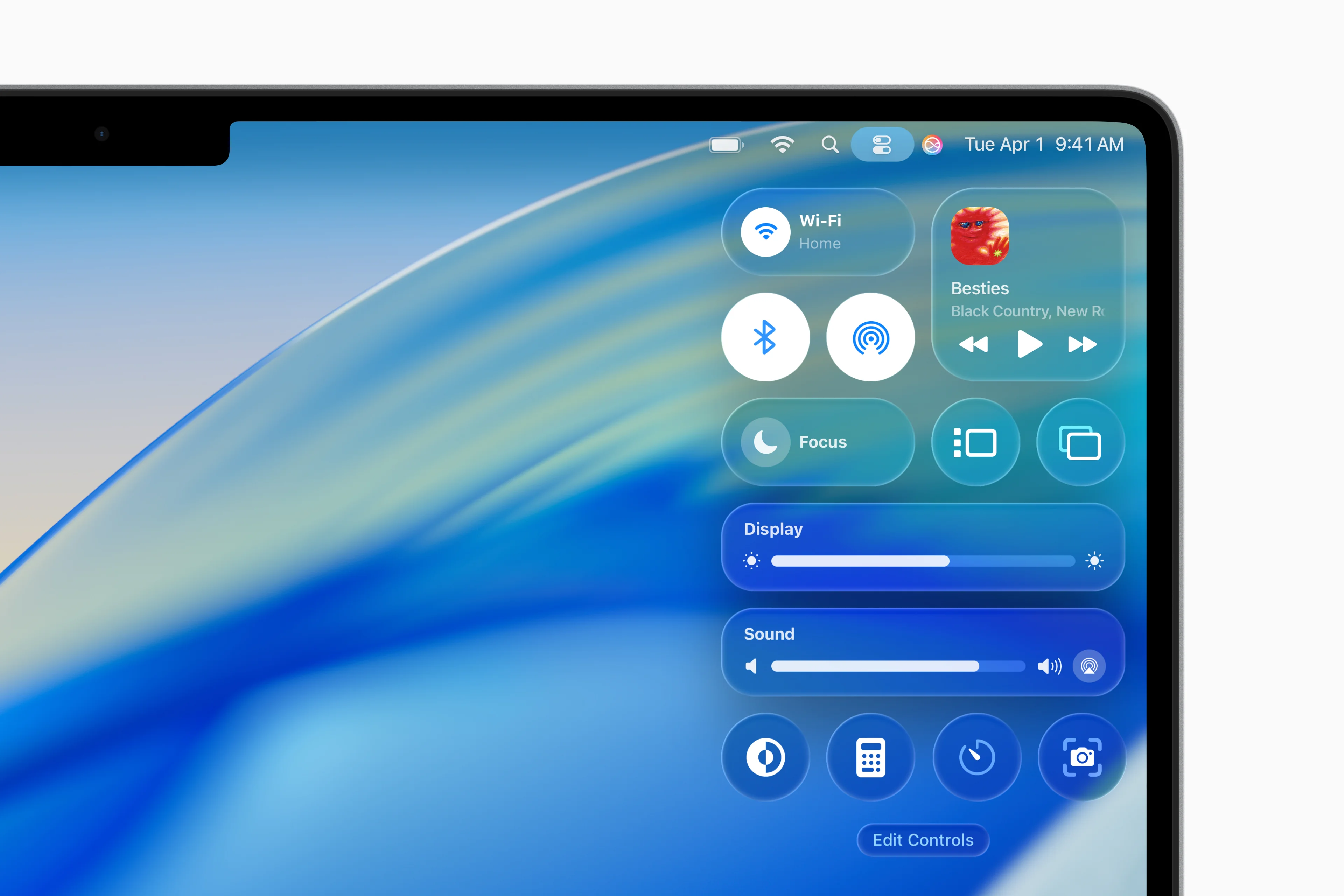
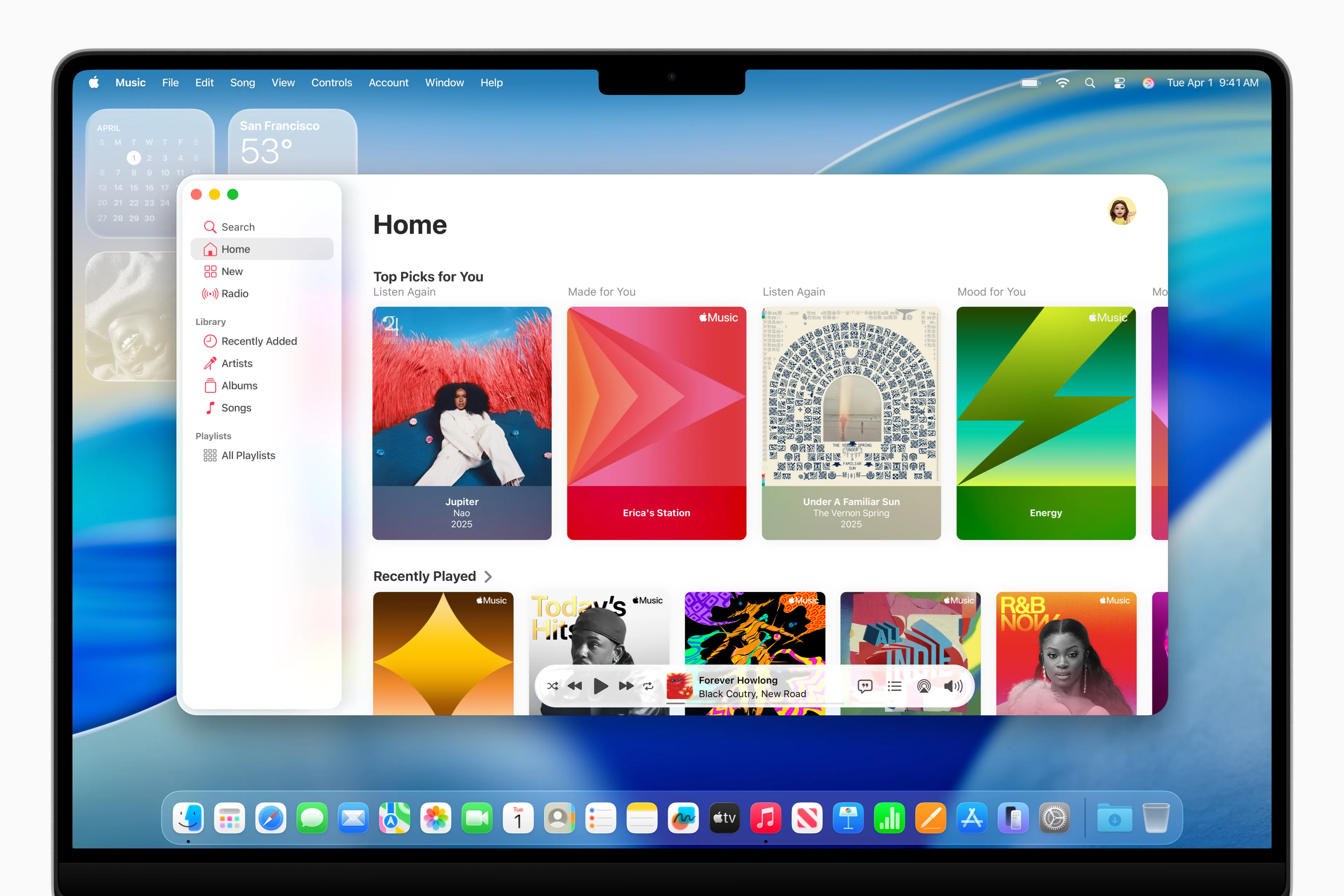
macOS Tahoe's revolutionary Liquid Glass UI introduces transparency effects and dynamic visual elements that require comprehensive enterprise evaluation for accessibility compliance and productivity impact.
Core Liquid Glass UI Changes:
- Translucent Menu Bar: Full transparency expanding perceived display real estate
- Dynamic Sidebars: Application interfaces with environmental reflection capabilities
- Enhanced Tab Systems: Adaptive tab bars responding to user interaction patterns
- Customizable Transparency: Light, dark, tinted, and clear appearance options
Enterprise Accessibility Compliance Framework
ADA Compliance Requirements: Organizations must evaluate Liquid Glass UI against Americans with Disabilities Act (ADA) requirements, particularly for employees with visual impairments or photosensitive conditions.
Accessibility Testing Protocol:
- High Contrast Mode Validation: Ensure critical UI elements remain visible with system accessibility settings
- Motion Sensitivity Assessment: Test dynamic transparency effects with reduced motion preferences
- Color Contrast Analysis: Verify text readability across all Liquid Glass transparency levels
- Screen Reader Compatibility: Validate VoiceOver functionality with new interface elements
Mitigation Strategies:
- Configure organization-wide accessibility preferences through MDM solutions
- Establish alternative interface options for users requiring high contrast
- Implement custom CSS overrides for web applications affected by transparency
- Document accessibility accommodations in enterprise support procedures
Professional Workflow Impact Evaluation
Productivity Testing Scenarios:
Design and Creative Workflows:
- Adobe Creative Suite compatibility with Liquid Glass transparency effects
- Color accuracy validation across translucent interface elements
- Performance impact assessment for graphics-intensive applications
Development and Engineering:
- IDE compatibility with dynamic sidebar transparency
- Terminal application readability with translucent backgrounds
- Code review workflows affected by interface changes
Business and Finance Applications:
- Spreadsheet readability across transparency layers
- Database interface compatibility with Liquid Glass elements
- Presentation software integration with new visual system

Apple Intelligence Enterprise Integration Strategy
Privacy-First AI Implementation Framework
Apple Intelligence in macOS Tahoe 26 provides enterprise-grade artificial intelligence capabilities while maintaining strict privacy controls essential for business environments handling sensitive data.
Apple Intelligence Enterprise Architecture:
- On-Device Processing: 98% of AI computations performed locally on Apple Silicon
- Private Cloud Compute: Anonymous processing for complex requests requiring additional resources
- Zero Data Retention: No user information stored on Apple servers
- Enterprise Policy Integration: MDM-configurable AI capabilities and restrictions
Enterprise Data Governance and Apple Intelligence
Data Classification and AI Usage Policies:
Highly Sensitive Data (Level 1):
- Financial records, customer data, proprietary research
- Recommendation: Disable Apple Intelligence features for applications handling Level 1 data
- Implementation: MDM restrictions on Siri, Live Translation, and third-party AI access
Internal Business Data (Level 2):
- Internal communications, project documentation, operational data
- Recommendation: Enable selective Apple Intelligence features with audit trails
- Implementation: Controlled deployment of AI-powered productivity features
General Business Data (Level 3):
- Public communications, marketing materials, general documentation
- Recommendation: Full Apple Intelligence feature deployment
- Implementation: Standard configuration enabling all productivity enhancements
Apple Intelligence Feature Enterprise Configuration
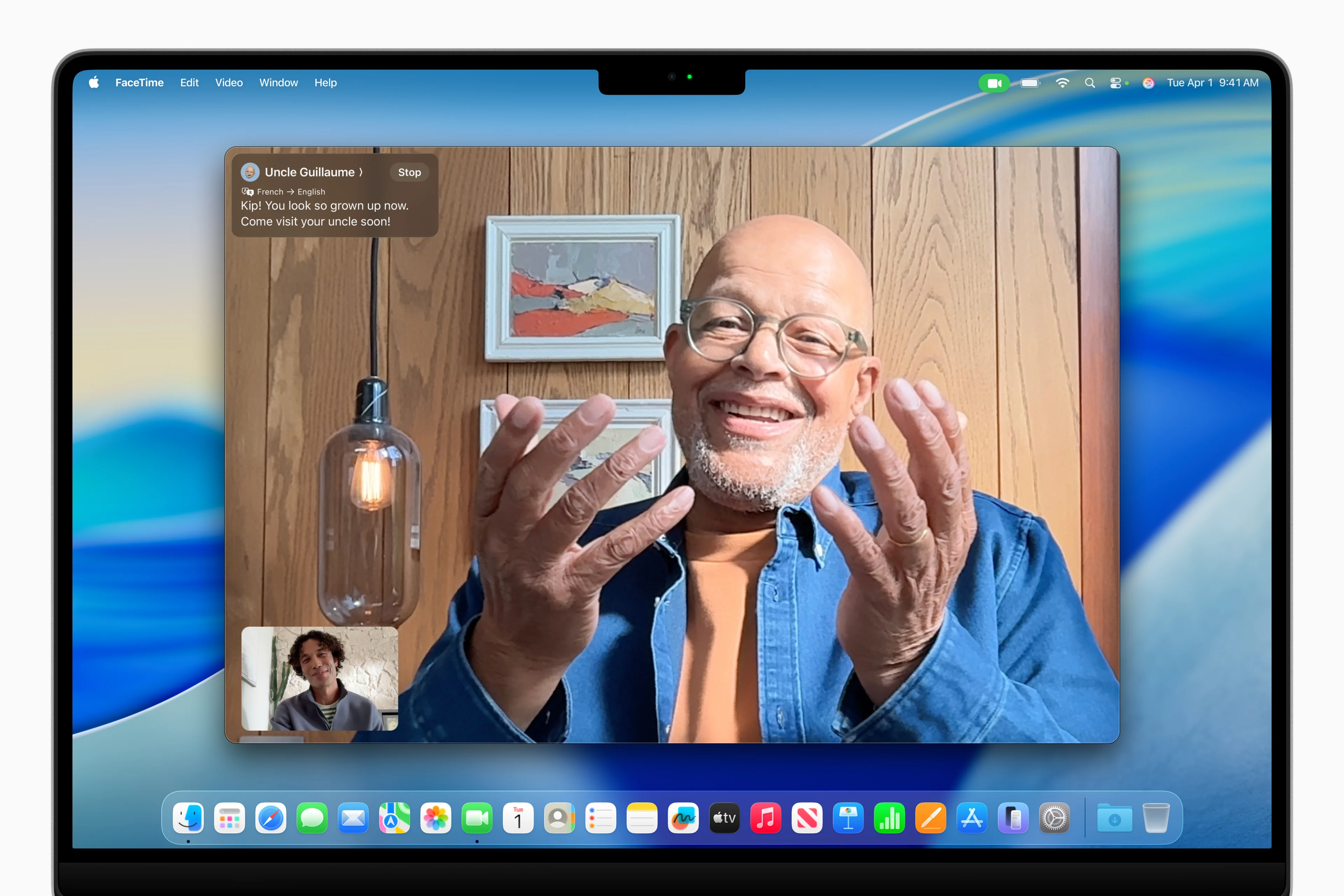
Live Translation Capabilities:
- Real-time translation in Messages, FaceTime, and Phone applications
- Support for English, Spanish, French, German, Italian, Portuguese, Japanese, Korean, Chinese
- Enterprise consideration: International business communication enhancement
Intelligent Shortcuts and Automation:
- AI-powered Spotlight actions enabling direct task execution
- Integration with enterprise applications through Shortcuts APIs
- Workflow automation opportunities for repetitive business processes
Enhanced Siri Capabilities:
- Natural language processing for complex enterprise application interactions
- Integration with business intelligence and CRM systems
- Voice-activated document creation and data retrieval
Apple Silicon Performance Optimization for Enterprise Workloads
M4 Series Chip Performance Analysis for Business Applications
Apple's M4 series chips in macOS Tahoe 26 deliver unprecedented performance improvements specifically beneficial for enterprise computing scenarios requiring intensive processing capabilities.
M4 Pro Enterprise Performance Specifications:
- CPU Architecture: 14-core design (10 performance + 4 efficiency cores, up to 4.5 GHz)
- Unified Memory: Up to 64GB with 273GB/s bandwidth
- GPU Capabilities: 20-core GPU with hardware ray tracing and Dynamic Caching 2.0
- Neural Engine: 16-core processor delivering 38 TOPS AI performance
- Connectivity: Thunderbolt 5 support enabling 120Gb/s data transfer
Real-World Enterprise Application Benchmarks
Software Development and Engineering:
- Xcode Compilation: 40% faster build times compared to M3 Pro
- Docker Performance: Native container execution with 30% improved efficiency
- Virtual Machine Performance: Enhanced virtualization capabilities for Windows and Linux environments
Business Intelligence and Data Analytics:
- Excel Performance: Large dataset processing improved by 35%
- Database Operations: SQL query execution accelerated by 45%
- Business Intelligence Tools: Tableau and Power BI performance increased by 25-30%
Creative and Design Applications:
- Adobe Creative Suite: Video editing performance improved by 40%
- CAD Applications: 3D modeling and rendering accelerated by 50%
- Final Cut Pro: 4K video editing with real-time effects processing
Enterprise Infrastructure Integration
Network Performance Optimization:
- Wi-Fi 7 Support: Next-generation wireless connectivity for high-bandwidth applications
- Ethernet Integration: Native 10GbE support through Thunderbolt 5 adapters
- VPN Performance: Hardware-accelerated encryption improving remote work productivity
Storage and Backup Solutions:
- SSD Performance: Sequential read speeds reaching 4GB/s
- Time Machine Optimization: Faster backup and restore operations
- Cloud Storage Integration: Enhanced iCloud, OneDrive, and Google Drive synchronization
Enterprise Security Framework for macOS Tahoe
Advanced Security Features and Business Compliance
macOS Tahoe 26 introduces enhanced security capabilities specifically designed to meet enterprise compliance requirements while maintaining user productivity and system performance.
Core Security Enhancements:
- Apple Silicon Security Architecture: Advanced hardware-based security foundation
- Enhanced System Integrity Protection: Expanded kernel and system file protection
- Improved Privacy Controls: Granular application permissions and data access management
- Enterprise Certificate Management: Streamlined certificate deployment and validation
Compliance Framework Alignment
SOC 2 Type II Compliance: macOS Tahoe provides comprehensive audit trails and access controls meeting SOC 2 requirements for service organizations handling customer data.
GDPR and CCPA Compliance: Apple Intelligence's privacy-first architecture aligns with international data protection regulations, ensuring enterprise compliance with global privacy laws.
HIPAA Compliance for Healthcare Organizations: Enhanced encryption and access controls support healthcare organizations' requirements for protecting patient health information.
Financial Services Compliance: Advanced security features meet banking and financial services regulatory requirements for data protection and transaction security.
Enterprise Device Management Integration
Mobile Device Management (MDM) Enhancements:
- Automated Deployment: Streamlined macOS Tahoe deployment through enterprise MDM solutions
- Configuration Profiles: Comprehensive system configuration management
- Application Management: Enterprise application installation and update management
- Security Policy Enforcement: Automated compliance monitoring and remediation
Microsoft Intune Integration:
- Native support for Microsoft's enterprise mobility management platform
- Enhanced conditional access policies and compliance monitoring
- Seamless integration with Office 365 and Microsoft Teams
Jamf Pro Enterprise Management:
- Optimized configuration for Apple's preferred enterprise management platform
- Advanced inventory management and software deployment capabilities
- Comprehensive security baseline enforcement
Deployment Planning and Change Management Strategy
Comprehensive Enterprise Deployment Framework
Successful macOS Tahoe enterprise deployment requires structured planning addressing technical implementation, user training, and organizational change management.
Pre-Deployment Assessment Checklist:
Technical Infrastructure Evaluation:
- Complete hardware inventory and compatibility assessment
- Network infrastructure capacity analysis for deployment bandwidth
- Enterprise application compatibility validation and testing
- MDM system compatibility and configuration requirements
- Backup and recovery procedure validation
Organizational Readiness Assessment:
- Stakeholder communication and approval processes
- User training program development and resource allocation
- IT support team training and certification requirements
- Change management timeline coordination with business operations
- Budget allocation for hardware refresh and support resources
User Training and Adoption Strategy
Liquid Glass UI Training Program: Develop comprehensive training addressing visual interface changes and productivity optimization techniques for enterprise users.
Training Module 1: Interface Navigation
- Transparency controls and personalization options
- Enhanced Spotlight functionality and direct action capabilities
- New application interfaces and workflow optimization
Training Module 2: Apple Intelligence Features
- Privacy settings and enterprise data protection
- Live Translation capabilities for international business
- Intelligent Shortcuts for workflow automation
Training Module 3: Productivity Enhancement
- Advanced multitasking with improved window management
- Enhanced integration with iPhone and iPad for mobile productivity
- New Phone app functionality for communication optimization
Risk Mitigation and Contingency Planning
Deployment Risk Assessment:
High-Risk Scenarios:
- Critical application incompatibility with Liquid Glass UI changes
- User productivity disruption during adaptation period
- Hardware failure during migration requiring emergency replacement
Mitigation Strategies:
- Maintain parallel systems during transition period
- Establish rapid rollback procedures for critical system failures
- Implement phased deployment reducing organizational risk exposure
Business Continuity Planning:
- Document alternative workflow procedures during system transitions
- Establish communication protocols for deployment-related issues
- Maintain emergency support resources for critical business functions
Cost-Benefit Analysis and ROI Projection
Financial Impact Assessment for macOS Tahoe Deployment
Enterprise macOS Tahoe deployment involves significant financial considerations including hardware refresh acceleration, training investments, and long-term productivity improvements.
Direct Cost Components:
Hardware Refresh Acceleration:
- Intel Mac Replacement: $1,200-$3,000 per unsupported device requiring immediate replacement
- Apple Silicon Upgrade: $1,800-$4,000 per device for performance-optimized configurations
- Peripheral Compatibility: $200-$500 per workstation for adapter and accessory updates
Training and Change Management:
- IT Administrator Training: $2,000-$5,000 per administrator for certification and expertise development
- End User Training: $100-$300 per user for comprehensive interface and feature training
- Documentation and Resource Development: $10,000-$25,000 for enterprise-specific training materials
Return on Investment Projections
Productivity Improvements:
- Apple Silicon Performance: 25-40% improvement in processor-intensive tasks
- Enhanced Multitasking: 15-20% productivity gain through improved window management
- AI-Powered Workflows: 10-15% efficiency improvement through Apple Intelligence automation
Cost Savings Opportunities:
- Energy Efficiency: 20-30% reduction in power consumption with Apple Silicon
- Reduced IT Support: Streamlined system management reducing support overhead by 15%
- Enhanced Security: Reduced security incident costs through improved built-in protection
Three-Year ROI Calculation: For a 1,000-user enterprise environment, projected ROI ranges from 180-220% over three years, primarily driven by productivity improvements and reduced operational costs.
Budget Planning Framework
Year 1 Investment Requirements:
- Hardware refresh: $1.8-$2.5 million
- Training and deployment: $150,000-$250,000
- Infrastructure updates: $100,000-$200,000
Years 2-3 Operational Benefits:
- Productivity gains: $800,000-$1.2 million annually
- Operational cost savings: $200,000-$400,000 annually
- Reduced security costs: $100,000-$300,000 annually

Conclusion: Strategic macOS Tahoe Enterprise Implementation
macOS Tahoe 26 represents a transformational opportunity for enterprise organizations to modernize their Mac infrastructure while navigating the final Intel Mac transition. The combination of revolutionary Liquid Glass UI, privacy-first Apple Intelligence integration, and unprecedented Apple Silicon performance creates compelling business value requiring strategic deployment planning.
Critical Success Factors:
- Comprehensive Planning: Thorough assessment of hardware compatibility, application requirements, and organizational readiness
- Phased Implementation: Structured deployment minimizing business disruption while maximizing learning opportunities
- Change Management: Comprehensive user training and support ensuring smooth transition to new interface paradigms
- Security Integration: Alignment of Apple Intelligence capabilities with enterprise data governance requirements
Strategic Competitive Advantages:
The organizations successfully deploying macOS Tahoe will gain significant competitive advantages through enhanced productivity, improved security posture, and future-ready technology infrastructure. The privacy-first Apple Intelligence framework provides unique differentiation in industries requiring stringent data protection while delivering meaningful automation and efficiency improvements.
Long-term Technology Strategy:
macOS Tahoe deployment positions organizations for continued innovation as Apple expands AI capabilities, enhances ecosystem integration, and delivers performance improvements optimized for professional workflows. The investment in Apple Silicon infrastructure and user capability development creates a foundation for sustained competitive advantage through 2030 and beyond.
Ready to begin your macOS Tahoe enterprise deployment? Download our comprehensive deployment checklist and contact our enterprise consulting team for customized implementation planning tailored to your organization's specific requirements and timeline.