Apple Creator Studio Complete Guide 2026: Logic Pro 12, Final Cut Pro Subscription Bundle - Features, Pricing, and Is It Worth It
Comprehensive guide to Apple Creator Studio launching January 28, 2026. Complete breakdown of Logic Pro 12, Final Cut Pro, Pixelmator Pro subscription bundle at $12.99/month. Features, pricing comparison vs Adobe, education discount, and value analysis for creative professionals.
Apple announced Apple Creator Studio on January 13, 2026 - a comprehensive subscription bundle for creative professionals that includes Final Cut Pro, Logic Pro 12, Pixelmator Pro, and more. Launching January 28, 2026, this represents Apple's biggest move into subscription-based creative software. Here's everything you need to know about what's included, pricing, and whether it's worth it for your creative workflow.
Executive Summary: Apple Creator Studio at a Glance
Launch Date: January 28, 2026
Pricing:
- Standard: $12.99/month or $129/year
- Education: $2.99/month or $29.99/year
What's Included:
- Logic Pro 12 (NEW)
- Final Cut Pro
- Pixelmator Pro
- Motion
- Compressor
- MainStage
Key Points:
- One-time purchases still available
- Requires macOS Tahoe 26 or later
- Education pricing requires verification
- Family Sharing not available at launch
What's Included in Apple Creator Studio
Complete Bundle Overview
Apple Creator Studio bundles six professional creative applications that would cost over $800 if purchased individually:
| Application | Individual Price | Category |
|---|---|---|
| Final Cut Pro | $299.99 | Video Editing |
| Logic Pro 12 | $199.99 | Music Production |
| Pixelmator Pro | $49.99 | Image Editing |
| Motion | $49.99 | Motion Graphics |
| Compressor | $49.99 | Media Encoding |
| MainStage | $29.99 | Live Performance |
| Total Individual | $679.94 | |
| Creator Studio/Year | $129 | |
| Savings First Year | $550.94 |
Logic Pro 12: The Headline Feature
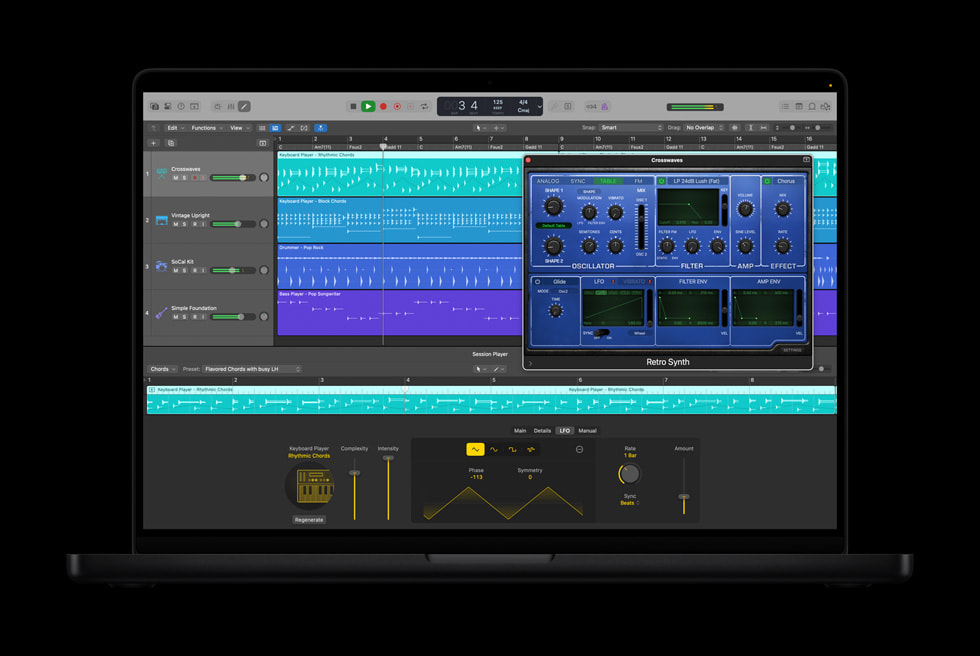
Logic Pro 12 is the major new release in this bundle, introducing AI-powered features that fundamentally change music production workflows:
New AI-Powered Features:
1. Synth Player - AI Session Player
- First AI-powered virtual synthesizer performer
- Automatically generates synth parts that complement your track
- Supports various electronic music genres
- Real-time adjustment of complexity, style, and intensity
- Works with any software synthesizer in your library
2. Chord ID - Intelligent Chord Recognition
- AI-powered chord detection from audio or MIDI
- Analyzes existing recordings to identify chord progressions
- Supports complex jazz and extended chords
- Export detected chords to MIDI for further editing
- Works with polyphonic audio sources
3. Quick Swipe Comping
- Faster take selection workflow
- Swipe across takes to select best portions
- Streamlined vocal and instrument editing
- Non-destructive editing with instant preview
4. Natural Language Loop Search
- Search Apple Loops using descriptive phrases
- Example: "upbeat acoustic guitar strumming"
- AI understands mood, tempo, and style descriptions
- Works with third-party loop libraries
Final Cut Pro Updates
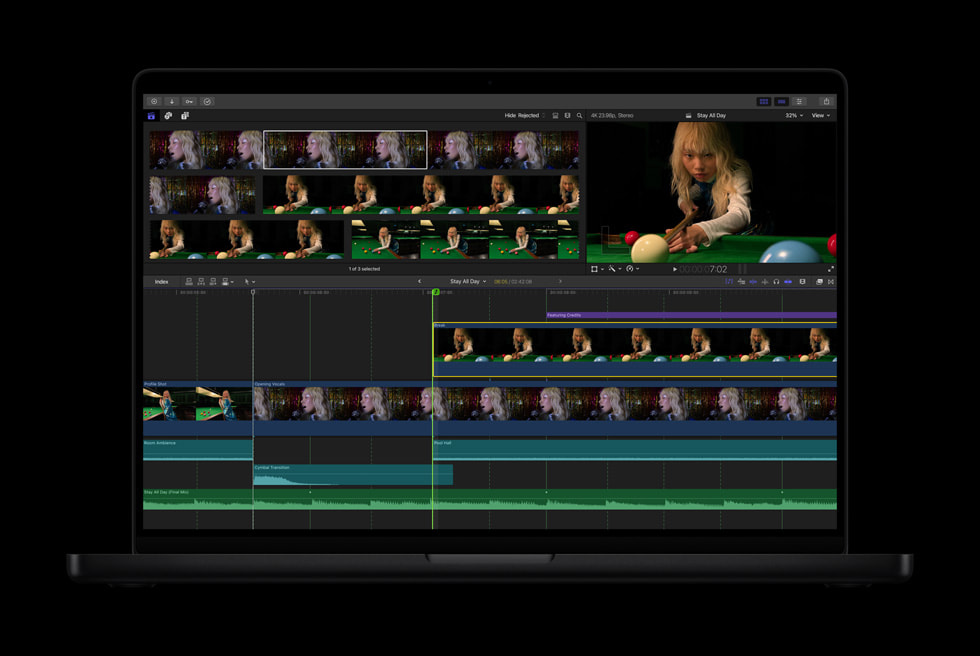
Final Cut Pro in Creator Studio includes all recent updates:
Key Features:
- Beat Detection: Automatically detect beats in music for precise editing
- Spatial Video Editing: Full support for Apple Vision Pro content
- Object Tracking: Enhanced tracking for effects and titles
- Magnetic Timeline: Non-destructive, clip-connected editing
- ProRes RAW Support: Professional codec workflow
- Metal GPU Acceleration: Optimized for Apple Silicon
Pixelmator Pro
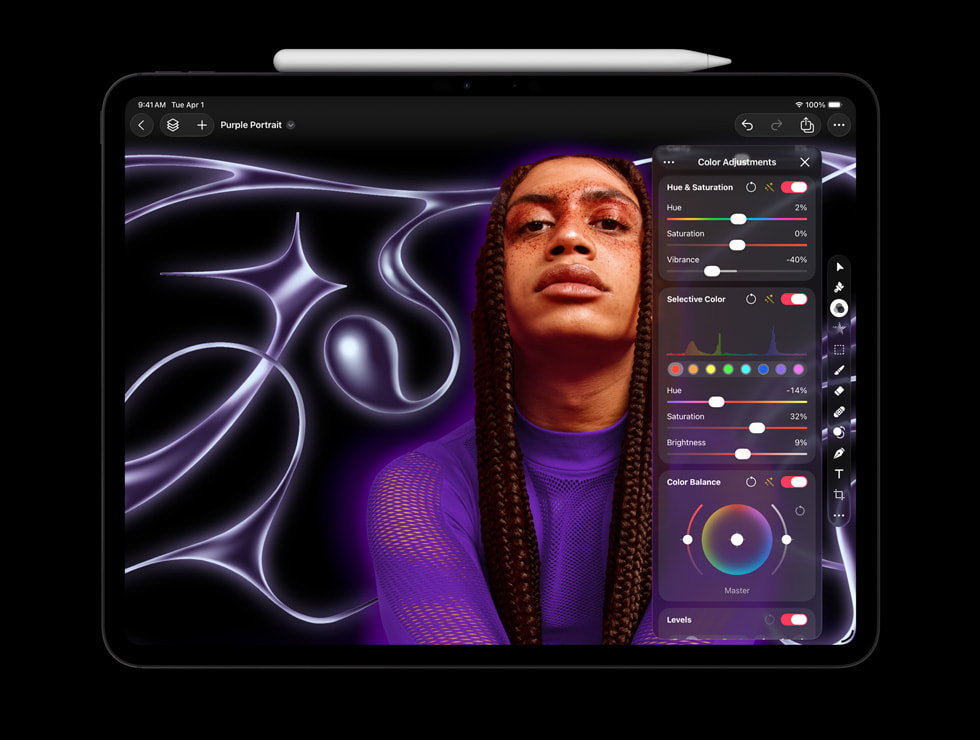
Professional Image Editing Features:
- ML-powered image enhancement
- Non-destructive editing
- RAW photo support
- Photoshop file compatibility
- GPU-accelerated filters
- Mac and iPad universal purchase
Motion
Motion Graphics Application:
- Real-time design and animation
- 2D/3D titles and effects
- Particle systems
- Behavior-based animation
- Direct integration with Final Cut Pro
- 360-degree video support
Compressor
Media Encoding:
- Professional encoding workflows
- Custom encoding presets
- Batch processing
- Support for all major formats
- Hardware acceleration on Apple Silicon
- iTunes Store package creation
MainStage
Live Performance Application:
- Concert-ready sound from Logic instruments
- Low-latency audio processing
- MIDI controller mapping
- Backing track playback
- Setlist management
- Looper and other performance tools
Pricing Analysis: Is Creator Studio Worth It?
Monthly vs Annual Pricing
| Plan | Monthly | Annual | Savings |
|---|---|---|---|
| Standard | $12.99/month | $129/year ($10.75/month) | $26.88/year |
| Education | $2.99/month | $29.99/year ($2.50/month) | $5.89/year |
One-Time Purchase Comparison
Apple maintains one-time purchase options for those who prefer ownership:
| Option | Cost | Break-Even Point |
|---|---|---|
| Logic Pro 12 alone | $199.99 | 16 months of subscription |
| Final Cut Pro alone | $299.99 | 24 months of subscription |
| Both apps | $499.98 | 39 months of subscription |
| All apps individually | $679.94 | 53 months (~4.5 years) |
Recommendation by Use Case:
Choose Subscription If:
- You need multiple apps from the bundle
- You want access to new features immediately
- You're uncertain about long-term creative direction
- Budget flexibility is important (lower initial cost)
- You're a student or educator (incredible value at $2.99/month)
Choose One-Time Purchase If:
- You only need one or two specific apps
- You plan to use the software for 4+ years
- You prefer software ownership
- You don't need the latest features immediately
Apple Creator Studio vs Adobe Creative Cloud
The natural comparison is with Adobe's subscription offerings:
| Bundle | Monthly Cost | Annual Cost | Key Apps |
|---|---|---|---|
| Apple Creator Studio | $12.99 | $129 | Final Cut Pro, Logic Pro 12, Pixelmator Pro, Motion |
| Adobe All Apps | $59.99 | $719.88 | Premiere Pro, After Effects, Photoshop, 20+ apps |
| Adobe Single App | $22.99 | $275.88 | One app only |
| Adobe Photography | $9.99 | $119.88 | Lightroom, Photoshop |
Key Differences:
Apple Creator Studio Advantages:
- 78% cheaper than Adobe All Apps ($129 vs $719.88/year)
- Optimized for Apple Silicon performance
- No internet requirement for most features
- One-time purchase option available
- Better integration with macOS and Apple ecosystem
Adobe Creative Cloud Advantages:
- Industry standard in many professional environments
- Cross-platform (Windows and Mac)
- More applications for specialized workflows
- Larger plugin and extension ecosystem
- Adobe Stock integration
Education Pricing Deep Dive

The education pricing for Apple Creator Studio is exceptional:
$2.99/month or $29.99/year - Available for:
- Current students (K-12, college, university)
- Teachers and educators
- Faculty members
- Staff at educational institutions
Verification Required:
- UNiDAYS verification for most users
- .edu email for some regions
- Student ID verification available
Value Analysis: At $29.99/year for education users, you're getting:
- $679.94 worth of software for $29.99
- 96% discount from individual purchase prices
- Access to professional-grade tools used in the industry
- Regular updates and new features
This makes Apple Creator Studio one of the best values in creative software for students.
System Requirements
Minimum Requirements
| Component | Requirement |
|---|---|
| Operating System | macOS Tahoe 26 or later |
| Processor | Apple Silicon (M1 or later) recommended, Intel supported |
| RAM | 8GB minimum, 16GB recommended |
| Storage | 6GB for apps, additional for content |
| Graphics | Metal-compatible GPU required |
Recommended Specifications by Workflow
Music Production (Logic Pro 12):
- M2 Pro or later
- 16GB unified memory minimum
- 512GB SSD minimum
- External audio interface recommended
Video Editing (Final Cut Pro):
- M3 Pro or M4 for 4K editing
- 32GB for 8K or multicam workflows
- Fast external storage for media
- Calibrated external display recommended
Image Editing (Pixelmator Pro):
- M1 or later
- 8GB RAM sufficient for most work
- SSD storage for RAW files
How to Subscribe to Apple Creator Studio
Starting January 28, 2026:
Through App Store:
- Open the App Store on your Mac
- Search for "Apple Creator Studio"
- Click Subscribe
- Choose monthly or annual plan
- Authenticate with Face ID, Touch ID, or password
Through System Settings:
- Open System Settings > Apple Account
- Click Subscriptions
- Select Apple Creator Studio
- Choose your plan
Education Subscription:
- Visit education.apple.com
- Verify your student/educator status
- Subscribe through the App Store
- Education pricing applies automatically
Managing Your Subscription
Cancel Anytime:
- No penalty for cancellation
- Access continues until end of billing period
- Apps remain installed but features are locked
Switching Plans:
- Change between monthly and annual at any time
- Prorated billing for plan changes
- No interruption in service
Final Cut Pro and Logic Pro: Still Available Separately
Apple emphasizes that one-time purchases remain available:
Final Cut Pro: $299.99
- Full purchase, own forever
- Free updates within major version
- No subscription required
Logic Pro 12: $199.99
- Full purchase, own forever
- Free updates within major version
- No subscription required
Pixelmator Pro: $49.99 (or included in Creator Studio)
This flexibility allows users to choose the model that works best for their needs and budget.
Expert Verdict: Who Should Subscribe?
Highly Recommended For:
Students and Educators: At $2.99/month, there's no better value for professional creative tools. Even if you only use one app, the price is worth it.
Multi-Discipline Creators: If you work across music, video, and graphics, the bundle saves significant money compared to individual purchases.
New Creative Professionals: The low monthly cost reduces the barrier to entry for professional tools.
Logic Pro 12 Early Adopters: The new AI features in Logic Pro 12 are worth exploring through the subscription before committing to a purchase.
Consider Alternatives If:
Single-App Users: If you only need Final Cut Pro or Logic Pro, the one-time purchase may be more economical over 4+ years.
Adobe Ecosystem Users: If your workflow is deeply integrated with Adobe products and cross-platform compatibility, switching costs may outweigh savings.
Casual Hobbyists: GarageBand and iMovie remain free and capable for non-professional use.
Conclusion
Apple Creator Studio represents a significant evolution in Apple's approach to professional creative software. At $12.99/month (or an incredible $2.99/month for education), it provides exceptional value for creators who work across multiple disciplines.
The introduction of Logic Pro 12 with AI-powered features like Synth Player and Chord ID signals Apple's commitment to keeping its creative tools at the cutting edge. Combined with Final Cut Pro, Pixelmator Pro, and the supporting applications, this bundle offers a complete creative toolkit at a fraction of the cost of alternatives.
Key Takeaways:
- Launch Date: January 28, 2026
- Standard Pricing: $12.99/month or $129/year
- Education Pricing: $2.99/month or $29.99/year (best value in creative software)
- One-Time Purchase: Still available for individual apps
- Recommendation: Subscribe if you use 2+ apps or want Logic Pro 12 features
For macOS Tahoe optimization to get the best performance from these creative apps, see our performance analysis guide. Learn about macOS Tahoe's professional workflow features.