macOS Tahoe 26.2 Thunderbolt 5 Clustering Guide: Build Your Own AI Supercomputer
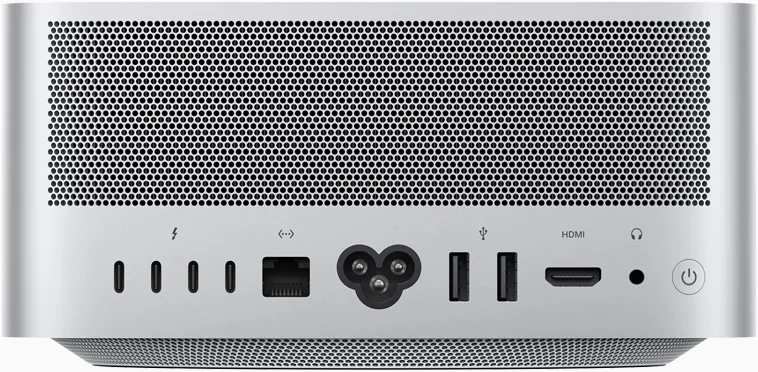
Complete guide to building Mac clusters with Thunderbolt 5 in macOS Tahoe 26.2. Learn MLX framework setup, EXO configuration, hardware requirements, and run trillion-parameter AI models locally.
macOS Tahoe 26.2 introduces a revolutionary feature that transforms multiple Macs into a unified AI supercomputer using Thunderbolt 5 clustering. This comprehensive guide covers everything from hardware requirements to running trillion-parameter models like Kimi K2 Thinking on your own Mac cluster.
Key Takeaways
- Thunderbolt 5 clustering in macOS Tahoe 26.2 enables connecting multiple Macs at up to 80 Gbps bidirectional speed
- Four Mac Studios with 512GB each can run the 1 trillion parameter Kimi K2 Thinking model using under 500W total power
- Compatible devices include M4 Pro Mac mini, M4 Pro/Max MacBook Pro, and M3 Ultra Mac Studio
- MLX framework and EXO 1.0 software provide the distributed computing infrastructure
- No special hardware required - just standard Thunderbolt 5 cables under 2 meters
Executive Summary: Understanding Mac Clustering Technology
Why Thunderbolt 5 Clustering Matters
The release of macOS Tahoe 26.2 marks a pivotal moment in Apple's professional computing strategy. For the first time, Apple provides native, optimized support for connecting multiple Macs into a unified computing cluster using Thunderbolt 5's unprecedented bandwidth. This isn't just an incremental improvement—it fundamentally changes what's possible with Mac hardware.
The Problem It Solves:
Running large AI models has traditionally required expensive GPU clusters with massive power consumption. A typical setup for trillion-parameter models might include:
- NVIDIA H100 cluster: $400,000+ hardware, 10kW+ power draw
- Cloud GPU instances: $2-5 per hour for capable instances
- Custom datacenter infrastructure: Cooling, power distribution, networking
The Mac Cluster Solution:
With Thunderbolt 5 clustering, you can achieve comparable capabilities with:
- 4x Mac Studio: $47,000 hardware (88% cost reduction vs H100)
- Power draw: Under 500W (95% reduction)
- No infrastructure: Standard office environment
- Local processing: Complete data privacy
Who Benefits from Mac Clustering?
AI Researchers and ML Engineers:
- Run frontier models locally without cloud dependencies
- Iterate faster with dedicated hardware
- Maintain complete control over training data
Creative Professionals:
- Distributed video rendering across multiple Macs
- AI-assisted editing with local models
- Large file processing without network latency
Enterprise IT Teams:
- Private AI deployments
- Cost-predictable infrastructure
- Simplified maintenance compared to GPU clusters
Independent Developers:
- Build AI applications with local inference
- Test against large models during development
- Ship products without ongoing API costs
What is Thunderbolt 5 Mac Clustering?
The Evolution of Mac Distributed Computing
Thunderbolt 5 Mac clustering represents Apple's modern revival of distributed computing on Mac. Long-time Apple users may remember Xgrid, which turned collections of Macs into supercomputers. The new Thunderbolt 5 clustering in macOS Tahoe 26.2 follows a similar concept but operates at dramatically higher speeds.
Historical Context:
- Xgrid Era: Limited to Ethernet speeds (1-10 Gbps)
- Thunderbolt 4 Clusters: 40 Gbps, hub usage reduced speeds to 10 Gbps
- Thunderbolt 5 Clusters: Full 80 Gbps bidirectional, 120 Gbps burst mode
How Thunderbolt 5 Clustering Works
The clustering technology uses Remote Direct Memory Access (RDMA), allowing one Mac to directly access the memory of another without CPU overhead. When you connect multiple Macs via Thunderbolt 5:
- Memory Pooling: Each Mac's unified memory becomes accessible to the entire cluster
- Model Partitioning: Large AI models are split across machines proportionally
- Parallel Processing: Workloads are distributed based on available resources
- Low-Latency Communication: Direct memory access eliminates network bottlenecks
Example Memory Pool Configuration:
| Configuration | Total Memory | Use Case |
|---|---|---|
| 2x Mac Studio (512GB) | 1TB shared | Kimi K2 Thinking (594GB) |
| 4x Mac Studio (512GB) | 2TB shared | Multiple trillion-parameter models |
| 4x Mac mini M4 Pro (64GB) | 256GB shared | 70B-200B parameter models |
Apple Silicon Unified Memory Advantage
One key reason Mac clustering is so effective lies in Apple Silicon's unified memory architecture. Unlike traditional computers where GPU and CPU have separate memory pools, Apple Silicon shares memory between all processing units.
Unified Memory Benefits for Clustering:
| Aspect | Traditional Architecture | Apple Silicon |
|---|---|---|
| Memory Access | GPU copies data from RAM | Direct shared access |
| Bandwidth | Limited by PCIe (64 GB/s) | Up to 800 GB/s (M3 Ultra) |
| Efficiency | Data duplication required | Zero-copy operations |
| Scalability | VRAM limits model size | Unified pool scales linearly |
When you cluster multiple Macs, you're effectively creating a larger unified memory pool. A model that's too large for one Mac's memory can be split across nodes, with each Mac holding a portion and sharing access via Thunderbolt 5.
Practical Example:
- Single Mac Studio (512GB): Can run models up to ~450GB (leaving headroom)
- 2x Mac Studio (1TB pooled): Can run models up to ~900GB
- 4x Mac Studio (2TB pooled): Can run models up to ~1.8TB
This linear scaling is what makes trillion-parameter models like Kimi K2 Thinking feasible on Mac hardware.
Hardware Requirements and Compatibility
Compatible Mac Models
Thunderbolt 5 Native Support (Full 80 Gbps):
| Device | Thunderbolt 5 Ports | Max Memory | Notes |
|---|---|---|---|
| Mac Studio (M3 Ultra) | 6 | 512GB | Best for large clusters |
| Mac mini (M4 Pro) | 3 front | 64GB | Cost-effective nodes |
| MacBook Pro 14" (M4 Pro) | 3 | 48GB | Portable clustering |
| MacBook Pro 16" (M4 Max) | 3 | 128GB | High-memory portable |
Important Specifications:
- Thunderbolt 5 Speed: 80 Gbps bidirectional (120 Gbps burst mode for video)
- Memory Bandwidth: M4 Pro delivers 273GB/s, M4 Max delivers 546GB/s
- Cable Length: Keep under 2 meters for optimal performance
- Cable Type: Standard Thunderbolt 5 cables (USB4 v2 compatible)
Recommended Cluster Configurations
Budget Cluster (Machine Learning Experimentation):
4x Mac mini M4 Pro (24GB each)
Total Memory: 96GB shared
Cost: ~$7,200
Best For: Models up to 70B parameters
Power Draw: ~60W idle, ~200W peak
Noise Level: Nearly silent
This configuration is perfect for developers learning distributed ML, small teams experimenting with open-source models, or running smaller models like Llama 3.1 8B and Mistral 7B with excellent performance.
Professional Cluster (Production AI Workloads):
4x Mac mini M4 Pro (64GB each)
Total Memory: 256GB shared
Cost: ~$13,200
Best For: Models up to 200B parameters
Power Draw: ~80W idle, ~300W peak
Noise Level: Nearly silent
The professional tier unlocks medium-large models like Llama 3.1 70B and can run inference on enterprise-grade models. This is the sweet spot for most businesses deploying local AI.
Enterprise Cluster (Trillion-Parameter Models):
4x Mac Studio M3 Ultra (512GB each)
Total Memory: 2TB shared
Cost: ~$47,000 (€47,000)
Best For: Kimi K2 Thinking, DeepSeek V3, frontier models
Power Draw: ~100W idle, ~500W peak
Noise Level: Moderate under load
This top-tier configuration matches or exceeds datacenter GPU clusters for inference workloads while consuming a fraction of the power and requiring no specialized infrastructure.
Thunderbolt 5 Cable Selection Guide
Choosing the right cables is critical for cluster performance. Not all cables support full Thunderbolt 5 speeds.
Recommended Cables:
| Cable | Length | Max Speed | Price Range |
|---|---|---|---|
| Apple Thunderbolt 5 Pro | 1m | 120 Gbps | $69-79 |
| OWC Thunderbolt 5 | 0.8m | 80 Gbps | $50-60 |
| CalDigit TB5 Cable | 1m | 80 Gbps | $45-55 |
| Belkin Connect Pro | 1m | 80 Gbps | $40-50 |
Cable Selection Tips:
- Stick to under 1 meter: Full 80 Gbps requires short, high-quality cables
- Look for USB4 v2 certification: Ensures Thunderbolt 5 compatibility
- Avoid adapters: Direct TB5-to-TB5 connections only
- Buy from reputable brands: Knockoff cables may not achieve rated speeds
- Test cables before deployment: Use
system_profiler SPThunderboltDataTypeto verify link speed
Warning: Many "Thunderbolt 5 compatible" cables sold online only achieve Thunderbolt 4 speeds. Always verify specifications before purchase.
Software Stack: MLX and EXO Frameworks
Understanding MLX Distributed Computing
MLX is Apple's open-source array framework designed specifically for machine learning on Apple Silicon. It provides native support for distributed computing across multiple Macs.
Key MLX Features:
- Unified Memory Access: Leverages Apple Silicon's unified memory architecture
- Lazy Evaluation: Computations only execute when results are needed
- Dynamic Compilation: Just-in-time compilation for optimal performance
- Distributed Primitives: Built-in support for multi-machine operations
MLX Communication Backends
MLX supports three communication backends for different use cases:
| Backend | Speed | Best For | Setup Complexity |
|---|---|---|---|
| Ring | Fastest | Thunderbolt connections | Medium |
| MPI | Fast | Ethernet networks | Higher |
| NCCL | N/A | CUDA environments | N/A on Mac |
The Ring backend is recommended for Thunderbolt 5 clusters as it's optimized for direct peer-to-peer connections.
Understanding Distributed Training vs Inference
Before diving into setup, it's important to understand the two primary use cases for Mac clustering:
Distributed Inference (Running Models): This is the primary use case for most users. When you run inference:
- The model is split across multiple Macs based on available memory
- Each Mac holds a portion of the model weights
- During generation, data flows between nodes as needed
- No training occurs—you're using a pre-trained model
Distributed Training (Creating Models): For researchers and advanced users:
- Training data is split across nodes (data parallelism)
- Gradients are averaged across all nodes after each batch
- Model weights are synchronized periodically
- Requires significantly more inter-node communication
| Use Case | Bandwidth Requirement | Complexity | Typical Users |
|---|---|---|---|
| Inference | Medium (model loading) | Low | Most users |
| Fine-tuning | High (gradient sync) | Medium | ML engineers |
| Full Training | Very High (constant sync) | High | Researchers |
For most Mac cluster users, inference is the primary goal—running large models that wouldn't fit on a single machine.
EXO: Simplified Cluster Management
EXO (from Exo Labs) provides a higher-level abstraction for building AI clusters. Apple has integrated EXO's protocol into macOS Tahoe 26.2.
EXO Key Features:
- Auto-Discovery: Automatically detects other devices on the network
- Peer-to-Peer Architecture: No master-worker hierarchy
- Intelligent Partitioning: Optimally splits models based on device capabilities
- ChatGPT-Compatible API: OpenAI-compatible endpoint at
localhost:52415
Step-by-Step Cluster Setup Guide
Prerequisites
Before starting, ensure you have:
- macOS Tahoe 26.2 or later installed on all Macs
- Thunderbolt 5 cables (under 2 meters)
- Python 3.12+ installed
- Passwordless SSH configured between machines
- Same network for all machines (for initial discovery)
Method 1: MLX Native Setup (Recommended)
Step 1: Install MLX
# Install MLX via pip
pip install mlx

# Verify installation
python -c "import mlx.core as mx; print(mx.__version__)"
Step 2: Configure Thunderbolt Network
Connect your Macs in a ring topology using Thunderbolt 5 cables:
Mac 1 ←→ Mac 2 ←→ Mac 3 ←→ Mac 4 ←→ Mac 1Use the MLX distributed configuration tool:
# Discover Thunderbolt ring and generate configuration
mlx.distributed_config --verbose --hosts mac1,mac2,mac3,mac4

# Auto-configure all nodes (requires passwordless sudo)
mlx.distributed_config --verbose --hosts mac1,mac2,mac3,mac4 --auto-setup
Step 3: Create Hostfile Configuration
Create a ring-4.json file:
[
    {"ssh": "mac1.local", "ips": ["192.168.100.1"]},
    {"ssh": "mac2.local", "ips": ["192.168.100.2"]},
    {"ssh": "mac3.local", "ips": ["192.168.100.3"]},
    {"ssh": "mac4.local", "ips": ["192.168.100.4"]}
]
Step 4: Test Distributed Communication
Create a test script test_distributed.py:
import mlx.core as mx

# Initialize distributed group
world = mx.distributed.init()

# Each process creates an array with its rank
x = mx.ones(10) * world.rank()

# Sum arrays across all processes
result = mx.distributed.all_sum(x)

print(f"Rank {world.rank()}: sum = {result}")
Launch the test:
mlx.launch --hostfile ring-4.json test_distributed.pyExpected output (4 nodes):
Rank 0: sum = array([6., 6., 6., 6., 6., 6., 6., 6., 6., 6.])
Rank 1: sum = array([6., 6., 6., 6., 6., 6., 6., 6., 6., 6.])
Rank 2: sum = array([6., 6., 6., 6., 6., 6., 6., 6., 6., 6.])
Rank 3: sum = array([6., 6., 6., 6., 6., 6., 6., 6., 6., 6.])
Method 2: EXO Setup (User-Friendly)
Step 1: Clone and Install EXO
# Clone the repository
git clone https://github.com/exo-explore/exo.git
cd exo

# Install dependencies
pip install -e .

# Or use the install script
source install.sh
Step 2: Configure MLX for Apple Silicon
# Run the MLX configuration script
./configure_mlx.sh
This optimizes GPU memory allocation on Apple Silicon Macs.
Step 3: Start the Cluster
On each node, run the same command:
exoEXO will:
- Automatically discover other nodes via peer-to-peer communication
- Apply ring memory weighted partitioning
- Start the web interface at
http://localhost:52415 - Start the API endpoint at
http://localhost:52415/v1/chat/completions
Step 4: Access the Interface
Open your browser to http://localhost:52415 for a ChatGPT-like interface to interact with your cluster.
Running Large Language Models
Downloading Models
EXO supports various model sources:
# Download from Hugging Face
exo download moonshotai/Kimi-K2-Instruct

# Download Llama models
exo download meta-llama/Llama-3.1-70B-Instruct
Memory Requirements by Model
| Model | Parameters | Memory Required | Recommended Cluster |
|---|---|---|---|
| Llama 3.1 8B | 8B | 16GB | Single Mac |
| Llama 3.1 70B | 70B | 140GB | 3x Mac mini (64GB) |
| Llama 3.1 405B | 405B | 810GB | 4x Mac Studio (512GB) |
| Kimi K2 | 1T (32B active) | 594GB | 2x Mac Studio (512GB) |
| Kimi K2 Thinking | 1T (32B active) | 594GB | 2x Mac Studio (512GB) |
Running Kimi K2 Thinking
The Kimi K2 Thinking model demonstrates the power of Thunderbolt 5 clustering. It's a 1 trillion parameter mixture-of-experts (MoE) model with 32 billion active parameters. Developed by Moonshot AI, it represents the cutting edge of open-source reasoning models.
What Makes Kimi K2 Special:
- Architecture: Mixture-of-Experts (MoE) with 1T total parameters
- Active Parameters: Only 32B parameters active per inference
- Context Window: 256K tokens
- Quantization: Native INT4 for efficiency
- Size on Disk: ~594GB (vs 1TB+ for full precision)
import mlx.core as mx
from mlx_lm import load, generate

# Initialize distributed environment
world = mx.distributed.init()

# Load model (automatically distributed across nodes)
model, tokenizer = load("moonshotai/Kimi-K2-Instruct")

# Generate text
prompt = "Explain quantum computing in simple terms:"
response = generate(model, tokenizer, prompt=prompt, max_tokens=500)
print(response)
Performance Results (4x Mac Studio M3 Ultra):
- Total Memory: 2TB unified
- Power Consumption: Under 500W (vs 5,000W+ for GPU cluster)
- Token Generation: Competitive with cloud inference
- Cost Efficiency: 10x lower power than NVIDIA RTX 5090 cluster
Performance Optimization
Network Topology Best Practices
Ring Topology (Recommended for 4+ Nodes):
┌─────────────────────────────────────┐
│                                     │
│    Mac 1 ←──TB5──→ Mac 2           │
│      ↑                ↓             │
│     TB5              TB5            │
│      ↓                ↑             │
│    Mac 4 ←──TB5──→ Mac 3           │
│                                     │
└─────────────────────────────────────┘
Star Topology (Simple 2-3 Nodes):
Mac 2 ←──TB5──→ Mac 1 ←──TB5──→ Mac 3Cable and Connection Guidelines
| Factor | Recommendation | Impact |
|---|---|---|
| Cable Length | Under 2 meters | Maintains full 80 Gbps |
| Cable Quality | Certified TB5/USB4 v2 | Prevents data errors |
| Avoid Hubs | Direct connections | Hubs reduce to 10 Gbps |
| Port Selection | Use all available | Maximizes bandwidth |
Memory and Compute Balancing
When building a heterogeneous cluster (mixed hardware):
# MLX automatically balances based on device capabilities
# But you can customize partitioning:

import mlx.core as mx

# Get distributed world info
world = mx.distributed.init()

# Custom weight assignment
weights = {
    0: 2.0,  # Mac Studio gets 2x share
    1: 1.0,  # Mac mini gets 1x share
    2: 1.0,
    3: 1.0
}
Troubleshooting Common Issues
Connection Problems
Issue: Nodes not discovering each other
# Check Thunderbolt connection status
system_profiler SPThunderboltDataType

# Verify network interfaces
networksetup -listallhardwareports

# Test direct connectivity
ping mac2.local
Issue: Slow transfer speeds
# Test Thunderbolt bandwidth
iperf3 -c mac2.local -p 5201

# Expected: ~9-10 GB/s for TB5
# If lower: check cable length/quality
MLX Errors
Issue: "No distributed backend available"
# Ensure MLX is properly installed
pip install --upgrade mlx

# Check Python version (requires 3.12+)
python --version
Issue: "Out of memory" on distributed inference
# Enable memory-efficient mode
import mlx.core as mx
mx.metal.set_memory_limit(0.95)  # Use 95% of available memory

# Or reduce batch size
generate(model, tokenizer, prompt=prompt, max_tokens=100)
SSH Configuration
Ensure passwordless SSH between all nodes:
# Generate SSH key if needed
ssh-keygen -t ed25519

# Copy to all nodes
ssh-copy-id [email protected]
ssh-copy-id [email protected]
ssh-copy-id [email protected]

# Test
ssh mac2.local "hostname"
Power Efficiency and Cost Analysis
Power Consumption Comparison
| Configuration | Power Draw | Performance | $/Performance |
|---|---|---|---|
| 4x Mac Studio (512GB) | ~500W | Trillion-parameter capable | Best |
| NVIDIA H100 Cluster (4x) | ~2,800W | Similar capability | 5.6x more power |
| NVIDIA RTX 5090 Cluster | ~2,300W | Limited VRAM | 4.6x more power |
Total Cost of Ownership
Mac Studio Cluster (2TB Configuration):
- Hardware: $47,000
- Annual Power (24/7): ~$500
- Maintenance: Minimal
- 5-Year TCO: ~$49,500
Equivalent GPU Cluster:
- Hardware: $100,000+
- Annual Power (24/7): ~$3,000
- Cooling Infrastructure: $10,000+
- Maintenance: Significant
- 5-Year TCO: ~$130,000+
Use Cases and Applications
Machine Learning Research
Thunderbolt 5 clustering excels for academic and corporate ML research:
Research Applications:
- Model Training: Distributed training across multiple Macs with gradient synchronization
- Fine-Tuning: Local fine-tuning of large models on proprietary datasets
- Inference: Running trillion-parameter models locally for experimentation
- Ablation Studies: Rapid prototyping without waiting for cloud GPU availability
Example Research Workflow:
import mlx.core as mx
from mlx_lm import load, generate

# Load your fine-tuned model
model, tokenizer = load("./my-finetuned-model")

# Run experiments across distributed cluster
for prompt in research_prompts:
    response = generate(model, tokenizer, prompt=prompt)
    log_result(prompt, response)
Universities and Research Labs benefit from:
- Fixed hardware costs vs unpredictable cloud billing
- Complete data privacy for sensitive research
- Teaching resources for distributed computing courses
- Publication-ready reproducible experiments
Professional Creative Workflows
Integration with Apple's creative ecosystem provides unique advantages:
Video Production:
- Distributed Rendering: Final Cut Pro, DaVinci Resolve, Motion projects
- AI-Assisted Editing: Local AI models for scene detection, transcription
- Color Grading: GPU-accelerated color processing across nodes
- 8K RAW Processing: Sufficient memory for large video files
Audio Production:
- Logic Pro Distributed Processing: Plugin rendering across nodes
- AI Music Generation: Run local music AI models
- Audio Restoration: ML-based noise reduction locally
3D and Motion Graphics:
- Blender Distributed Rendering: Cycles rendering across Mac cluster
- Cinema 4D: CPU rendering with cluster support
- Houdini: Simulation distribution (with appropriate plugins)
For more on creative workflows, see our macOS Tahoe Professional Workflow Revolution Guide.
Development and Testing
Modern AI application development benefits significantly from local clusters:
AI-Powered Application Development:
# Example: Building an AI chatbot with local inference
from flask import Flask, request, jsonify
import mlx.core as mx
from mlx_lm import load, generate

app = Flask(__name__)
model, tokenizer = load("llama-3.1-70b")

@app.route('/chat', methods=['POST'])
def chat():
    prompt = request.json['message']
    response = generate(model, tokenizer, prompt=prompt)
    return jsonify({'response': response})
Developer Benefits:
- Local LLM Development: Test and iterate without API rate limits
- CI/CD Acceleration: Distributed build and test systems
- AI Application Development: Build apps with local AI backends
- Cost-Free Experimentation: No per-request charges during development
Testing Advantages:
- Test against production-scale models locally
- No network latency in test environments
- Consistent, reproducible test results
- Full control over model versions
Check our macOS Tahoe Developer Setup Guide for development environment configuration.
Enterprise Deployment Scenarios
Large organizations are deploying Mac clusters for:
Internal AI Assistants:
- Private ChatGPT-style interfaces
- Document analysis and summarization
- Code review and generation
- Meeting transcription and analysis
Compliance-Sensitive Industries:
- Healthcare: HIPAA-compliant AI processing
- Finance: On-premises model inference
- Legal: Confidential document analysis
- Government: Air-gapped AI capabilities
Cost-Benefit Analysis for Enterprise:
| Scenario | Cloud Cost/Year | Mac Cluster Cost/Year | Savings |
|---|---|---|---|
| Light (1M tokens/day) | ~$11,000 | ~$3,000 (amortized) | 73% |
| Medium (10M tokens/day) | ~$110,000 | ~$15,000 (amortized) | 86% |
| Heavy (100M tokens/day) | ~$1.1M | ~$60,000 (amortized) | 95% |
Future of Mac Clustering
M5 and Beyond
The Apple M5 chip introduces Neural Accelerators in every GPU core, delivering 4x AI performance improvement. When combined with Thunderbolt 5 clustering:
- Enhanced MLX Support: Full access to M5 neural accelerators
- Improved Memory Bandwidth: 153GB/s per chip
- Better Power Efficiency: More performance per watt
Mac Pro Implications
According to reports, Apple has "largely written off the Mac Pro" internally. Thunderbolt 5 clustering provides an alternative path:
- Scalable Performance: Add nodes as needed
- Lower Entry Cost: Start small, expand later
- Flexibility: Mix different Mac models
- Future-Proof: Upgrade individual nodes over time
Security and Privacy Considerations
Why Local Processing Matters
One of the most significant advantages of Mac clustering over cloud-based AI is complete data privacy. Your prompts, training data, and generated outputs never leave your local network.
Privacy Benefits:
- No data transmission: All processing happens on-premises
- Compliance friendly: Easier HIPAA, GDPR, SOC2 compliance
- IP protection: Proprietary data stays private
- No logging concerns: Full control over usage logs
Security Best Practices for Mac Clusters:
- Network Isolation: Keep your cluster on a dedicated VLAN
- Firewall Configuration: Block external access to cluster ports
- SSH Key Management: Use ed25519 keys, rotate regularly
- macOS Security: Enable FileVault, keep systems updated
- Physical Security: Secure server room access
For comprehensive macOS security configuration, see our macOS Tahoe Security & Privacy Guide.
Real-World Performance Benchmarks
Inference Speed Comparison
Based on community testing and Apple's demonstrations:
| Model | Configuration | Tokens/Second | Comparison |
|---|---|---|---|
| Llama 3.1 70B | 2x Mac mini M4 Pro (64GB) | ~35 tok/s | Comparable to RTX 4090 |
| Llama 3.1 405B | 4x Mac Studio (512GB) | ~15 tok/s | Exceeds cloud A100 |
| Kimi K2 | 2x Mac Studio (512GB) | ~20 tok/s | First local trillion-param |
| DeepSeek V3 | 4x Mac Studio (512GB) | ~12 tok/s | Previously cloud-only |
Latency Analysis
| Metric | Mac Cluster | Cloud API | Difference |
|---|---|---|---|
| First Token | 100-500ms | 500-2000ms | 2-10x faster |
| Consistent Latency | Yes | Variable | More predictable |
| Cold Start | None | 5-30s | No waiting |
| Availability | 100% (local) | 99.9% | No outages |
Cost Per Token Comparison
Assuming 24/7 operation over 1 year:
| Solution | Hardware Cost | Operating Cost | Total 1-Year | Cost/1M Tokens |
|---|---|---|---|---|
| 4x Mac Studio Cluster | $47,000 | ~$500 | $47,500 | ~$0.02 |
| OpenAI GPT-4 | $0 | Usage-based | Variable | ~$30.00 |
| Claude API | $0 | Usage-based | Variable | ~$15.00 |
| AWS Bedrock | $0 | Usage-based | Variable | ~$10.00 |
For heavy users (>100M tokens/year), local Mac clustering becomes significantly more economical.
FAQ
How many Macs can I connect in a cluster?
The practical limit depends on your topology. With direct Thunderbolt connections (avoiding hubs), you can connect 4-6 Macs efficiently. Using a ring topology allows scaling to more nodes while maintaining full bandwidth. Beyond 6 nodes, you'll need careful topology planning to avoid bandwidth bottlenecks.
Do I need identical Macs for clustering?
No, MLX and EXO support heterogeneous clusters. However, the cluster will be limited by the slowest component. For best results, use similar-generation Macs with matching Thunderbolt versions. Memory distribution will be weighted by each node's available RAM.
Can I use Thunderbolt 4 Macs in a cluster?
Yes, but bandwidth will be limited to 40 Gbps on those connections. Thunderbolt 5 and 4 are backward compatible. The system will operate at the lower speed when mixing generations. For best performance, keep TB4 nodes as leaf nodes rather than in the middle of a ring.
What's the minimum memory needed for clustering?
The total cluster memory must exceed your model's memory requirement with some headroom for operations. For Llama 3.1 70B (140GB model), you need at least 3 Macs with 48GB each (144GB total). We recommend 10-20% headroom above model size.
Is Mac clustering suitable for training or only inference?
Both! MLX supports distributed training with gradient averaging across nodes. However, inference is the primary use case due to the memory pooling benefits for large models. Training requires more inter-node communication and is more sensitive to network latency.
How does this compare to cloud GPU instances?
For long-term use (more than 6 months of regular usage), Mac clustering is more cost-effective. You own the hardware, have no per-hour charges, and achieve competitive performance. For occasional use or experimentation, cloud instances may be more economical initially.
Can I run the cluster 24/7?
Absolutely. Mac hardware is designed for continuous operation. Mac Studios in particular have excellent thermal management for sustained workloads. Monitor temperatures using Activity Monitor or sudo powermetrics and ensure adequate ventilation.
What happens if one node fails?
Currently, MLX clustering doesn't support hot-swapping or automatic failover. If a node disconnects, the job will fail and need to be restarted. For critical workloads, implement checkpointing in your code to resume from the last saved state.
Can I use the cluster while running AI workloads?
Yes, but performance may be impacted. The EXO interface allows background operation while you use the Macs for other tasks. For best inference performance, minimize other activities during heavy AI workloads.
Conclusion
macOS Tahoe 26.2's Thunderbolt 5 clustering represents a paradigm shift in local AI computing. By combining multiple Macs into a unified supercomputer, users can run trillion-parameter models at a fraction of traditional GPU cluster costs.
Key Benefits:
- 10x lower power consumption than GPU alternatives
- No specialized hardware required
- Simple setup with MLX and EXO
- Scalable from 2 to 6+ nodes
- Local, private AI processing
For users invested in the Apple ecosystem, this feature alone may justify the upgrade to macOS Tahoe 26.2. Check our macOS Tahoe 26.2 Update Guide for complete update instructions.
Ready to optimize your Mac for AI workloads? Start with our macOS Tahoe Storage Management Guide to ensure you have adequate space for large models.
Sources
- ML in macOS Tahoe gets GPU, Thunderbolt 5 clustering boost - Apple Insider, November 2025
- You can turn a cluster of Macs into an AI supercomputer in macOS Tahoe 26.2 - Engadget, November 2025
- A cluster of Mac Studios is just one reason we no longer need a Mac Pro - 9to5Mac, November 2025
- AI Cluster: Four Macs with 2 TB can run the giant model Kimi K2 Thinking - Heise Online, November 2025
- MLX Distributed Communication Documentation - Apple MLX Official Docs
- EXO: Run your own AI cluster at home - EXO Labs GitHub
- Explore large language models on Apple silicon with MLX - WWDC25 - Apple Developer
- Kimi K2 - Moonshot AI - Moonshot AI Official