macOS Tahoe Developer's Ultimate Guide 2025: Xcode 16, SwiftUI Liquid Glass, Foundation Models, and Apple Intelligence Integration
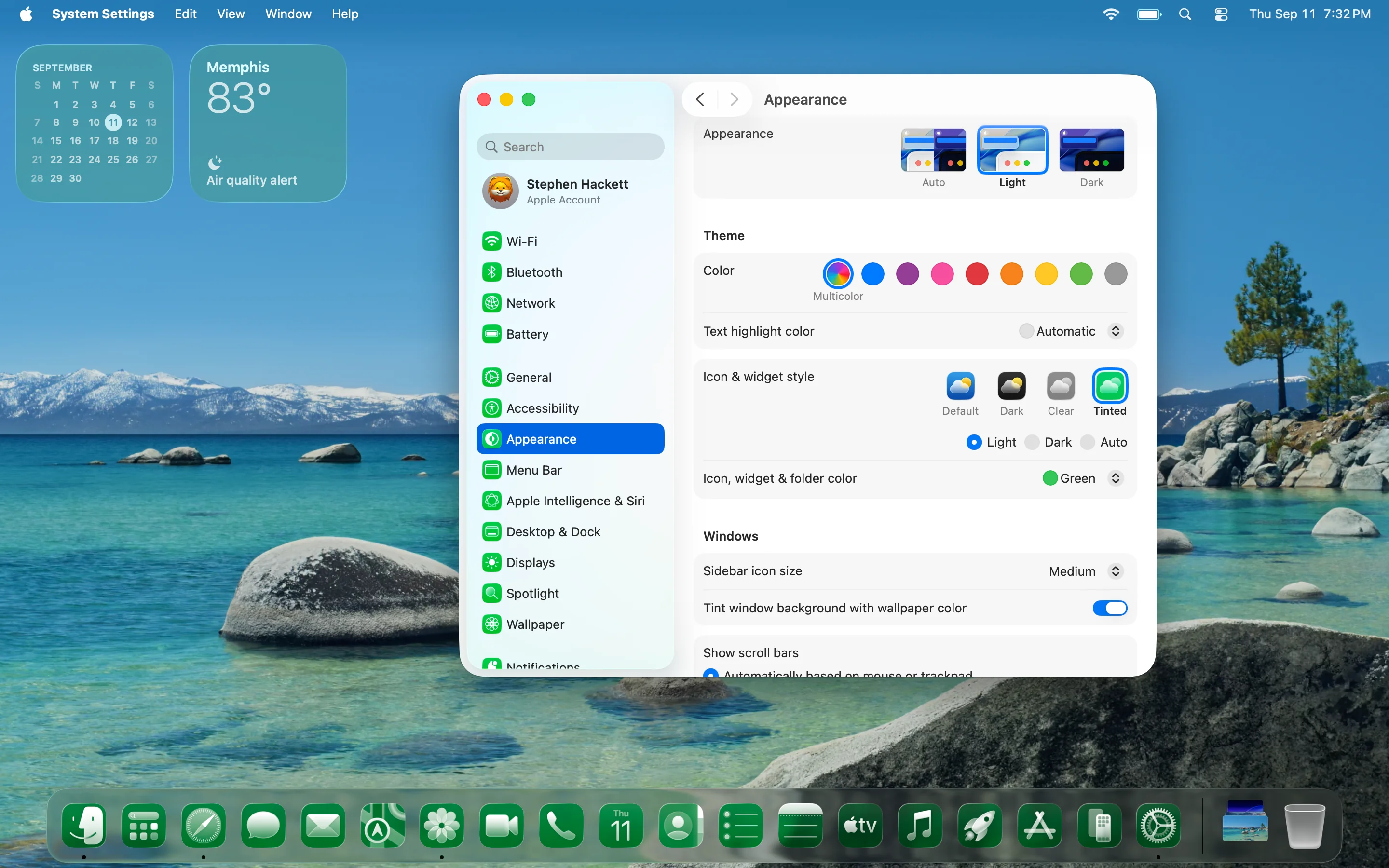
Complete developer guide for macOS Tahoe 26 featuring Xcode 16 with AI integration, SwiftUI Liquid Glass design system, Foundation Models framework, new APIs, performance tools, and cross-platform development strategies for Apple's revolutionary operating system.
macOS Tahoe 26 represents the most significant evolution in Apple's development ecosystem since the introduction of SwiftUI. This comprehensive guide explores everything developers need to know about macOS Tahoe's revolutionary tools, frameworks, and capabilities, from Xcode 16's AI integration to the groundbreaking Liquid Glass design system and on-device Foundation Models framework.
Executive Summary: macOS Tahoe 26 Development Revolution
What Makes macOS Tahoe 26 Groundbreaking for Developers
macOS Tahoe 26 introduces a paradigm shift in Apple development, combining revolutionary visual design with powerful artificial intelligence capabilities. As the final macOS version supporting Intel hardware, Tahoe represents both an end and a beginning—marking the complete transition to Apple Silicon optimization while introducing technologies that will define the next decade of Mac development.
Critical Development Changes:
- Xcode 16 (Xcode 26): Native ChatGPT integration with AI-powered coding assistance
- Liquid Glass Design System: Revolutionary translucent UI framework across all Apple platforms
- Foundation Models Framework: On-device 3-billion parameter language model with Swift integration
- Metal 4 Graphics: Advanced graphics capabilities with frame interpolation and denoising
- Enhanced Performance Tools: Processor Trace instrument with function-level analysis
- Cross-Platform Unification: Consistent development experience across iOS, iPadOS, macOS, watchOS, and tvOS
Strategic Implications:
- Final Intel compatibility creates urgency for Apple Silicon transition planning
- AI-first development workflow fundamentally changes coding practices
- Unified design system reduces cross-platform development complexity
- On-device intelligence eliminates external API dependencies for AI features
Development Environment Requirements
System Compatibility:
- Apple Silicon Macs: Full feature access including AI integration and performance tools
- Intel Macs (Final Support): Limited compatibility for select 2019-2020 models
- Memory Requirements: 16GB RAM minimum for professional development, 32GB+ recommended
- Storage: 1TB+ SSD recommended for optimal Xcode performance and AI model caching
Supported Intel Models (Final Generation):
- Mac Pro (2019)
- MacBook Pro 16-inch (2019)
- MacBook Pro 13-inch (2020, four Thunderbolt 3 ports)
- iMac 27-inch (2020)
Xcode 16: AI-Powered Development Revolution
ChatGPT Integration and Coding Intelligence
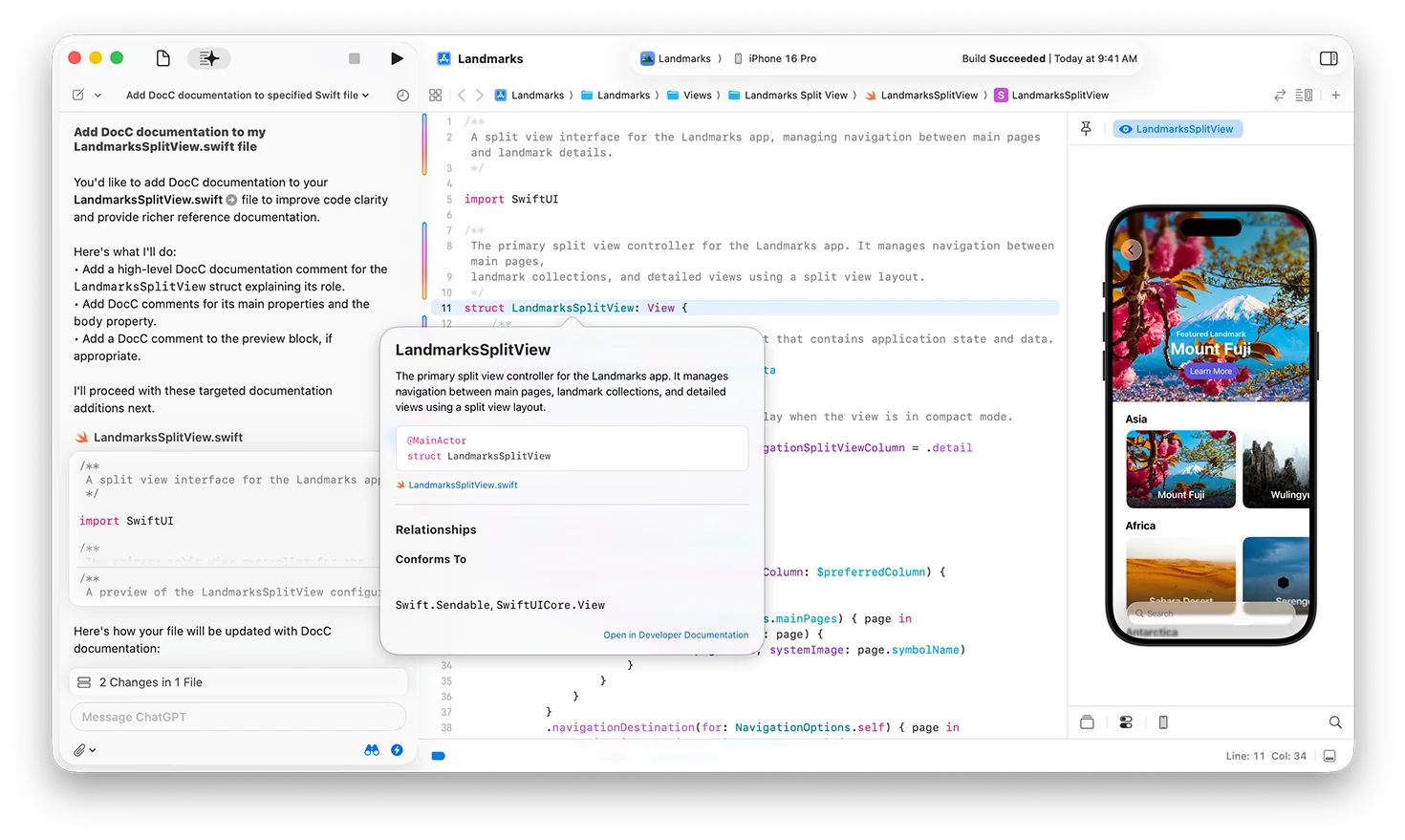
Xcode 16 introduces the most significant productivity enhancement in IDE history through native large language model integration. The AI-powered coding assistance fundamentally transforms development workflows, offering contextual help that understands your entire project.
Core AI Features:
Contextual Code Generation:
// AI can generate complete functions from comments
// TODO: Create a function to validate email addresses with regex
func validateEmail(_ email: String) -> Bool {
    let emailRegex = "^[A-Z0-9a-z._%+-]+@[A-Za-z0-9.-]+\\.[A-Za-z]{2,64}$"
    let emailPredicate = NSPredicate(format:"SELF MATCHES %@", emailRegex)
    return emailPredicate.evaluate(with: email)
}
Intelligent Documentation:
- Automatic Doc Comments: AI generates comprehensive documentation for functions and classes
- Code Explanation: Real-time explanations of complex code segments
- API Documentation: Contextual help for Apple frameworks and third-party libraries
- Best Practices: Suggestions for code improvement and optimization
Error Resolution and Debugging:
// AI can suggest fixes for compilation errors
struct ContentView: View {
    @State private var isPresented = false

    var body: some View {
        VStack {
            Text("Hello, World!")
            Button("Show Sheet") {
                isPresented = true
            }
        }
        // AI suggests: .sheet(isPresented: $isPresented) { }
        .sheet(isPresented: $isPresented) {
            DetailView()
        }
    }
}
Performance Requirements:
- macOS Tahoe 26: Required for ChatGPT integration
- Apple Silicon: Optimal performance with dedicated Neural Engine
- Internet Connection: Required for cloud-based AI features
- Local Processing: Some AI features work offline using on-device models
Enhanced Development Tools and Interface
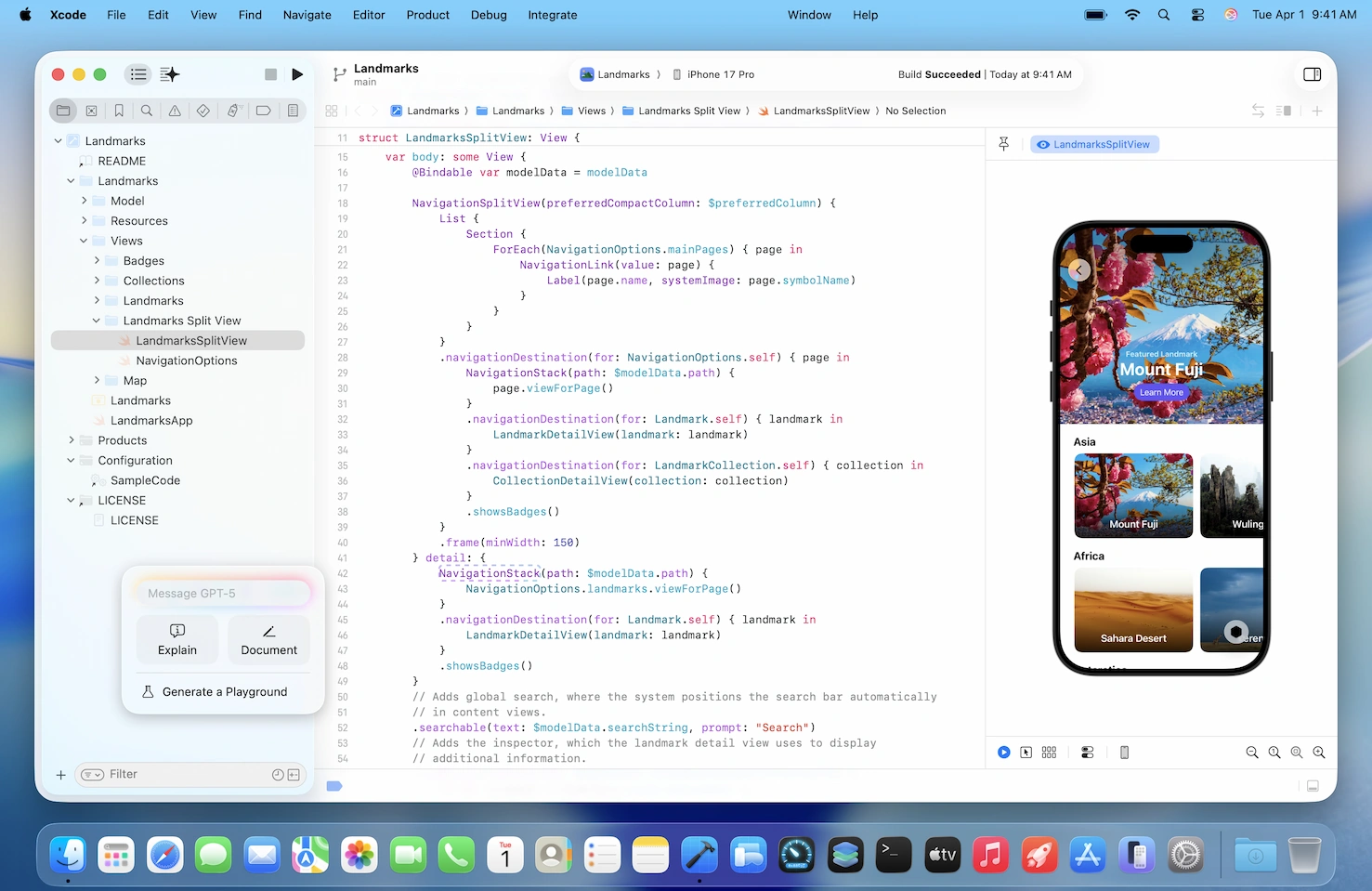
Redesigned Navigation System:
- Enhanced Tab Experience: Improved tab management with in-tab navigation
- Pinning Capabilities: Pin frequently accessed files and resources
- Contextual Navigation: AI-powered suggestions for related files and resources
- Quick Actions: Faster access to common development tasks
Compilation and Build Improvements:
- Compilation Caching: Accelerated build times when switching branches
- Clean Build Optimization: Faster clean builds through intelligent caching
- Incremental Compilation: Enhanced incremental compilation for large projects
- Background Processing: Non-blocking compilation for improved workflow
Voice Control Integration:
# Voice commands for Xcode navigation
"Navigate to ContentView"
"Add import Foundation"
"Build and run"
"Show preview"
"Comment this line"
Icon Composer Tool:
- Single Design Input: Create icons from one design file
- Adjustable Depth: Dynamic depth and lighting effects
- Platform Optimization: Automatic optimization for iPhone, iPad, Mac, Apple Watch
- Liquid Glass Integration: Native support for translucent icon effects
Swift 6.1 Language Enhancements
Enhanced Productivity Features:
- Improved Diagnostics: Better error messages with suggested fixes
- Enhanced Package Management: Package traits for better dependency management
- Data-Race Safety: Compile-time safety improvements
- Cross-Platform Support: Better support for multi-platform development
Foundation Models Integration:
import FoundationModels

struct AIAssistant {
    let model = FoundationModel.shared

    func generateResponse(to prompt: String) async throws -> String {
        let response = try await model.generate(
            prompt: prompt,
            maxTokens: 150,
            temperature: 0.7
        )
        return response.text
    }
}
SwiftUI and Liquid Glass Design System
Revolutionary Design Language Implementation
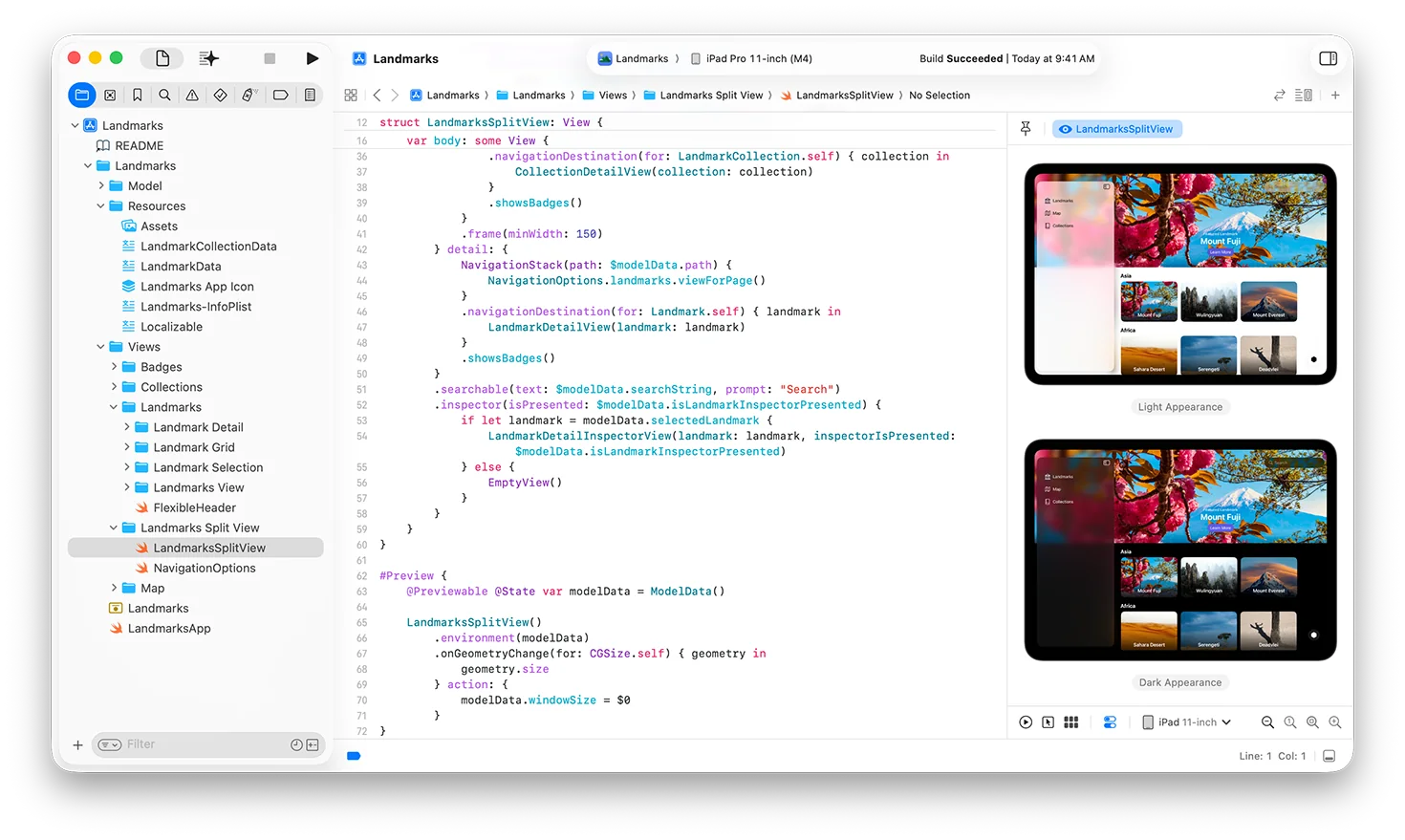
Liquid Glass represents the most significant design evolution since the introduction of flat design. This translucent material system creates depth and visual hierarchy while maintaining Apple's commitment to clarity and functionality.
Core Liquid Glass Principles:
- Translucency: Glass effects that reflect and refract underlying content
- Dynamic Adaptation: Automatic light-to-dark transitions based on content
- Depth Perception: Multi-layered visual hierarchy
- Interactive Responsiveness: Glass morphing during user interactions
SwiftUI Implementation:
Basic Glass Effect:
struct GlassCard: View {
    var body: some View {
        VStack {
            Text("Glass Effect")
                .font(.headline)
            Text("Content with translucent background")
                .font(.body)
        }
        .padding()
        .glassEffect() // New modifier in SwiftUI
        .cornerRadius(12)
    }
}
Advanced Glass Customization:
struct CustomGlassView: View {
    var body: some View {
        Rectangle()
            .fill(.clear)
            .glassEffect(
                style: .prominent,
                blendMode: .overlay,
                opacity: 0.8
            )
            .overlay {
                VStack {
                    Image(systemName: "star.fill")
                        .font(.largeTitle)
                    Text("Premium Feature")
                        .font(.headline)
                }
                .foregroundStyle(.primary)
            }
    }
}
Interactive Glass Components:
struct LiquidGlassButton: View {
    @State private var isPressed = false

    var body: some View {
        Button("Liquid Glass Button") {
            // Action
        }
        .padding()
        .glassEffect(
            style: isPressed ? .regular : .prominent,
            animated: true
        )
        .scaleEffect(isPressed ? 0.95 : 1.0)
        .onPressGesture(
            pressing: { pressing in
                withAnimation(.easeInOut(duration: 0.1)) {
                    isPressed = pressing
                }
            },
            perform: {}
        )
    }
}
Cross-Platform Design Consistency
Unified Glass Framework:
// Single implementation works across all platforms
struct UniversalGlassContainer<Content: View>: View {
    let content: Content

    init(@ViewBuilder content: () -> Content) {
        self.content = content()
    }

    var body: some View {
        content
            .padding()
            .glassEffect()
            .cornerRadius(platformSpecificRadius())
    }

    private func platformSpecificRadius() -> CGFloat {
        #if os(iOS)
        return 16
        #elseif os(macOS)
        return 12
        #elseif os(watchOS)
        return 8
        #else
        return 12
        #endif
    }
}
Platform-Adaptive Components:
- Navigation Bars: Floating glass navigation with platform-appropriate behaviors
- Tab Bars: Compact appearance on iPhone, expanded on iPad and Mac
- Toolbars: Dynamic glass morphing during state transitions
- Sidebars: Translucent sidebars that adapt to content density
Advanced Glass Effects and Animations
Corner Concentricity:
struct ConcentricGlassView: View {
    var body: some View {
        RoundedRectangle(cornerRadius: 16)
            .fill(.clear)
            .glassEffect()
            .overlay {
                RoundedRectangle(cornerRadius: 12)
                    .stroke(.white.opacity(0.2), lineWidth: 1)
                    .padding(4)
            }
            .overlay {
                RoundedRectangle(cornerRadius: 8)
                    .stroke(.white.opacity(0.1), lineWidth: 0.5)
                    .padding(8)
            }
    }
}
Dynamic Glass Transitions:
struct TransitioningGlass: View {
    @State private var isExpanded = false

    var body: some View {
        VStack {
            if isExpanded {
                DetailContent()
                    .transition(.glassSlide)
            }
        }
        .glassEffect(
            style: isExpanded ? .prominent : .regular,
            animated: true
        )
        .animation(.glassSpring(duration: 0.6), value: isExpanded)
    }
}

extension AnyTransition {
    static var glassSlide: AnyTransition {
        .asymmetric(
            insertion: .move(edge: .top).combined(with: .opacity),
            removal: .move(edge: .bottom).combined(with: .opacity)
        )
    }
}

extension Animation {
    static func glassSpring(duration: Double) -> Animation {
        .interpolatingSpring(
            mass: 0.8,
            stiffness: 100,
            damping: 10,
            initialVelocity: 0
        )
        .speed(1 / duration)
    }
}
Foundation Models Framework: On-Device AI Integration
Framework Architecture and Capabilities
The Foundation Models framework represents Apple's commitment to privacy-first artificial intelligence, delivering powerful on-device language understanding without compromising user data security.
Technical Specifications:
- Model Size: ~3 billion parameters optimized for Apple Silicon
- Performance: 0.6ms time-to-first-token latency, 30 tokens/second generation
- Compression: 3.7 bits-per-weight using advanced LoRA adapters
- Platforms: macOS, iOS, iPadOS, visionOS (Apple Silicon required)
Core Framework Features:
Basic Text Generation:
import FoundationModels

class AITextGenerator {
    private let model = FoundationModel.shared

    func generateText(prompt: String) async throws -> String {
        let request = TextGenerationRequest(
            prompt: prompt,
            maxTokens: 200,
            temperature: 0.7,
            topP: 0.9
        )

        let response = try await model.generateText(request)
        return response.generatedText
    }
}
Guided Generation with Constraints:
@Generable
struct EmailResponse {
    let subject: String
    let body: String
    let tone: EmailTone
    let priority: Priority
}

enum EmailTone: String, CaseIterable {
    case formal, casual, friendly, professional
}

enum Priority: String, CaseIterable {
    case low, medium, high, urgent
}

class EmailAssistant {
    func generateEmail(context: String) async throws -> EmailResponse {
        let prompt = "Generate an email response for: \(context)"
        return try await FoundationModel.shared.generate(
            EmailResponse.self,
            prompt: prompt
        )
    }
}
Tool Calling Implementation:
protocol AITool {
    var name: String { get }
    var description: String { get }
    func execute(parameters: [String: Any]) async throws -> String
}

struct WeatherTool: AITool {
    let name = "get_weather"
    let description = "Get current weather for a location"

    func execute(parameters: [String: Any]) async throws -> String {
        guard let location = parameters["location"] as? String else {
            throw AIError.invalidParameters
        }

        // Integrate with weather service
        let weather = try await WeatherService.current(for: location)
        return "Current weather in \(location): \(weather.description)"
    }
}

class AIAssistantWithTools {
    private let tools: [AITool] = [WeatherTool()]

    func processRequest(_ input: String) async throws -> String {
        let response = try await FoundationModel.shared.processWithTools(
            input: input,
            availableTools: tools
        )
        return response.finalAnswer
    }
}
Multimodal Capabilities and Image Understanding
Image Analysis Integration:
import Vision
import FoundationModels

class MultimodalAI {
    func analyzeImage(_ image: UIImage, question: String) async throws -> String {
        // Convert image to appropriate format
        guard let imageData = image.jpegData(compressionQuality: 0.8) else {
            throw AIError.imageProcessingFailed
        }

        let request = MultimodalRequest(
            image: imageData,
            prompt: question,
            maxTokens: 150
        )

        let response = try await FoundationModel.shared.processMultimodal(request)
        return response.analysis
    }
}

// Usage example
let imageAnalyzer = MultimodalAI()
let result = try await imageAnalyzer.analyzeImage(
    userImage,
    question: "What architectural style is shown in this building?"
)
Custom Model Training:
// Python-style training configuration in Swift
struct CustomTrainingConfig {
    let baseModel: String = "foundation-3b"
    let trainingData: URL
    let rank: Int = 32
    let learningRate: Double = 0.0001
    let epochs: Int = 10
}

class CustomModelTrainer {
    func trainSpecializedModel(config: CustomTrainingConfig) async throws -> URL {
        let trainer = FoundationModelTrainer(config: config)

        // Training happens on-device for privacy
        let modelURL = try await trainer.train()

        // Save for later use
        try await FoundationModel.shared.loadCustomModel(from: modelURL)

        return modelURL
    }
}
Privacy and Performance Optimization
Privacy-First Implementation:
- No External API Calls: All processing happens entirely on-device
- Data Security: User inputs never leave the device
- Model Updates: Differential privacy for model improvements
- Cache Management: Automatic cleanup of temporary data
Performance Optimization Strategies:
class OptimizedAIService {
    private let cache = NSCache<NSString, AIResponse>()
    private let queue = DispatchQueue(label: "ai.processing", qos: .userInitiated)

    func processWithCaching(_ input: String) async throws -> String {
        let cacheKey = NSString(string: input.hash.description)

        if let cachedResponse = cache.object(forKey: cacheKey) {
            return cachedResponse.text
        }

        let response = try await FoundationModel.shared.generate(
            prompt: input,
            cachePolicy: .preferCache
        )

        cache.setObject(response, forKey: cacheKey)
        return response.text
    }
}
Metal 4 Graphics and Performance Enhancement
Advanced Graphics Capabilities
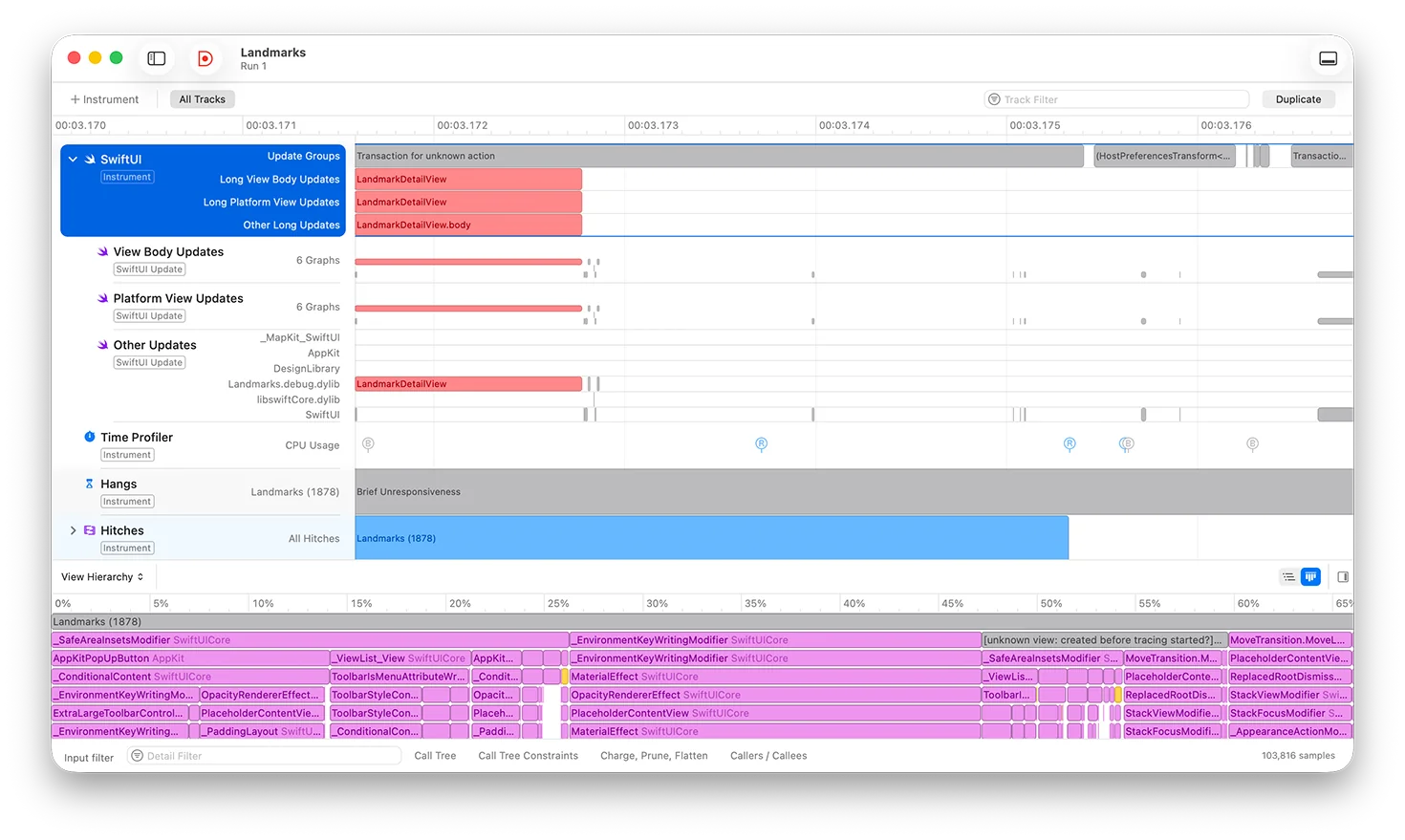
Metal 4 introduces revolutionary graphics capabilities that fundamentally change what's possible in macOS applications, from real-time ray tracing to advanced machine learning acceleration.
Key Metal 4 Features:
- MetalFX Frame Interpolation: AI-powered frame rate enhancement
- MetalFX Denoising: Real-time noise reduction for ray tracing
- Enhanced Ray Tracing: Hardware-accelerated ray tracing on Apple Silicon
- Machine Learning Integration: Seamless integration with Core ML and Foundation Models
MetalFX Implementation:
import Metal
import MetalFX

class MetalFXRenderer {
    private var device: MTLDevice
    private var upscaler: MTLFXTemporalScaler?

    init() {
        guard let device = MTLCreateSystemDefaultDevice() else {
            fatalError("Metal not available")
        }
        self.device = device
        setupUpscaler()
    }

    private func setupUpscaler() {
        let descriptor = MTLFXTemporalScalerDescriptor()
        descriptor.colorTextureFormat = .bgra8Unorm
        descriptor.depthTextureFormat = .depth32Float
        descriptor.motionVectorTextureFormat = .rg16Float
        descriptor.outputTextureFormat = .bgra8Unorm
        descriptor.inputWidth = 1920
        descriptor.inputHeight = 1080
        descriptor.outputWidth = 3840
        descriptor.outputHeight = 2160

        upscaler = descriptor.makeTemporalScaler(device: device)
    }

    func renderFrame(commandBuffer: MTLCommandBuffer,
                    colorTexture: MTLTexture,
                    depthTexture: MTLTexture,
                    motionTexture: MTLTexture) -> MTLTexture? {

        guard let upscaler = upscaler else { return nil }

        let outputTexture = createOutputTexture()

        upscaler.colorTexture = colorTexture
        upscaler.depthTexture = depthTexture
        upscaler.motionVectorTexture = motionTexture
        upscaler.outputTexture = outputTexture

        upscaler.encode(commandBuffer: commandBuffer)

        return outputTexture
    }
}
Real-Time Ray Tracing:
import MetalPerformanceShaders

class RayTracingRenderer {
    private var device: MTLDevice
    private var raytracer: MPSRayIntersector?
    private var accelerationStructure: MPSTriangleAccelerationStructure?

    func setupRayTracing() {
        raytracer = MPSRayIntersector(device: device)
        raytracer?.rayDataType = .originMaskDirectionMaxDistance
        raytracer?.rayStride = MemoryLayout<Ray>.stride

        // Setup acceleration structure for scene geometry
        accelerationStructure = MPSTriangleAccelerationStructure(device: device)
        accelerationStructure?.rebuild()
    }

    func renderRayTracedFrame() {
        guard let commandBuffer = commandQueue.makeCommandBuffer() else { return }

        // Generate primary rays
        generatePrimaryRays(commandBuffer: commandBuffer)

        // Intersect rays with scene
        raytracer?.encodeIntersection(
            commandBuffer: commandBuffer,
            intersectionType: .nearest,
            rayBuffer: rayBuffer,
            rayBufferOffset: 0,
            intersectionBuffer: intersectionBuffer,
            intersectionBufferOffset: 0,
            rayCount: rayCount,
            accelerationStructure: accelerationStructure!
        )

        // Shade intersections
        shadeIntersections(commandBuffer: commandBuffer)

        commandBuffer.commit()
    }
}
Performance Profiling and Optimization
Processor Trace Integration:
import os.signpost

class PerformanceProfiler {
    private let subsystem = "com.app.performance"
    private let category = "rendering"

    func profileRenderingPerformance() {
        let log = OSLog(subsystem: subsystem, category: category)
        let signpostID = OSSignpostID(log: log)

        os_signpost(.begin, log: log, name: "Frame Rendering", signpostID: signpostID)

        // Rendering code here
        renderFrame()

        os_signpost(.end, log: log, name: "Frame Rendering", signpostID: signpostID)
    }

    func profileWithProcessorTrace<T>(_ operation: () throws -> T) rethrows -> T {
        // Processor Trace automatically captures function calls
        // when enabled in Instruments
        return try operation()
    }
}
GPU Performance Optimization:
class GPUOptimizer {
    private var device: MTLDevice
    private var commandQueue: MTLCommandQueue

    func optimizeForThermalState() {
        let thermalState = ProcessInfo.processInfo.thermalState

        switch thermalState {
        case .nominal:
            // Full performance mode
            setRenderQuality(.high)
            setFrameRate(120)

        case .fair:
            // Balanced performance
            setRenderQuality(.medium)
            setFrameRate(60)

        case .serious, .critical:
            // Power saving mode
            setRenderQuality(.low)
            setFrameRate(30)

        @unknown default:
            setRenderQuality(.medium)
        }
    }

    private func setRenderQuality(_ quality: RenderQuality) {
        // Adjust shader complexity, texture resolution, etc.
    }

    private func setFrameRate(_ fps: Int) {
        // Adjust render loop timing
    }
}
Advanced Development Tools and Debugging
Instruments and Performance Analysis
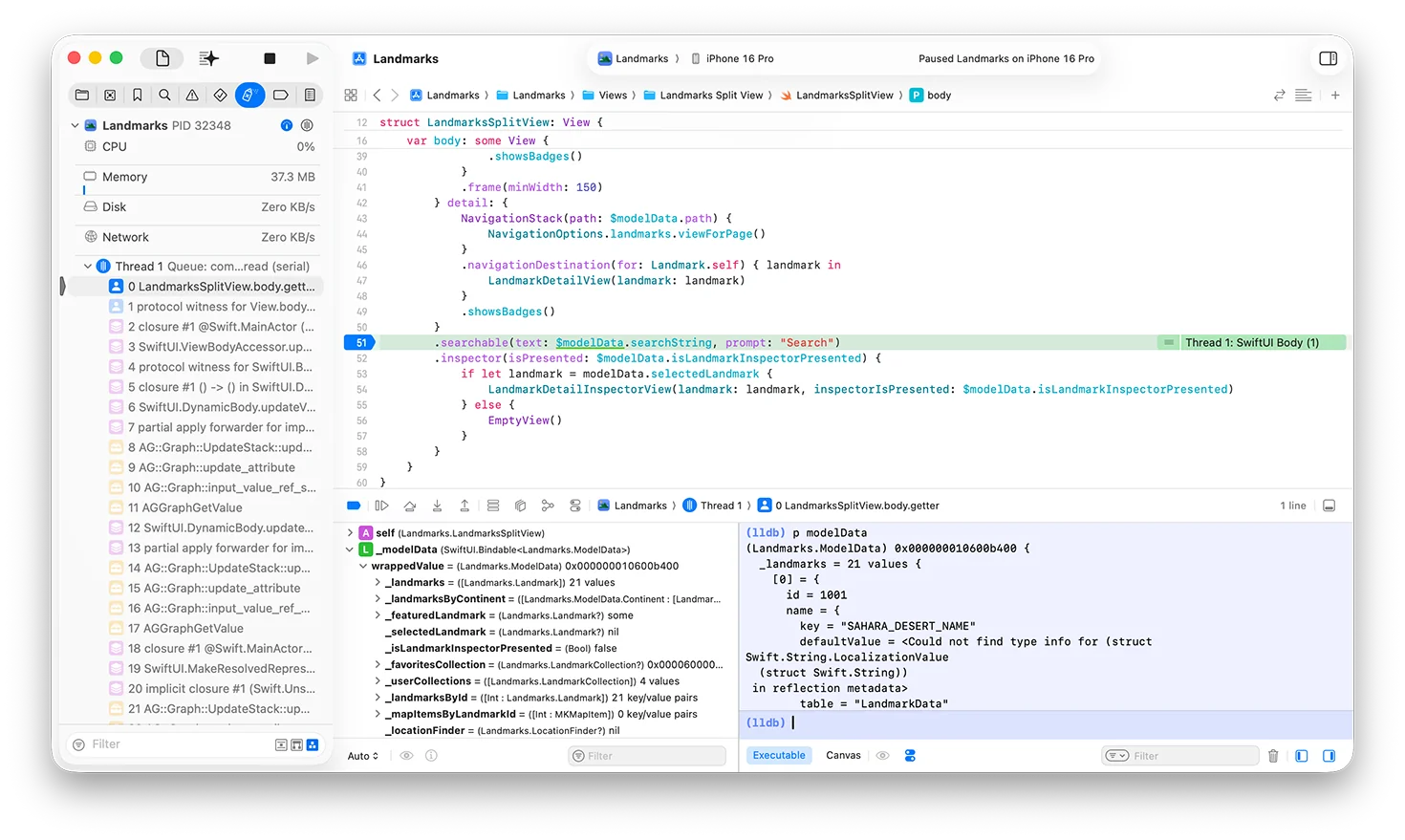
macOS Tahoe 26 introduces revolutionary debugging and performance analysis tools that provide unprecedented insight into application behavior and performance characteristics.
New Instruments in Tahoe:
Processor Trace Instrument:
// Enable processor trace in your app
class ProcessorTraceProfiler {
    func enableHighFidelityProfiling() {
        // Processor Trace captures every function call
        // with minimal overhead on M4 and iPhone 16

        #if DEBUG
        // Enable detailed tracing for development builds
        os_trace_set_mode(.enabled)
        #endif
    }

    func profileCriticalPath() {
        // All function calls in this block will be traced
        performCriticalOperation()
    }
}
SwiftUI View Profiling:
import SwiftUI

struct OptimizedListView: View {
    @State private var items: [Item] = []

    var body: some View {
        List(items) { item in
            ItemRow(item: item)
                .id(item.id) // Help SwiftUI optimize updates
        }
        .animation(.default, value: items)
        // SwiftUI Instrument tracks view update performance
        .task {
            await loadItems()
        }
    }
}

// Optimized for minimal view updates
struct ItemRow: View {
    let item: Item

    var body: some View {
        HStack {
            AsyncImage(url: item.imageURL) { image in
                image
                    .resizable()
                    .aspectRatio(contentMode: .fill)
            } placeholder: {
                RoundedRectangle(cornerRadius: 8)
                    .fill(.gray.opacity(0.3))
            }
            .frame(width: 50, height: 50)
            .clipped()

            VStack(alignment: .leading) {
                Text(item.title)
                    .font(.headline)
                Text(item.subtitle)
                    .font(.caption)
                    .foregroundColor(.secondary)
            }
        }
    }
}
Power and Thermal Profiling:
import IOKit.ps

class PowerProfiler {
    func monitorPowerConsumption() {
        let thermalNotificationCenter = NotificationCenter.default

        thermalNotificationCenter.addObserver(
            forName: ProcessInfo.thermalStateDidChangeNotification,
            object: nil,
            queue: .main
        ) { _ in
            self.adjustPerformanceForThermalState()
        }
    }

    private func adjustPerformanceForThermalState() {
        let state = ProcessInfo.processInfo.thermalState

        switch state {
        case .critical:
            // Reduce CPU/GPU usage immediately
            reduceBackgroundProcessing()
            lowerRenderQuality()

        case .serious:
            // Moderate performance reduction
            optimizeForEfficiency()

        default:
            // Normal operation
            restoreFullPerformance()
        }
    }

    func measureBatteryImpact() {
        // Monitor battery drain during specific operations
        let startLevel = getBatteryLevel()

        performOperation()

        let endLevel = getBatteryLevel()
        let consumption = startLevel - endLevel

        logPowerConsumption(consumption)
    }
}
Enhanced Debugging Capabilities
LLDB Improvements:
# Enhanced LLDB commands for Tahoe debugging
(lldb) po yourSwiftUIView.body
# Now shows complete view hierarchy with Liquid Glass effects

(lldb) memory read --format instruction --count 20 $pc
# Processor Trace integration shows execution path

(lldb) script
# Python scripting for custom debugging workflows
import lldb
import os

def print_view_hierarchy(debugger, command, result, internal_dict):
    target = debugger.GetSelectedTarget()
    process = target.GetProcess()
    thread = process.GetSelectedThread()
    frame = thread.GetSelectedFrame()

    # Custom view hierarchy analysis
    print("SwiftUI View Hierarchy:")
    # Implementation details...

lldb.debugger.HandleCommand('command script add -f custom_debug.print_view_hierarchy vh')
Live View Debugging:
#if DEBUG
extension View {
    func debugViewHierarchy() -> some View {
        self.overlay(
            Rectangle()
                .stroke(Color.red, lineWidth: 1)
                .opacity(0.3)
        )
        .onTapGesture(count: 2) {
            // Double-tap to inspect view in debug mode
            print("Debug view: \(String(describing: type(of: self)))")
            print("Frame: \(UIScreen.main.bounds)")
        }
    }
}
#endif
Memory Debugging:
import os

class MemoryProfiler {
    private let logger = Logger(subsystem: "com.app.memory", category: "profiling")

    func trackMemoryUsage() {
        let memoryInfo = mach_task_basic_info()
        var count = mach_msg_type_number_t(MemoryLayout<mach_task_basic_info>.size)/4

        let kerr: kern_return_t = withUnsafeMutablePointer(to: &memoryInfo) {
            $0.withMemoryRebound(to: integer_t.self, capacity: 1) {
                task_info(mach_task_self_, task_flavor_t(MACH_TASK_BASIC_INFO), $0, &count)
            }
        }

        if kerr == KERN_SUCCESS {
            let memoryUsage = memoryInfo.resident_size
            logger.info("Memory usage: \(memoryUsage / 1024 / 1024) MB")
        }
    }

    func detectMemoryLeaks() {
        // Integration with Instruments for leak detection
        #if DEBUG
        if let leakDetection = NSClassFromString("MallocStackLogging") {
            // Enable malloc stack logging for debugging
            setenv("MallocStackLogging", "1", 1)
        }
        #endif
    }
}
Cross-Platform Development Strategies
Unified Development Approach
macOS Tahoe 26's cross-platform capabilities enable developers to create consistent experiences across all Apple devices while optimizing for platform-specific features and user expectations.
Platform-Adaptive Architecture:
import SwiftUI

struct AdaptiveContentView: View {
    @Environment(\.horizontalSizeClass) private var horizontalSizeClass
    @Environment(\.verticalSizeClass) private var verticalSizeClass

    var body: some View {
        Group {
            #if os(macOS)
            MacOSLayout()
            #elseif os(iOS)
            if horizontalSizeClass == .compact {
                PhoneLayout()
            } else {
                TabletLayout()
            }
            #elseif os(watchOS)
            WatchLayout()
            #elseif os(tvOS)
            TVLayout()
            #endif
        }
        .glassEffect() // Works across all platforms
    }
}

// Platform-specific implementations
struct MacOSLayout: View {
    var body: some View {
        NavigationSplitView {
            SidebarView()
        } detail: {
            DetailView()
        }
        .navigationSplitViewStyle(.balanced)
    }
}

struct PhoneLayout: View {
    var body: some View {
        NavigationStack {
            ContentListView()
        }
    }
}
Shared Business Logic:
// Shared across all platforms
@Observable
class AppState {
    var selectedItem: Item?
    var items: [Item] = []
    var isLoading = false

    func loadItems() async {
        isLoading = true
        defer { isLoading = false }

        do {
            // Use Foundation Models for intelligent sorting
            let aiSortedItems = try await FoundationModel.shared.enhanceItems(items)
            await MainActor.run {
                self.items = aiSortedItems
            }
        } catch {
            // Handle error
        }
    }
}

// Platform-specific UI
struct ItemListView: View {
    @State private var appState = AppState()

    var body: some View {
        Group {
            #if os(macOS)
            Table(appState.items) {
                TableColumn("Name", value: \.name)
                TableColumn("Date", value: \.date) { item in
                    Text(item.date, style: .date)
                }
            }
            #else
            List(appState.items) { item in
                ItemRowView(item: item)
            }
            #endif
        }
        .task {
            await appState.loadItems()
        }
    }
}
Shared Resources and Assets:
// Asset management across platforms
extension Image {
    static func platformIcon(_ name: String) -> Image {
        #if os(macOS)
        return Image(systemName: "\(name).circle")
        #elseif os(iOS)
        return Image(systemName: "\(name).fill")
        #elseif os(watchOS)
        return Image(systemName: name)
        #endif
    }
}

// Color schemes that work across platforms
extension Color {
    static let platformPrimary: Color = {
        #if os(macOS)
        return .blue
        #elseif os(iOS)
        return .accentColor
        #elseif os(watchOS)
        return .green
        #endif
    }()
}
Platform-Specific Optimizations
macOS-Specific Features:
#if os(macOS)
import AppKit

class MacOSSpecificManager: NSObject {
    func setupMenuBar() {
        let statusItem = NSStatusBar.system.statusItem(withLength: NSStatusItem.variableLength)
        statusItem.button?.title = "App"

        let menu = NSMenu()
        menu.addItem(NSMenuItem(title: "Show Main Window", action: #selector(showMainWindow), keyEquivalent: ""))
        statusItem.menu = menu
    }

    @objc func showMainWindow() {
        NSApp.activate(ignoringOtherApps: true)
        NSApp.windows.first?.makeKeyAndOrderFront(nil)
    }

    func setupDockMenu() -> NSMenu {
        let dockMenu = NSMenu()
        dockMenu.addItem(NSMenuItem(title: "New Document", action: #selector(newDocument), keyEquivalent: ""))
        return dockMenu
    }

    @objc func newDocument() {
        // Create new document
    }
}

// Integration with SwiftUI
struct MacOSContentView: View {
    @State private var macManager = MacOSSpecificManager()

    var body: some View {
        ContentView()
            .onAppear {
                macManager.setupMenuBar()
            }
    }
}
#endif
iOS-Specific Features:
#if os(iOS)
import UIKit

struct iOSSpecificView: UIViewRepresentable {
    func makeUIView(context: Context) -> UIView {
        let view = UIView()

        // iOS-specific gestures and interactions
        let longPress = UILongPressGestureRecognizer(
            target: context.coordinator,
            action: #selector(Coordinator.handleLongPress)
        )
        view.addGestureRecognizer(longPress)

        return view
    }

    func updateUIView(_ uiView: UIView, context: Context) {
        // Update UI as needed
    }

    func makeCoordinator() -> Coordinator {
        Coordinator()
    }

    class Coordinator: NSObject {
        @objc func handleLongPress(_ gesture: UILongPressGestureRecognizer) {
            // Handle iOS-specific long press
        }
    }
}
#endif
Performance Optimization and Best Practices
Memory Management and Optimization
SwiftUI Performance Optimization:
struct OptimizedListView: View {
    @State private var items: [Item] = []

    var body: some View {
        LazyVStack(pinnedViews: .sectionHeaders) {
            ForEach(groupedItems, id: \.key) { group in
                Section {
                    ForEach(group.value) { item in
                        ItemRowView(item: item)
                            .equatable() // Prevent unnecessary redraws
                    }
                } header: {
                    SectionHeaderView(title: group.key)
                        .glassEffect()
                }
            }
        }
        .scrollIndicators(.hidden)
        .background(.clear)
    }

    private var groupedItems: [(key: String, value: [Item])] {
        Dictionary(grouping: items) { item in
            item.category
        }
        .sorted { $0.key < $1.key }
    }
}

extension ItemRowView: Equatable {
    static func == (lhs: ItemRowView, rhs: ItemRowView) -> Bool {
        lhs.item.id == rhs.item.id
    }
}
Memory-Efficient Image Loading:
import SwiftUI

struct OptimizedAsyncImage: View {
    let url: URL?
    let placeholder: Image

    @State private var imageData: Data?
    @State private var isLoading = false

    var body: some View {
        Group {
            if let imageData = imageData,
               let uiImage = UIImage(data: imageData) {
                Image(uiImage: uiImage)
                    .resizable()
                    .aspectRatio(contentMode: .fill)
            } else if isLoading {
                ProgressView()
                    .glassEffect()
            } else {
                placeholder
                    .foregroundColor(.secondary)
            }
        }
        .task(id: url) {
            await loadImage()
        }
    }

    @MainActor
    private func loadImage() async {
        guard let url = url else { return }

        isLoading = true
        defer { isLoading = false }

        do {
            // Use URLSession with optimized cache policy
            let request = URLRequest(
                url: url,
                cachePolicy: .returnCacheDataElseLoad,
                timeoutInterval: 30
            )

            let (data, _) = try await URLSession.shared.data(for: request)

            // Compress image if too large
            if let image = UIImage(data: data) {
                let compressedData = compressImageIfNeeded(image)
                self.imageData = compressedData
            }
        } catch {
            // Handle error silently or show error state
        }
    }

    private func compressImageIfNeeded(_ image: UIImage) -> Data? {
        let maxSize: CGFloat = 1024 // Max dimension
        let compressionQuality: CGFloat = 0.8

        let size = image.size
        if max(size.width, size.height) > maxSize {
            let scale = maxSize / max(size.width, size.height)
            let newSize = CGSize(
                width: size.width * scale,
                height: size.height * scale
            )

            UIGraphicsBeginImageContextWithOptions(newSize, false, 0)
            image.draw(in: CGRect(origin: .zero, size: newSize))
            let resizedImage = UIGraphicsGetImageFromCurrentImageContext()
            UIGraphicsEndImageContext()

            return resizedImage?.jpegData(compressionQuality: compressionQuality)
        }

        return image.jpegData(compressionQuality: compressionQuality)
    }
}
Build Optimization and CI/CD
Xcode Build Settings:
# .xcodebuild settings for optimal performance
SWIFT_COMPILATION_MODE = "wholemodule"
SWIFT_OPTIMIZATION_LEVEL = "-O"
GCC_OPTIMIZATION_LEVEL = "s"

# Enable build caching
COMPILER_INDEX_STORE_ENABLE = "YES"
ENABLE_PREVIEWS = "YES"

# Optimize for Apple Silicon
VALID_ARCHS = "arm64"
EXCLUDED_ARCHS[sdk=iphonesimulator*] = "i386"

# Enable advanced optimizations
SWIFT_ENABLE_INCREMENTAL_COMPILATION = "YES"
SWIFT_ENABLE_BATCH_MODE = "YES"
CI/CD Pipeline Configuration:
# GitHub Actions for macOS Tahoe development
name: Build and Test

on:
  push:
    branches: [main, develop]
  pull_request:
    branches: [main]

jobs:
  build-and-test:
    runs-on: macos-14

    steps:
    - uses: actions/checkout@v4

    - name: Setup Xcode
      uses: maxim-lobanov/setup-xcode@v1
      with:
        xcode-version: '16.0'

    - name: Cache build artifacts
      uses: actions/cache@v3
      with:
        path: |
          ~/Library/Developer/Xcode/DerivedData
          ~/Library/Caches/org.swift.swiftpm
        key: ${{ runner.os }}-xcode-${{ hashFiles('**/*.xcodeproj') }}

    - name: Build
      run: |
        xcodebuild clean build \
          -project YourApp.xcodeproj \
          -scheme YourApp \
          -destination 'platform=macOS' \
          -configuration Release \
          CODE_SIGNING_ALLOWED=NO

    - name: Test
      run: |
        xcodebuild test \
          -project YourApp.xcodeproj \
          -scheme YourApp \
          -destination 'platform=macOS' \
          -enableCodeCoverage YES

    - name: Archive
      if: github.ref == 'refs/heads/main'
      run: |
        xcodebuild archive \
          -project YourApp.xcodeproj \
          -scheme YourApp \
          -destination 'generic/platform=macOS' \
          -archivePath YourApp.xcarchive
Security and Privacy Implementation
Secure Development Practices
App Transport Security Configuration:
<!-- Info.plist configuration for secure networking -->
<key>NSAppTransportSecurity</key>
<dict>
    <key>NSAllowsArbitraryLoads</key>
    <false/>
    <key>NSAllowsLocalNetworking</key>
    <true/>
    <key>NSExceptionDomains</key>
    <dict>
        <key>your-api.com</key>
        <dict>
            <key>NSExceptionRequiresForwardSecrecy</key>
            <false/>
            <key>NSExceptionMinimumTLSVersion</key>
            <string>TLSv1.3</string>
        </dict>
    </dict>
</dict>
Keychain Integration:
import Security
import CryptoKit

class SecureStorage {
    private let service = "com.yourapp.secure"

    func store(data: Data, for key: String) throws {
        let query: [CFString: Any] = [
            kSecClass: kSecClassGenericPassword,
            kSecAttrService: service,
            kSecAttrAccount: key,
            kSecValueData: data,
            kSecAttrAccessible: kSecAttrAccessibleWhenUnlockedThisDeviceOnly
        ]

        let status = SecItemAdd(query as CFDictionary, nil)

        if status == errSecDuplicateItem {
            // Update existing item
            let updateQuery: [CFString: Any] = [
                kSecClass: kSecClassGenericPassword,
                kSecAttrService: service,
                kSecAttrAccount: key
            ]

            let updateAttributes: [CFString: Any] = [
                kSecValueData: data
            ]

            let updateStatus = SecItemUpdate(updateQuery as CFDictionary, updateAttributes as CFDictionary)
            guard updateStatus == errSecSuccess else {
                throw KeychainError.updateFailed
            }
        } else if status != errSecSuccess {
            throw KeychainError.storeFailed
        }
    }

    func retrieve(for key: String) throws -> Data {
        let query: [CFString: Any] = [
            kSecClass: kSecClassGenericPassword,
            kSecAttrService: service,
            kSecAttrAccount: key,
            kSecReturnData: true,
            kSecMatchLimit: kSecMatchLimitOne
        ]

        var result: AnyObject?
        let status = SecItemCopyMatching(query as CFDictionary, &result)

        guard status == errSecSuccess else {
            throw KeychainError.retrieveFailed
        }

        guard let data = result as? Data else {
            throw KeychainError.invalidData
        }

        return data
    }
}

enum KeychainError: Error {
    case storeFailed
    case updateFailed
    case retrieveFailed
    case invalidData
}
Privacy-Conscious Data Handling:
import FoundationModels

class PrivacyAwareAI {
    private let model = FoundationModel.shared

    func processUserInput(_ input: String) async throws -> String {
        // Sanitize input to remove personal information
        let sanitizedInput = sanitizePersonalData(input)

        // Process entirely on-device
        let response = try await model.generate(
            prompt: sanitizedInput,
            privacyMode: .strict // No data logging
        )

        return response.text
    }

    private func sanitizePersonalData(_ input: String) -> String {
        // Remove email addresses, phone numbers, etc.
        var sanitized = input

        // Email regex
        let emailRegex = try! NSRegularExpression(pattern: #"\b[A-Za-z0-9._%+-]+@[A-Za-z0-9.-]+\.[A-Z|a-z]{2,}\b"#)
        sanitized = emailRegex.stringByReplacingMatches(
            in: sanitized,
            options: [],
            range: NSRange(location: 0, length: sanitized.count),
            withTemplate: "[EMAIL]"
        )

        // Phone number regex
        let phoneRegex = try! NSRegularExpression(pattern: #"\b\d{3}-\d{3}-\d{4}\b"#)
        sanitized = phoneRegex.stringByReplacingMatches(
            in: sanitized,
            options: [],
            range: NSRange(location: 0, length: sanitized.count),
            withTemplate: "[PHONE]"
        )

        return sanitized
    }
}
Future-Proofing and Migration Strategies
Intel to Apple Silicon Transition
Universal Binary Support:
# Build universal binaries for transition period
xcodebuild -project YourApp.xcodeproj \
  -scheme YourApp \
  -destination 'generic/platform=macOS' \
  -arch arm64 -arch x86_64 \
  archive
Feature Detection:
import Foundation

struct DeviceCapabilities {
    static let hasAppleSilicon: Bool = {
        var size = 0
        sysctlbyname("hw.optional.arm64", nil, &size, nil, 0)
        return size > 0
    }()

    static let hasNeuralEngine: Bool = {
        hasAppleSilicon && ProcessInfo.processInfo.operatingSystemVersion.majorVersion >= 11
    }()

    static let supportsFoundationModels: Bool = {
        hasNeuralEngine && ProcessInfo.processInfo.operatingSystemVersion.majorVersion >= 26
    }()

    static func optimizeForHardware() {
        if hasAppleSilicon {
            // Enable Apple Silicon optimizations
            enableAdvancedFeatures()
        } else {
            // Fallback for Intel Macs
            useCompatibilityMode()
        }
    }

    private static func enableAdvancedFeatures() {
        // Enable Foundation Models, advanced graphics, etc.
    }

    private static func useCompatibilityMode() {
        // Disable features that require Apple Silicon
    }
}
Migration Timeline Planning:
class MigrationManager {
    enum MigrationPhase {
        case preparation  // 6 months before Tahoe
        case transition   // Tahoe 26 launch period
        case optimization // Post-migration optimization
        case completion   // Apple Silicon only
    }

    static func getCurrentPhase() -> MigrationPhase {
        let now = Date()
        let tahoeRelease = DateComponents(year: 2025, month: 9, day: 15)
        let tahoeDate = Calendar.current.date(from: tahoeRelease)!

        let monthsFromRelease = Calendar.current.dateComponents([.month], from: tahoeDate, to: now).month ?? 0

        switch monthsFromRelease {
        case ..<0:
            return .preparation
        case 0..<6:
            return .transition
        case 6..<12:
            return .optimization
        default:
            return .completion
        }
    }

    static func recommendedActions() -> [String] {
        switch getCurrentPhase() {
        case .preparation:
            return [
                "Test on Apple Silicon hardware",
                "Update dependencies for ARM64",
                "Plan Intel deprecation timeline"
            ]
        case .transition:
            return [
                "Monitor Intel Mac user percentage",
                "Provide migration guidance",
                "Optimize for Apple Silicon"
            ]
        case .optimization:
            return [
                "Remove Intel-specific code paths",
                "Implement Apple Silicon exclusive features",
                "Optimize performance for M-series chips"
            ]
        case .completion:
            return [
                "Full Apple Silicon optimization",
                "Leverage advanced hardware features",
                "Plan for future M-series capabilities"
            ]
        }
    }
}
Conclusion: Mastering macOS Tahoe Development
Strategic Development Roadmap
macOS Tahoe 26 represents a pivotal moment in Mac development, offering unprecedented opportunities for developers who adapt quickly to its revolutionary capabilities. The combination of AI-powered development tools, unified design systems, and powerful on-device intelligence creates new possibilities for application innovation.
Immediate Action Items:
- Update Development Environment: Migrate to Xcode 16 and familiarize your team with AI-assisted coding workflows
- Implement Liquid Glass Design: Begin integrating translucent design elements into your applications
- Explore Foundation Models: Prototype AI features using on-device intelligence capabilities
- Optimize for Apple Silicon: Ensure full compatibility and performance optimization for M-series processors
- Plan Intel Transition: Develop migration strategy for users on the final supported Intel Macs
Long-Term Strategic Considerations:
Platform Evolution Readiness:
- macOS 27 Preparation: Anticipate Apple Silicon-exclusive features and capabilities
- Cross-Platform Unification: Leverage unified design and development frameworks
- AI Integration Depth: Plan for deeper integration of AI capabilities across all app functions
- Performance Optimization: Prepare for next-generation M-series processor capabilities
Competitive Advantages:
- Early Adoption: First-mover advantage in Liquid Glass design implementation
- AI Differentiation: Unique features powered by on-device intelligence
- Performance Leadership: Optimal utilization of Apple Silicon capabilities
- User Experience Excellence: Seamless integration with macOS Tahoe's revolutionary interface
Technical Investment Priorities:
- Development Team Training: Comprehensive education on new frameworks and tools
- Infrastructure Modernization: CI/CD pipelines optimized for Apple Silicon development
- Testing Strategy: Comprehensive testing across Intel and Apple Silicon configurations
- Performance Monitoring: Implementation of advanced profiling and optimization workflows
Future-Ready Development Practices
Sustainable Development Approach:
// Example of future-ready code structure
protocol PlatformOptimized {
    var supportsAdvancedFeatures: Bool { get }
    func optimizeForCurrentPlatform()
}

extension PlatformOptimized {
    var supportsAdvancedFeatures: Bool {
        DeviceCapabilities.hasAppleSilicon &&
        DeviceCapabilities.supportsFoundationModels
    }

    func optimizeForCurrentPlatform() {
        if supportsAdvancedFeatures {
            enableAIFeatures()
            implementLiquidGlassDesign()
            optimizeForNeuralEngine()
        } else {
            useStandardFeatures()
            implementFallbackDesign()
        }
    }
}
Innovation Opportunities:
- AI-Enhanced User Interfaces: Intelligent interface adaptation based on user behavior
- Context-Aware Applications: Apps that understand and adapt to user context
- Seamless Cross-Device Experiences: Unified experiences across all Apple platforms
- Privacy-First Innovation: Advanced features that maintain user privacy
macOS Tahoe 26 provides developers with the tools and frameworks needed to create the next generation of Mac applications. Success in this new era requires embracing AI-powered development workflows, mastering the Liquid Glass design system, and optimizing for Apple Silicon's unique capabilities.
The developers who invest in understanding and implementing these technologies today will be positioned to lead the Mac software ecosystem for years to come. macOS Tahoe isn't just an operating system update—it's a platform for innovation that will define the future of Mac development.
Ready to start developing for macOS Tahoe? Explore our compatibility guide and installation guide to begin your journey with Apple's most advanced operating system.