macOS Tahoe Compatibility Guide: Complete 2025 Checker for Intel and Apple Silicon Macs
Complete macOS Tahoe (macOS 26) compatibility guide with system requirements, supported Mac models, installation tips, and compatibility checker tools. Last chance for Intel Mac support.
macOS Tahoe (macOS 26) marks a historic milestone as Apple's final macOS release supporting Intel-powered Macs. Released on September 15, 2025, this update introduces the Liquid Glass interface while maintaining limited support for a small set of Intel models. Whether you're checking if your Mac can run Tahoe or planning your upgrade strategy, this guide summarizes the latest, verified compatibility details.
Quick Compatibility Checker: Will Your Mac Run macOS Tahoe?
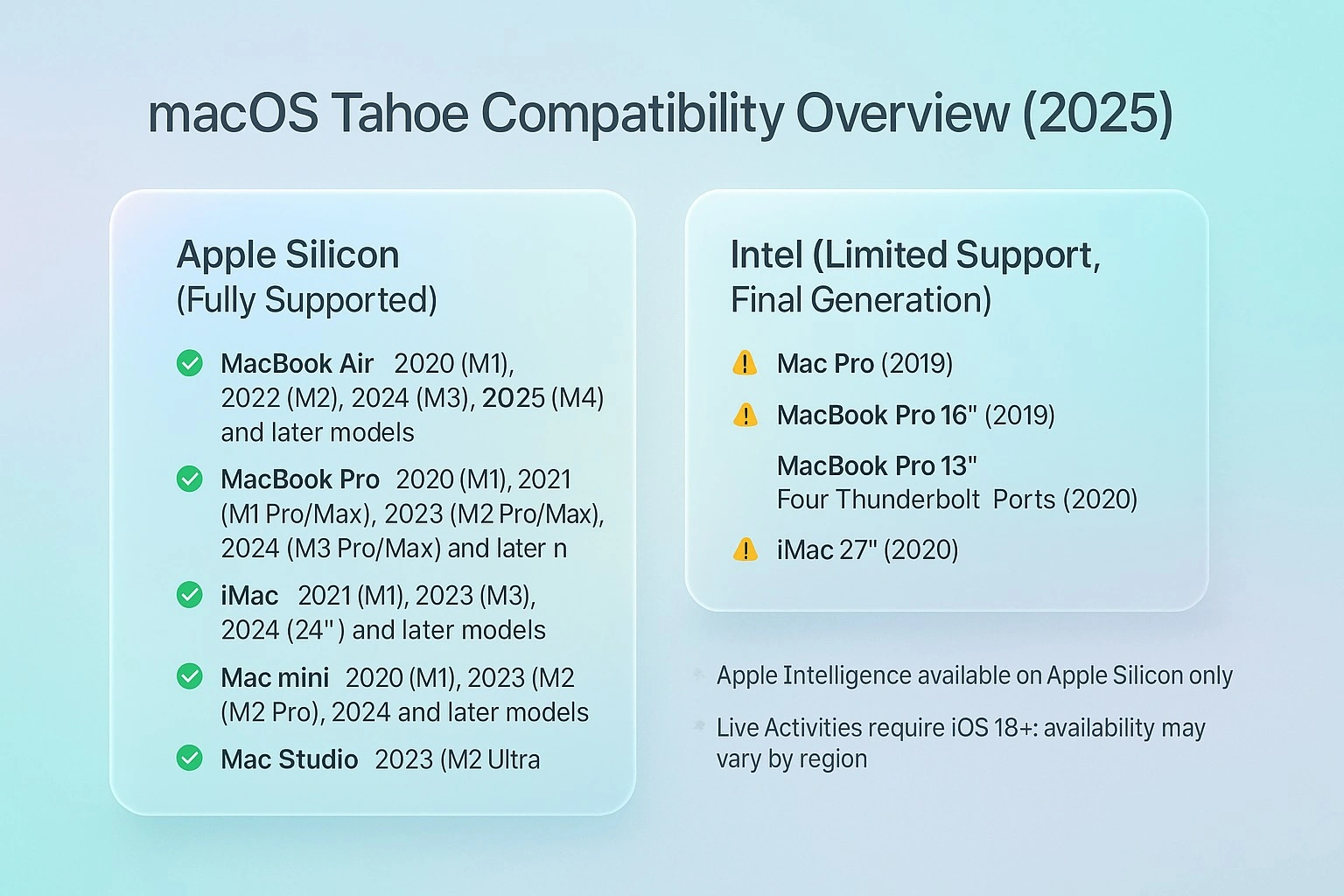
Apple Silicon Macs (Full Compatibility ✅)
All modern features available, including Apple Intelligence and the Liquid Glass UI:
- MacBook Air: 2020 (M1), 2022 (M2), 2024 (M3), 2025 (M4, 13/15-inch) and later
- MacBook Pro: 2020 (M1), 2021 (M1 Pro/Max), 2023 (M2 Pro/Max), 2024 (M3 Pro/Max) and later
- iMac: 2021 (M1), 2023 (M3), 2024 (24-inch) and later
- Mac mini: 2020 (M1), 2023 (M2/M2 Pro), 2024 and later
- Mac Studio: 2022 (M1 Max/Ultra), 2023 (M2 Max/Ultra), 2025 and later
- Mac Pro: 2023 (M2 Ultra) and later
Intel Macs (Limited Compatibility ⚠️)
Only the following four Intel models (final Intel-supported release):
- Mac Pro: 2019
- MacBook Pro (16-inch): 2019
- MacBook Pro (13-inch, Four Thunderbolt 3 ports): 2020
- iMac: 2020 (27-inch)
Discontinued Intel Macs (Not Compatible ❌)
The following Intel models cannot upgrade to macOS Tahoe:
- MacBook Air: 2017, 2018
- MacBook Pro: 2016, 2017, 2018 models
- iMac: 2017, 2019 models not listed above
- iMac Pro: All models (2017)
- Mac mini: 2018 and earlier
- Mac Pro: 2013 and earlier
macOS Tahoe System Requirements: Technical Specifications
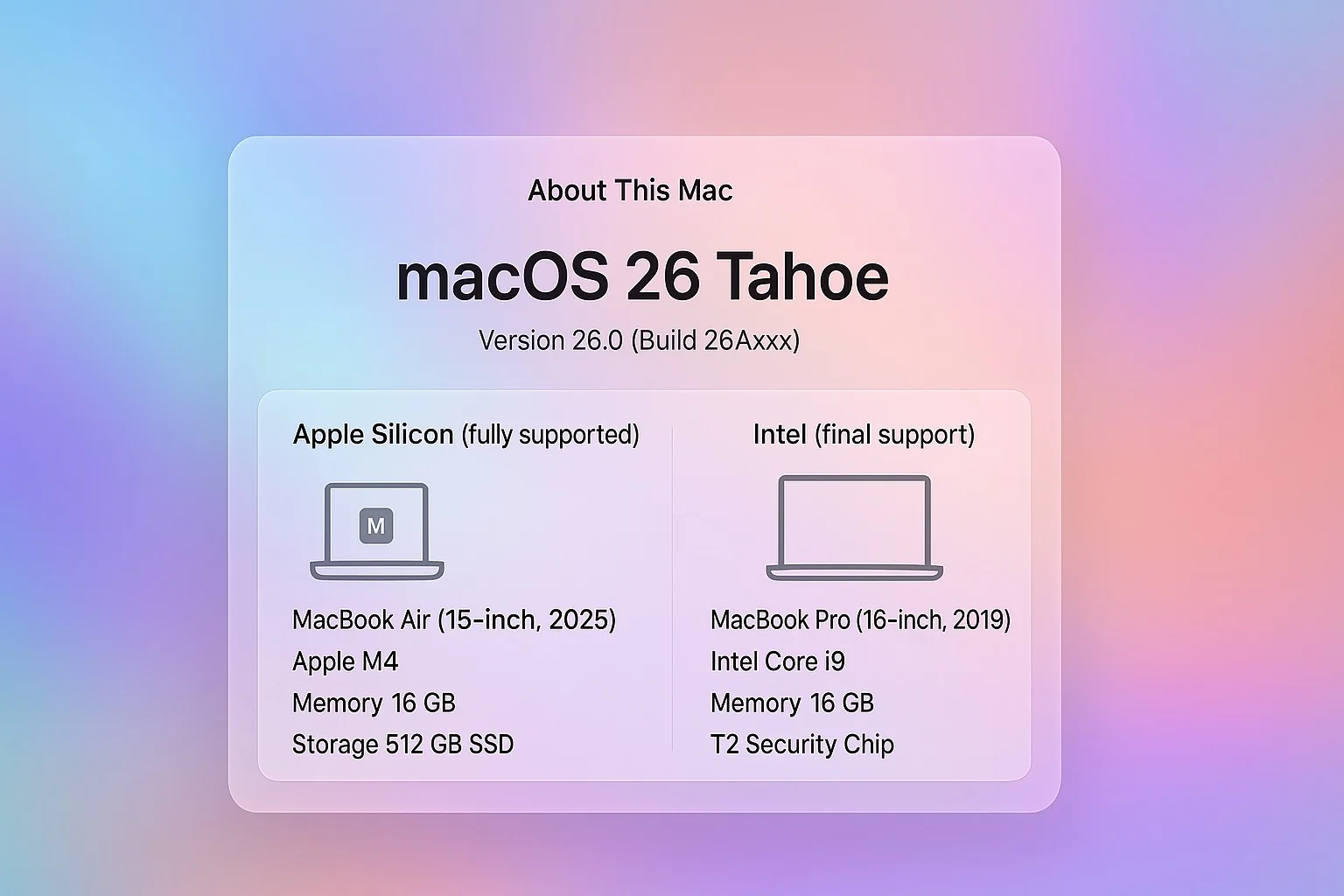
Minimum Hardware Requirements
Storage Requirements:
- 35–45 GB free space recommended for a typical upgrade; allocate more if enabling Apple Intelligence offline models and resources
- Installer size varies by channel; as a safe buffer, ensure at least 40 GB of free space to avoid interruptions
- SSD strongly recommended for smoother Liquid Glass animations and overall responsiveness
Memory Specifications:
- 8 GB RAM minimum (all compatible models meet this)
- 12 GB RAM recommended for professional workflows
- 16 GB RAM optimal for Apple Intelligence features
Security Chip Requirements:
- Apple Silicon: integrated security architecture
- Intel: the four supported Intel models include the T2 Security Chip; enabling Secure Boot is recommended
Feature Availability Matrix
| Feature | Apple Silicon Macs | Supported Intel Macs |
|---|---|---|
| Liquid Glass UI | ✅ Supported | ✅ Supported (performance varies by model) |
| Apple Intelligence | ✅ Supported | ❌ Not available |
| Live Activities* | ✅ Supported | ✅ Supported (may be region-limited) |
| Universal Control | ✅ Supported | ✅ Supported |
| AirPlay to Mac | ✅ Supported | ✅ Supported |
| SharePlay | ✅ Supported | ✅ Supported |
| Focus Modes | ✅ Supported | ✅ Supported |
*Note: In some regions (e.g., the EU), Live Activities and certain iPhone-linked experiences may be limited.
Apple Intelligence and macOS Tahoe: Silicon-Only Features
Why Intel Macs Can't Run Apple Intelligence
Apple Intelligence requires the Neural Engine found exclusively in Apple Silicon processors. This dedicated AI hardware enables:
On-Device Processing:
- Real-time language model inference
- Privacy-preserving AI computation
- Energy-efficient machine learning
- Seamless integration across Apple ecosystem
Neural Engine Notes:
- M‑series chips include a Neural Engine that enables on-device inference for Apple Intelligence and related features
- Intel Macs lack equivalent hardware and therefore do not support Apple Intelligence
Apple Intelligence Features Exclusive to Apple Silicon
Visual Intelligence:
- Screen content recognition and processing
- Smart action suggestions based on context
- Cross-app information transfer
- Multi-language content understanding
Enhanced Siri Integration:
- Natural conversation capabilities
- Contextual awareness across applications
- Personal request processing without cloud dependency
- Improved voice recognition accuracy
Writing Tools:
- AI-powered text editing and enhancement
- Grammar and style suggestions
- Content summarization and expansion
- Language translation with cultural context
Liquid Glass Interface: Performance Impact and Requirements
Understanding Liquid Glass Technology
macOS Tahoe introduces Liquid Glass, a revolutionary design system that creates translucent, dynamic interface elements. This technology requires significant graphics processing power and affects system performance.
Technical Implementation:
- Real-time transparency effects with dynamic light refraction
- GPU-accelerated rendering for smooth visual transitions
- Adaptive performance scaling based on system capabilities
- Energy-efficient optimization for extended battery life
Performance Requirements by Mac Model
Apple Silicon Macs (Optimal Performance):
- M1/M2/M3/M4: all render Liquid Glass smoothly; newer chips offer better efficiency and higher frame rates
Intel Macs (Reduced Effects):
- 2019-2020 Intel Models: Limited transparency effects to maintain performance
- Automatic scaling: System reduces effects based on GPU capabilities
- Battery impact: More significant drain on Intel MacBooks
Step-by-Step Installation Guide for macOS Tahoe
Pre-Installation Compatibility Check
Method 1: System Information App
- Hold Option key and click Apple menu
- Select System Information
- Check Hardware Overview for model identifier
- Verify Chip shows Apple Silicon or T2-equipped Intel processor
Method 2: Terminal Command
system_profiler SPHardwareDataType | grep "Model Identifier\|Chip"Method 3: About This Mac
- Click Apple menu > About This Mac
- Verify your Mac model and year
- Check for Apple M1/M2/M3 or Intel with T2 designation
Installation Process for Compatible Macs
Step 1: Preparation
- Backup your Mac using Time Machine or alternative method
- Free up storage: Ensure at least 40 GB free space (45+ GB recommended; more if enabling Apple Intelligence offline models)
- Update current macOS: Install latest version of your current OS
- Check app compatibility: Verify critical applications support Tahoe
Step 2: Download and Install
- Open System Settings (System Preferences on older versions)
- Navigate to General > Software Update
- Wait for macOS Tahoe 26.0 to appear
- Click Upgrade Now or Install Now
- Follow on-screen instructions for installation
Step 3: Post-Installation Optimization
- Allow 24-48 hours for Spotlight reindexing
- Update applications to Tahoe-compatible versions
- Configure Liquid Glass preferences in System Settings
- Test critical workflows to ensure compatibility
Intel Mac End-of-Support: Planning Your Transition
Timeline for Intel Mac Support
macOS Tahoe (2025): Last macOS release to support Intel Next macOS (2026): Expected to be Apple Silicon–only Security Updates: Intel models expected to receive security updates through ~2028 Third-Party Support: Vendor support for Intel will gradually decline starting in 2026
Migration Strategies for Intel Mac Users
Option 1: Upgrade to Apple Silicon
- Immediate benefits: Full feature compatibility and improved performance
- Cost consideration: New Mac purchase required ($999-$6,999)
- Data transfer: Migration Assistant simplifies transition
- ROI calculation: Consider productivity gains vs. investment cost
Option 2: Extended Intel Mac Usage
- Stability focus: Remain on macOS Tahoe through 2028
- Security updates: Continue receiving critical patches
- Feature limitations: Accept reduced functionality over time
- Eventual upgrade: Plan transition by 2028-2029
Option 3: Alternative Operating Systems
- Linux compatibility: Most Intel Macs support modern Linux distributions
- Windows compatibility: Boot Camp or virtualization options
- Specialized workflows: Consider if macOS dependency is essential
- Learning curve: Factor in retraining and workflow adaptation
Troubleshooting Common macOS Tahoe Compatibility Issues
Installation Problems and Solutions
Problem: "Update Not Found" Error
Solution: Reset System Management Controller (SMC)
Intel Macs: Shut down → Hold Shift-Control-Option + Power for 10 seconds → Release → Start
Apple Silicon: Shut down for 30 seconds → Restart (SMC resets automatically)
Problem: Installation Stuck at "Checking for Updates"
Solution: Clear software update cache
1. Open Terminal
2. Run: sudo rm -rf /Library/Updates/*
3. Restart Mac
4. Try software update again
Problem: Insufficient Storage Space
Solution: Free up disk space systematically
1. Empty Trash completely
2. Clear Downloads folder
3. Use Storage Management recommendations
4. Remove large unused applications
5. Clear system caches: ~/Library/Caches/
Performance Issues After Installation
Problem: Slow Boot Times or App Launching
- Cause: Spotlight reindexing in progress
- Solution: Wait 24-48 hours for indexing completion
- Verification: Activity Monitor shows minimal CPU usage when complete
Problem: Battery Drain on MacBooks
- Cause: Liquid Glass effects and background processes
- Solution: Reduce transparency in Accessibility settings
- Advanced: Use Activity Monitor to identify energy-intensive processes
Problem: Wi-Fi Connectivity Issues
- Cause: Network configuration conflicts
- Solution: Reset network settings and re-add Wi-Fi networks
- Command: Delete /Library/Preferences/SystemConfiguration/NetworkInterfaces.plist
Performance Optimization for macOS Tahoe
Apple Silicon Mac Optimization
Maximize Neural Engine Utilization:
- Enable Apple Intelligence features for productivity enhancement
- Use Visual Intelligence for improved workflow efficiency
- Configure Live Activities for real-time information access
- Optimize Focus Modes for automated productivity switching
Storage and Memory Management:
- Enable Optimize Mac Storage for automatic cleanup
- Use iCloud Drive with local storage optimization
- Leverage memory compression; ensure the recommended free space before installing or upgrading
- Use Activity Monitor to track resource usage
Intel Mac Optimization Strategies
Graphics Performance Tuning:
- Reduce transparency: System Settings > Accessibility > Display
- Disable motion effects: Reduce visual animations for better performance
- Limit background app refresh: Conserve system resources
- Close unnecessary applications: Maintain optimal memory availability
Battery Life Extension:
- Adjust Energy Saver settings: Optimize for battery life over performance
- Reduce screen brightness: Significant impact on battery duration
- Disable location services: For non-essential applications
- Use Safari over Chrome: Better energy efficiency on macOS
Professional Workflow Compatibility Assessment
Creative Professional Applications
Video Editing and Motion Graphics:
- Final Cut Pro: Full Tahoe compatibility with Apple Silicon optimization
- Adobe Creative Suite: Verify latest versions for Tahoe support
- DaVinci Resolve: Enhanced performance on Apple Silicon Macs
- Motion: Improved rendering with Neural Engine acceleration
Audio Production and Music Creation:
- Logic Pro: Native Tahoe support with enhanced features
- Pro Tools: Check HDX hardware compatibility
- Ableton Live: Verify plugin compatibility for seamless operation
- MainStage: Full Apple Silicon optimization available
3D Modeling and CAD Applications:
- Blender: Significant performance improvements on Apple Silicon
- AutoCAD: Verify latest version compatibility
- SketchUp: Enhanced rendering capabilities
- Fusion 360: Cloud-based functionality maintained
Enterprise and Business Applications
Microsoft Office Suite:
- Office 365: Full compatibility with enhanced features
- Teams: Improved video conferencing performance
- SharePoint: Browser-based functionality unaffected
- Power BI: Desktop application compatibility verified
Development Tools and IDEs:
- Xcode: Enhanced performance and new features
- Visual Studio Code: Full compatibility with extensions
- JetBrains IDEs: Optimized for Apple Silicon
- Docker: Native Apple Silicon support available
Future-Proofing Your Mac Setup
Purchasing Recommendations for 2025-2026
Budget-Conscious Users:
- M1 MacBook Air (refurbished): Excellent value with full Tahoe support
- M2 Mac mini: Powerful desktop option for stationary setups
- Consider timing: Black Friday and back-to-school sales offer significant savings
Professional Users:
- M3 MacBook Pro: Balanced performance for most professional workflows
- M2 Mac Studio: Maximum performance for creative professionals
- Future planning: M4 models expected in 2026 with enhanced capabilities
Enterprise Deployment:
- Standardize on Apple Silicon: Avoid Intel models for new purchases
- Plan migration timeline: Gradual replacement through 2025-2026
- Training consideration: Ensure IT staff prepared for new management tools
Long-Term Support Strategy
Security and Updates:
- Feature updates: major new features primarily arrive in the release year; subsequent updates focus on maintenance
- Security patches: security updates are expected to continue through 2028
- Third-party applications: Verify vendor support roadmaps
- Backup strategies: Maintain compatibility with future macOS versions
Hardware Lifecycle Planning:
- Apple Silicon longevity: 5-7 year useful life expectation
- Performance headroom: Current models exceed most workflow requirements
- Upgrade timing: Consider workflow changes vs. hardware capabilities
- Trade-in programs: Apple and third-party options maximize value retention
Conclusion: Navigating the macOS Tahoe Transition
macOS Tahoe represents a pivotal moment in Mac computing history, offering a bridge between the Intel era and Apple's silicon-centric future. While Intel Mac users face the reality of final system support, the extensive feature set and enhanced compatibility make Tahoe an excellent final update for legacy hardware.
Key Takeaways for Decision Making:
For Apple Silicon Mac Users:
- Immediate upgrade recommended: Full feature access and improved performance
- Enhanced productivity: Apple Intelligence and Liquid Glass provide tangible benefits
- Future-proof investment: Continued support and feature development assured
For Intel Mac Users:
- Carefully evaluate timing: Balance feature desires with system stability requirements
- Plan transition strategy: Begin evaluating Apple Silicon alternatives
- Maximize remaining value: Optimize current setup for extended useful life
For Potential Mac Buyers:
- Avoid Intel models: Purchase Apple Silicon Macs for maximum longevity
- Consider timing: Current generation offers excellent performance-to-price ratio
- Plan for ecosystem benefits: Enhanced integration across Apple devices
The macOS Tahoe compatibility landscape reflects Apple's commitment to supporting existing users while advancing the platform's future capabilities. Whether upgrading immediately or planning a strategic transition, understanding compatibility requirements ensures optimal decision-making for your specific needs and timeline.
Ready to check if your specific Mac model supports macOS Tahoe? Use our interactive compatibility tool to get personalized recommendations and upgrade guidance tailored to your exact hardware configuration and usage requirements.