Wie man Apples Liquid Glass UI in React implementiert: Vollständiger Entwicklerleitfaden
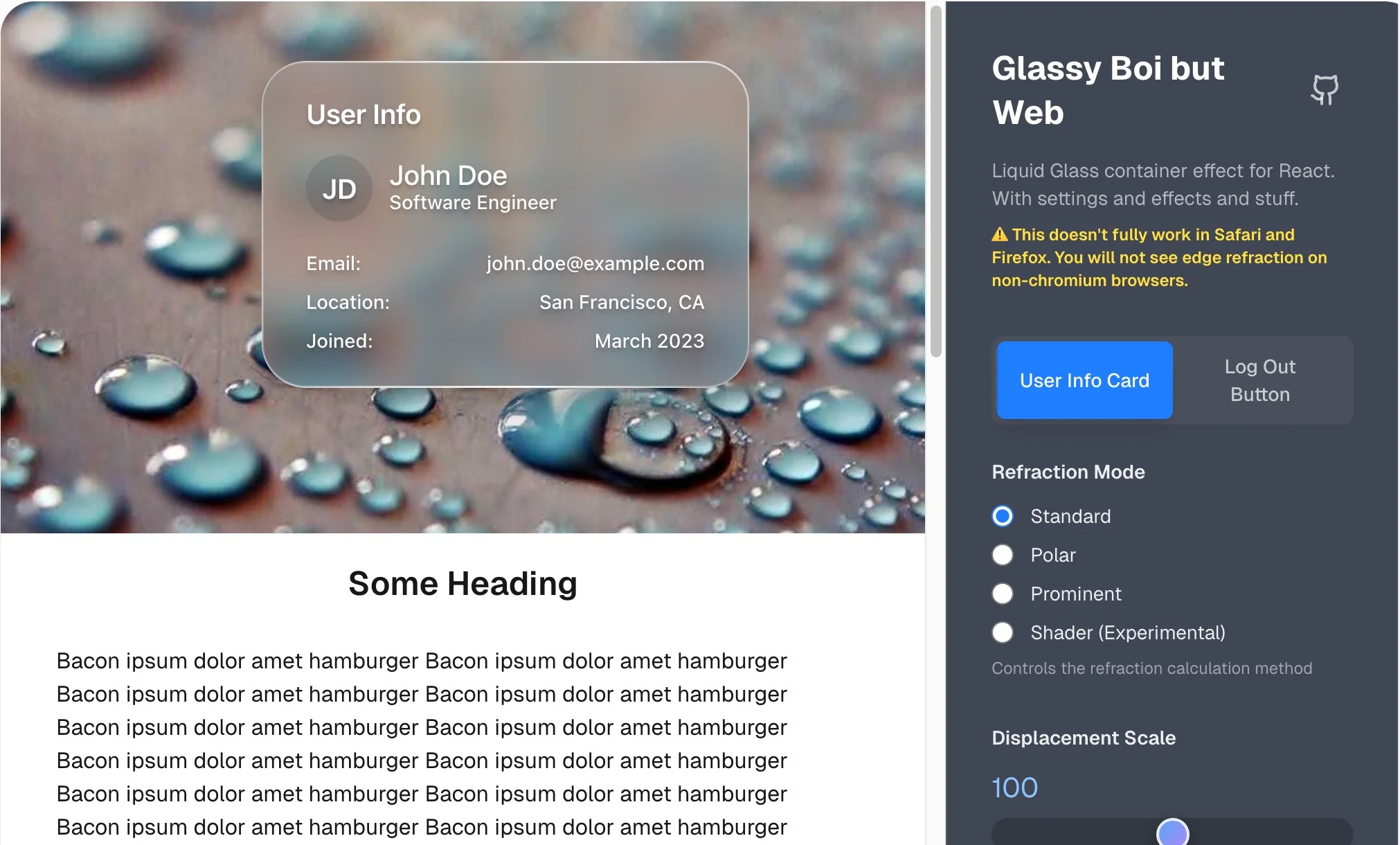
Lernen Sie, wie Sie macOS Tahoes atemberaubende Liquid Glass-Schnittstelle in React nachbauen. Enthält Code-Beispiele, Leistungstipps und Design-Prinzipien.
Apples Einführung der Liquid Glass UI in macOS Tahoe 26 hat einen neuen Standard für Interface-Design gesetzt. Die gute Nachricht? Sie können jetzt ähnliche Effekte in Ihren React-Anwendungen implementieren. Dieser umfassende Leitfaden führt durch die Erstellung Apple-inspirierter Liquid Glass-Komponenten für Webanwendungen.
Liquid Glass Design verstehen
Was macht Liquid Glass besonders?
Liquid Glass repräsentiert Apples raffinierteste Interface-Design-Evolution seit der Einführung von Transluzenz in macOS. Der Effekt kombiniert:
- Dynamische Transparenz, die auf Inhalte reagiert
- Echtzeit-Lichtbrechung, die Tiefe schafft
- Flüssige Animationen, die sich natürlich und reaktionsschnell anfühlen
- Kontextuelle Anpassungsfähigkeit basierend auf Benutzerinteraktion
Technische Grundlagen
Der Liquid Glass-Effekt basiert auf mehreren Schlüsseltechnologien:
- WebGL-Shader für Echtzeit-Rendering
- CSS backdrop-filter für Unschärfeeffekte
- SVG-Filter für erweiterte Lichtmanipulation
- GPU-Beschleunigung für flüssige Animationen
Erste Schritte mit liquid-glass-react
Installation und Setup
Installieren Sie zunächst die liquid-glass-react-Komponente:
npm install liquid-glass-react
# oder
yarn add liquid-glass-react
Grundlegende Implementierung
import React from 'react';
import { LiquidGlass } from 'liquid-glass-react';
import './App.css';

function App() {
  return (
    <div className="app">
      <LiquidGlass
        displacementScale={2.0}
        blurAmount={1.5}
        elasticity={0.7}
        className="liquid-container"
      >
        <div className="content">
          <h1>Willkommen zu Liquid Glass</h1>
          <p>Erleben Sie Apples revolutionäres Interface-Design</p>
        </div>
      </LiquidGlass>
    </div>
  );
}
Wesentliche CSS-Stile
.liquid-container {
  width: 100%;
  height: 100vh;
  background: linear-gradient(135deg,
    rgba(255, 255, 255, 0.1) 0%,
    rgba(255, 255, 255, 0.05) 100%);
  backdrop-filter: blur(10px) saturate(180%);
  border: 1px solid rgba(255, 255, 255, 0.2);
  border-radius: 16px;
}

.content {
  padding: 40px;
  color: rgba(255, 255, 255, 0.9);
  text-align: center;
}
Erweiterte Konfigurationsoptionen
Kern-Parameter
Displacement Scale (0.0 - 5.0) Steuert die Intensität des flüssigen Verzerrungseffekts:
<LiquidGlass displacementScale={2.5}>
  {/* Höhere Werte erzeugen dramatischere Verzerrung */}
</LiquidGlass>
Blur Amount (0.0 - 3.0) Bestimmt die Hintergrund-Unschärfeintensität:
<LiquidGlass blurAmount={1.8}>
  {/* Imitiert macOS Tahoes Tiefenschärfe-Effekt */}
</LiquidGlass>
Elasticity (0.0 - 1.0) Passt an, wie flüssig das Glas erscheint:
<LiquidGlass elasticity={0.9}>
  {/* Höhere Werte fühlen sich flüssiger an */}
</LiquidGlass>
Visuelle Verbesserungs-Parameter
Corner Radius
<LiquidGlass cornerRadius={20}>
  {/* Entspricht macOS Tahoes abgerundeten Interface-Elementen */}
</LiquidGlass>
Aberration Intensity
<LiquidGlass aberrationIntensity={0.4}>
  {/* Erzeugt subtile Farbtrennung für Premium-Gefühl */}
</LiquidGlass>
Reale Implementierungs-Beispiele
macOS Tahoe-Stil Menüleiste
import React, { useState } from 'react';
import { LiquidGlass } from 'liquid-glass-react';

const MenuBar = () => {
  const [isActive, setIsActive] = useState(false);

  return (
    <LiquidGlass
      displacementScale={1.2}
      blurAmount={2.0}
      elasticity={0.8}
      className={`menu-bar ${isActive ? 'active' : ''}`}
      style={{
        position: 'fixed',
        top: 0,
        left: 0,
        right: 0,
        height: '32px',
        background: 'rgba(255, 255, 255, 0.05)',
        backdropFilter: 'blur(20px) saturate(180%)',
        borderBottom: '1px solid rgba(255, 255, 255, 0.1)',
        zIndex: 1000
      }}
    >
      <div className="menu-items">
        <span className="menu-item">Datei</span>
        <span className="menu-item">Bearbeiten</span>
        <span className="menu-item">Ansicht</span>
        <span className="menu-item">Fenster</span>
        <span className="menu-item">Hilfe</span>
      </div>
    </LiquidGlass>
  );
};
Interaktive Karten-Komponente
const CompatibilityCard = ({ macModel, compatibility }) => {
  const [isHovered, setIsHovered] = useState(false);

  return (
    <LiquidGlass
      displacementScale={isHovered ? 3.0 : 2.0}
      blurAmount={isHovered ? 2.0 : 1.5}
      elasticity={0.85}
      className="compatibility-card"
      onMouseEnter={() => setIsHovered(true)}
      onMouseLeave={() => setIsHovered(false)}
      style={{
        padding: '24px',
        margin: '16px',
        background: compatibility.isSupported
          ? 'rgba(52, 199, 89, 0.1)'
          : 'rgba(255, 69, 58, 0.1)',
        border: '1px solid rgba(255, 255, 255, 0.15)',
        borderRadius: '16px',
        transition: 'all 0.3s ease'
      }}
    >
      <h3>{macModel}</h3>
      <p>{compatibility.features.join(', ')}</p>
      <div className="support-indicator">
        {compatibility.isSupported ? '✅ Vollständig unterstützt' : '⚠️ Begrenzte Unterstützung'}
      </div>
    </LiquidGlass>
  );
};
Leistungsoptimierung
GPU-Beschleunigungs-Best Practices
Hardware-Beschleunigung aktivieren:
.liquid-glass-container {
  transform: translateZ(0);
  will-change: transform, opacity;
  contain: layout style paint;
}
Für Mobile optimieren:
const isMobile = window.innerWidth < 768;

<LiquidGlass
  displacementScale={isMobile ? 1.0 : 2.5}
  blurAmount={isMobile ? 0.8 : 1.5}
  elasticity={isMobile ? 0.5 : 0.8}
>
Speicherverwaltung
Komponenten-Bereinigung:
import { useEffect, useRef } from 'react';

const OptimizedLiquidGlass = ({ children, ...props }) => {
  const containerRef = useRef(null);

  useEffect(() => {
    const container = containerRef.current;

    return () => {
      // WebGL-Kontexte und Event-Listener bereinigen
      if (container) {
        const canvas = container.querySelector('canvas');
        if (canvas) {
          const gl = canvas.getContext('webgl') || canvas.getContext('webgl2');
          if (gl) {
            gl.getExtension('WEBGL_lose_context')?.loseContext();
          }
        }
      }
    };
  }, []);

  return (
    <div ref={containerRef}>
      <LiquidGlass {...props}>{children}</LiquidGlass>
    </div>
  );
};
Browser-Kompatibilität und Fallbacks
Feature-Erkennung
const hasWebGLSupport = () => {
  try {
    const canvas = document.createElement('canvas');
    return !!(
      window.WebGLRenderingContext &&
      (canvas.getContext('webgl') || canvas.getContext('webgl2'))
    );
  } catch (e) {
    return false;
  }
};

const hasBackdropFilterSupport = () => {
  return CSS.supports('backdrop-filter', 'blur(1px)');
};

const ConditionalLiquidGlass = ({ children, fallbackComponent, ...props }) => {
  const supportsLiquidGlass = hasWebGLSupport() && hasBackdropFilterSupport();

  if (!supportsLiquidGlass) {
    return fallbackComponent || (
      <div className="fallback-glass">{children}</div>
    );
  }

  return <LiquidGlass {...props}>{children}</LiquidGlass>;
};
CSS-Fallback-Stile
.fallback-glass {
  background: rgba(255, 255, 255, 0.1);
  border: 1px solid rgba(255, 255, 255, 0.2);
  border-radius: 16px;
  backdrop-filter: blur(10px);
}

/* Safari-spezifische Korrekturen */
@supports (-webkit-backdrop-filter: blur(10px)) {
  .fallback-glass {
    -webkit-backdrop-filter: blur(10px);
  }
}
Design-System-Integration
Konsistente Glas-Komponenten erstellen
// Glas-Komponenten-Bibliothek
const GlassButton = ({ variant = 'primary', children, ...props }) => {
  const variants = {
    primary: {
      displacementScale: 1.5,
      blurAmount: 1.0,
      background: 'rgba(0, 122, 255, 0.2)'
    },
    secondary: {
      displacementScale: 1.2,
      blurAmount: 0.8,
      background: 'rgba(255, 255, 255, 0.1)'
    },
    danger: {
      displacementScale: 1.8,
      blurAmount: 1.2,
      background: 'rgba(255, 69, 58, 0.2)'
    }
  };

  return (
    <LiquidGlass
      {...variants[variant]}
      elasticity={0.7}
      cornerRadius={8}
      className={`glass-button glass-button--${variant}`}
      {...props}
    >
      <button className="button-content">{children}</button>
    </LiquidGlass>
  );
};

const GlassCard = ({ children, ...props }) => (
  <LiquidGlass
    displacementScale={2.0}
    blurAmount={1.5}
    elasticity={0.8}
    cornerRadius={16}
    className="glass-card"
    {...props}
  >
    <div className="card-content">{children}</div>
  </LiquidGlass>
);
Erweiterte Techniken
Dynamische Parameter-Animation
import { useSpring, animated } from '@react-spring/web';

const AnimatedLiquidGlass = ({ isActive, children }) => {
  const springProps = useSpring({
    displacementScale: isActive ? 3.0 : 2.0,
    blurAmount: isActive ? 2.0 : 1.5,
    elasticity: isActive ? 0.9 : 0.7,
    config: { tension: 200, friction: 25 }
  });

  return (
    <animated.div style={springProps}>
      <LiquidGlass
        displacementScale={springProps.displacementScale}
        blurAmount={springProps.blurAmount}
        elasticity={springProps.elasticity}
      >
        {children}
      </LiquidGlass>
    </animated.div>
  );
};
Benutzerdefinierte Shader-Integration
const customShaderConfig = {
  fragmentShader: `
    precision mediump float;

    uniform sampler2D u_texture;
    uniform float u_time;
    uniform vec2 u_resolution;

    varying vec2 v_texCoord;

    void main() {
      vec2 uv = v_texCoord;

      // Zeitbasierte Verzerrung hinzufügen
      uv.x += sin(uv.y * 10.0 + u_time) * 0.01;
      uv.y += sin(uv.x * 10.0 + u_time * 0.5) * 0.01;

      vec4 color = texture2D(u_texture, uv);

      // Glasartige Brechung anwenden
      float aberration = 0.005;
      color.r = texture2D(u_texture, uv + vec2(aberration, 0.0)).r;
      color.b = texture2D(u_texture, uv - vec2(aberration, 0.0)).b;

      gl_FragColor = color;
    }
  `
};

<LiquidGlass
  customShader={customShaderConfig}
  displacementScale={2.5}
>
  {children}
</LiquidGlass>
Barrierefreiheits-Überlegungen
Bewegungsempfindlichkeit
const AccessibleLiquidGlass = ({ children, ...props }) => {
  const prefersReducedMotion = window.matchMedia(
    '(prefers-reduced-motion: reduce)'
  ).matches;

  const accessibleProps = prefersReducedMotion
    ? {
        displacementScale: 0.5,
        elasticity: 0.3,
        // Reduzierte Bewegung für empfindliche Benutzer
      }
    : props;

  return (
    <LiquidGlass {...accessibleProps}>
      {children}
    </LiquidGlass>
  );
};
Screenreader-Unterstützung
<LiquidGlass
  aria-label="Interaktives Glas-Interface-Element"
  role="presentation"
  {...props}
>
  <div aria-live="polite" className="sr-only">
    Inhalt mit Liquid Glass-Effekt aktualisiert
  </div>
  {children}
</LiquidGlass>
Testen und Debugging
Leistungsüberwachung
const PerformanceMonitor = ({ children }) => {
  useEffect(() => {
    let frameCount = 0;
    let lastTime = performance.now();

    const measureFPS = () => {
      frameCount++;
      const currentTime = performance.now();

      if (currentTime - lastTime >= 1000) {
        console.log(`Liquid Glass FPS: ${frameCount}`);
        frameCount = 0;
        lastTime = currentTime;
      }

      requestAnimationFrame(measureFPS);
    };

    measureFPS();
  }, []);

  return children;
};
Error Boundaries
class LiquidGlassErrorBoundary extends React.Component {
  constructor(props) {
    super(props);
    this.state = { hasError: false };
  }

  static getDerivedStateFromError(error) {
    return { hasError: true };
  }

  componentDidCatch(error, errorInfo) {
    console.error('Liquid Glass Fehler:', error, errorInfo);
  }

  render() {
    if (this.state.hasError) {
      return (
        <div className="fallback-glass">
          {this.props.fallback || this.props.children}
        </div>
      );
    }

    return this.props.children;
  }
}
Produktions-Deployment
Build-Optimierung
// webpack.config.js Optimierung für Liquid Glass
module.exports = {
  optimization: {
    splitChunks: {
      chunks: 'all',
      cacheGroups: {
        liquidGlass: {
          test: /[\\/]node_modules[\\/]liquid-glass-react[\\/]/,
          name: 'liquid-glass',
          priority: 10,
          reuseExistingChunk: true
        }
      }
    }
  }
};
CDN und Caching
// Lazy Loading für Leistung
const LiquidGlass = React.lazy(() =>
  import('liquid-glass-react').then(module => ({
    default: module.LiquidGlass
  }))
);

const LazyLiquidGlass = ({ children, ...props }) => (
  <Suspense fallback={<div className="fallback-glass">{children}</div>}>
    <LiquidGlass {...props}>{children}</LiquidGlass>
  </Suspense>
);
Zukünftige Verbesserungen
Integration mit Design-Systemen
// TypeScript-Interface für Design-System-Integration
interface LiquidGlassTheme {
  colors: {
    glassTint: string;
    borderColor: string;
    backgroundGradient: string[];
  };
  effects: {
    displacementScale: number;
    blurAmount: number;
    elasticity: number;
  };
  accessibility: {
    reducedMotion: boolean;
    highContrast: boolean;
  };
}

const ThemedLiquidGlass: React.FC<{
  theme: LiquidGlassTheme;
  children: React.ReactNode;
}> = ({ theme, children }) => {
  const effectProps = theme.accessibility.reducedMotion
    ? { ...theme.effects, displacementScale: 0.5 }
    : theme.effects;

  return (
    <LiquidGlass
      {...effectProps}
      style={{
        background: `linear-gradient(${theme.colors.backgroundGradient.join(', ')})`,
        border: `1px solid ${theme.colors.borderColor}`
      }}
    >
      {children}
    </LiquidGlass>
  );
};
Fazit
Die Implementierung von Apples Liquid Glass UI in React eröffnet aufregende Möglichkeiten für die Erstellung von Premium-, ansprechenden Benutzeroberflächen. Die liquid-glass-react-Komponente bietet eine solide Grundlage, aber die wahre Magie entsteht, wenn Sie sie mit durchdachten Design-Prinzipien und Leistungsoptimierung kombinieren.
Wichtige Erkenntnisse:
- Einfach beginnen mit grundlegenden Konfigurationen, bevor Sie Komplexität hinzufügen
- Leistung priorisieren mit ordnungsgemäßer GPU-Beschleunigung und Fallbacks
- Barrierefreiheit berücksichtigen für Benutzer mit Bewegungsempfindlichkeit
- Gründlich testen über verschiedene Geräte und Browser hinweg
- Leistung überwachen, um flüssige Benutzererfahrungen sicherzustellen
Da macOS Tahoe weiterhin Interface-Design-Trends beeinflusst, positioniert die Beherrschung der Liquid Glass-Implementierung Ihre Anwendungen an der Spitze der modernen UI-Entwicklung. Die Kombination aus technischer Raffinesse und visueller Eleganz macht es zu einem mächtigen Werkzeug für die Schaffung unvergesslicher Benutzererfahrungen.
Nächste Schritte:
- Experimentieren Sie mit der offiziellen Demo
- Forken Sie das GitHub-Repository für Anpassungen
- Treten Sie den Entwickler-Community-Diskussionen bei
- Teilen Sie Ihre Implementierungen und lernen Sie von anderen
Bereit, Liquid Glass in Ihr Projekt zu bringen? Überprüfen Sie unseren Kompatibilitätsleitfaden, um sicherzustellen, dass Ihre Ziel-Browser die erweiterten Funktionen unterstützen, die für optimales Liquid Glass-Rendering erforderlich sind.